Configuring an SKI Application with ActivID Authentication Server or ActivID Appliance
-
Go to the Device Policy - Creation page.
-
In the Action column, next to SKI1, click Add, and then click Configure.
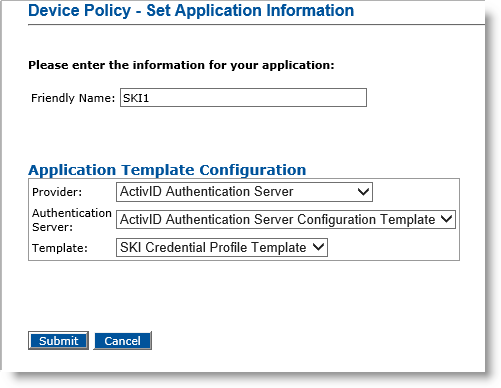
The Device Policy - Set Application Information page appears:
-
Friendly Name—Enter a name that easily identifies the type of application you have selected for the device policy.
-
Provider drop-down list—Select ActivID Authentication Server.
-
Authentication server drop-down list—Select the name of the ActivID Authentication Server or ActivID Appliance that will manage the credentials for this application. This server must have been previously declared in ActivID CMS.
-
Template drop-down list—Keep the default template.
-
Click Submit.
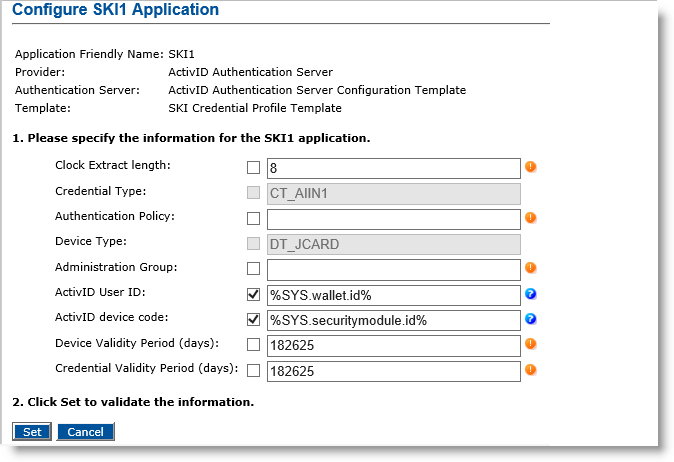
The Configure SKI1 Application page appears:
-
Enter the desired Authentication Policy and Administration Group parameters. These parameters must have been previously configured in ActivID Authentication Server or ActivID Appliance.
-
Update the Device Validity Period and Credential Validity Period parameters, if necessary.
Note: The Device Validity Period parameter is mandatory. The Credential Validity Period is optional and, when left empty, the value that has been explicitly set or derived in the ActivID Authentication Server or ActivID Appliance will be used. -
Click Set.


