Setting Parameters for Directories
-
In the ActivID CMS Operator Portal page, select the Configuration tab, and then select the Customization sub-tab.
-
From the Select a Topic drop-down list, select Directories.
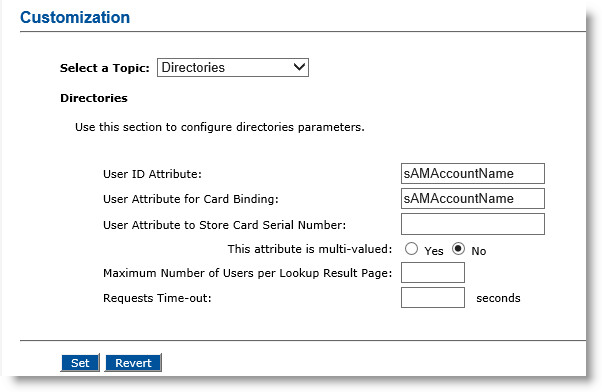
The default value shown during lookup appears to the right of User ID Attribute. The default values for the directories are listed in the following table.
UserID and Directory Types UserID
Directory Types
sAMAccountName
Microsoft Active Directory
uid
Microsoft ADAM
cn
Atos DirX
uid
IBM Tivoli Directory Server/NetIQ eDirectory/Oracle Directory Server
-
In the User Attribute for Card Binding field, enter the directory attribute for device binding.
-
In the User Attribute to Store Card Serial Number field, enter the directory attribute that will contain the device serial number.
-
For the This attribute is multi-valued option, select Yes or No.
-
In the Maximum Number of Users per Lookup Result Page field, enter the maximum number of lookup results to display. This number applies to all directories except Active Directory.
-
In the Requests Time-out field, enter the amount of time (in seconds) for ActivID CMS to wait for a response from the directory.
-
Optionally, you can click Revert to go back to the previously saved settings.
-
Click Set. A confirmation message appears.


