Recycling a Device
Before you can recycle a device:
You must terminate a permanent device before you can recycle it. For more information, see Terminating a Device.
You must cancel a temporary device before you can recycle it. For more information, see Canceling a Temporary Device.
Device recycling enables you to remove the content of a device and issue the device to another user.
You can only recycle a device if:
-
The initial and permanent replacement device has been terminated (that is, all the credentials have been revoked).
-
A temporary replacement device has been canceled.
- A device issuance has failed.
Do not recycle a device that has a user’s information and/or a picture printed on it, since you cannot re-issue it to another user.
-
Select the Device Update tab.
-
From the Select the smart card reader drop-down list, select the appropriate card reader.
-
Insert the card you want to recycle into the card reader you selected.
-
Click Proceed. ActivID CMS checks the status of the device.
When ActivID CMS determines that the device has been terminated, a message appears.
-
Click Recycle.
ActivID CMS starts to recycle the device.
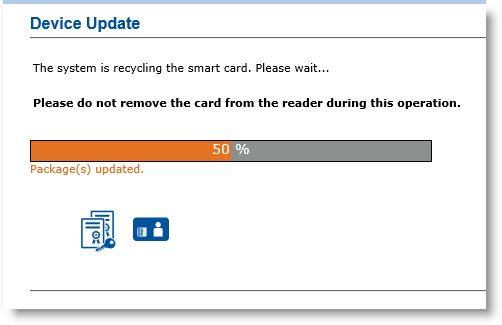
Synchronization messages appear under the progress bar. After ActivID CMS recycles the device, a confirmation message appears.
-
Remove the device from the reader.
You can issue it to another user. The initial Device Update page reappears again. You can process another device.
Do not remove the card from the reader during this process.
When recycling, ActivID CMS removes the physical content of the device. Do not remove the card from the reader during this step.
When you recycle a device with an unshared PIN configuration, you need to reset (clear) the FIDO PIN from the recycled device using Windows before issuing it to another user.


