ActivID CMS Configuration
The ActivID CMS REST API requires an operator with the relevant rights to authenticate using their certificate. A part of the REST API is also accessible for end-users who have been authenticated using a certificate or a password. The following topics provide details on configuring operators based on the version of the REST API you are using.
Configuring Operator Permissions for the REST API
By default, the REST API is accessible for a limited set of predefined roles. You can configure other roles to have access to this API and define their permissions.
Each entry point of the API is protected by a dedicated permission, with the permissions grouped in scopes, which are then assigned to different roles. Some of the entry points (like POST /ContentRequest) have different permissions depending on the type of the request.
Scope of Permissions
There are currently four scopes available: Device Management, Help Desk, Configuration Operator and Device.
Device Management grants all permissions needed to issue a device (user search, get user details, add a device, get device details, and recycle a device).
Help Desk grants all permissions needed to manage a user's devices (user search, get user details, get device details, terminate a device, and recycle a device).
Configuration Operator grants all permissions needed to manage operators.
Device grants all permissions needed to manage an end user's own devices.
Permission Mapping
|
Entry Point |
Device Management Scope | Help Desk Scope |
Configuration Operator Scope |
Device Scope |
|---|---|---|---|---|
|
ContentRequest |
|
|||
|
POST /ContentRequest type="issuance" |
√ |
X |
X |
X |
|
POST /ContentRequest type="recycle" |
√ | √ | X | X |
|
POST /ContentRequest type="unlock pin" |
√ | √ | X | X |
| POST /ContentRequest/validate | √ | X | X | X |
|
DELETE /ContentRequest/<id> |
√ | √ | X | X |
| PATCH /ContentRequest/<id> | √ | √ | X | X |
| POST /ContentRequest/<id>/<action> | √ | X | X | X |
|
POST /ContentRequest/.search |
√ | √ | X | X |
| Credential | ||||
| GET /Credential/<id> | √ | √ | X | √ |
| CredentialPolicy | ||||
| GET /CredentialPolicy/global | √ | X | X | √ |
| Device | ||||
| POST /Device | √ | X | X | √ |
| GET /Device/<id> | √ | √ | X | X |
| DELETE /Device/<id> | X | √ | X | X |
| POST /Device/<id>/resume | X | √ | X | X |
| POST /Device/<id>/suspend | X | √ | X | X |
| POST /Device/<id>/terminate | X | √ | X | X |
| POST /Device/<id>/revoke | X | √ | X | X |
| POST /Device/<id>/activate | √ | √ | X | √ |
| POST /Device/.search | √ | √ | X | √ |
| DeviceFlow | ||||
| POST /DeviceFlow type="ASSISTED_ISSUANCE" | √ | X | X | X |
| POST /DeviceFlow type="APPLICATIONS_UPDATE" | √ | X | X | X |
| POST /DeviceFlow type="REISSUANCE" | √ | X | X | X |
| POST /DeviceFlow/<id> type="ASSISTED_ISSUANCE" | √ | X | X | X |
| POST /DeviceFlow/<id> type="APPLICATIONS_UPDATE" | √ | X | X | X |
| POST /DeviceFlow/<id> type="REISSUANCE" | √ | X | X | X |
| DevicePolicy | ||||
| GET /DevicePolicy/<id> | √ | X | X | √ |
| POST /DevicePolicy/.search | √ | √ | X | √ |
| Groups | ||||
| GET /Groups | √ | √ | X | X |
| Operators | ||||
| POST /Users | X | X | √ | X |
| GET /Users | X | X | √ | X |
| DELETE /Users/<uid> | X | X | √ | X |
| GET /Users/<uid> | X | X | √ | X |
| POST /Users/.search | X | X | √ | X |
| Printer | ||||
| GET /Printer | √ | X | X | X |
| Self | ||||
| GET /Self | X | X | X | √ |
| POST /Self/ContentRequest | X | X | X | √ |
| POST /Self/ContentRequest/.search | X | X | X | √ |
| POST /Self/ContentRequest/<id>/<action> | X | X | X | √ |
| GET /Self/Device | X | X | X | √ |
| * POST /Self/Device | X | X | X | √ |
| POST /Self/Device/<id>/<action> | X | X | X | √ |
| * POST /Self/Device/<id>/Credential | X | X | X | √ |
| * POST /Self/DeviceFlow | X | X | X | √ |
| * POST /Self/DeviceFlow/<id> | X | X | X | √ |
| GET /Self/Wallet | X | X | X | √ |
| *not implemented currently | ||||
| Stats | ||||
| GET /Stats | √ | √ | X | X |
| SyncSession | ||||
| SyncSession Entry Points Note: Do not use this API directly. Use the ActivID CMS extension and client instead. |
√ | √ | X | X |
| Users | ||||
| GET /Users/<uid> | √ | √ | X | X |
| POST /Users/<uid>/EnrollmentData | √ | √ | X | X |
| POST /Users/.search | √ | √ | X | X |
| Wallet | ||||
| GET /Wallet/<id> | √ | √ | X | X |
| PATCH /Wallet/<id> | √ | X | X | X |
| POST /Wallet/<id>/<action> | √ | X | X | X |
| POST /Wallet/.search | √ | √ | X | X |
| WalletPolicy | ||||
| GET /WalletPolicy/global | √ | √ | X | √ |
Default Configuration
Operators who have the predefined Issuance role inherit the Device Management scope. An operator with this role can do anything except terminate a device.
Operators who have the predefined Help Desk role inherit the Help Desk scope. An operator with this role can do anything except issue a device.
Operators who have the predefined Administration role inherit the Device Management, Help Desk and Configuration Operator scopes. An operator with this role can do everything.
End-users who have the predefined Cardholder role inherit the Device scope. An end-user with this scope can manage their own devices.
If you have modified the predefined roles in the ActivID CMS Operator Portal, these changes are Not taken into account by the inherited scopes in the REST API. In this case, it is strongly recommended to review the customization of scopes for roles (see details below).
Customizing Scopes for Roles
The mapping between roles and scopes is defined in a configuration file: %PROGRAMDATA%\HID Global\Credential Management System\Shared Files\scopeAssignment.properties. You can modify this file in order to change existing roles or add new ones.
Each role in the scopeAssignment.properties file is defined using the following attributes:
-
roleWithScope.name.{id}: matches the name of an existing role
-
roleWithScope.scopes.{id}: configures the list of predefined scopes assigned to the role
For example, the Help Desk role is included by default as shown here:
roleWithScope.name.2=Help Desk
roleWithScope.scopes.2=Scope.helpdeskroleWithScope.name.1=Administration
roleWithScope.scopes.1=Scope.device_management,Scope.helpdesk,Scope.configuration_operator
roleWithScope.name.2=Help Desk
roleWithScope.scopes.2=Scope.helpdesk
roleWithScope.name.3=Issuance
roleWithScope.scopes.3=Scope.device_management
roleWithScope.name.4=Cardholder
roleWithScope.scopes.4=Scope.device
You can create roles in the ActivID CMS Operator Portal and assign them to an operator, but you must add these roles to the scopeAssignment.properties file (using the same format shown in the example above) and assign one or more of the predefined scopes to each role.
For example, if you create a role "Full Help Desk" in ActivID CMS and assign it to an operator, you can add this role to the scopeAssignment.properties file as shown below, and assign both predefined scopes to it:
roleWithScope.name.5=Full Help Desk
roleWithScope.scopes.5=Scope.helpdesk,Scope.device_management
It is also possible to modify the default roles present by adding or removing one or more of the predefined scopes, but it is recommended to leave the default configuration.
Configuring Operator Permissions for the Legacy REST API (v1)
To verify that an operator meets the requirements for using the REST API, you must:
-
Make sure that adequate rights are associated with the operator by checking the information concerning the operator’s role:
RC/ActivID CMS Configuration.png "Role Information screen") Note: “Logs out Operator” is not used by the REST API. Other permissions must be given as needed, depending on which operations are expected to be performed.
Note: “Logs out Operator” is not used by the REST API. Other permissions must be given as needed, depending on which operations are expected to be performed. -
Make sure there is a certificate associated with the operator by viewing the operator’s information:
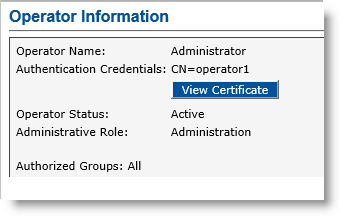 Note: If there is no certificate associated with the operator, the View Certificate button displays “No Certificate registered” as shown below.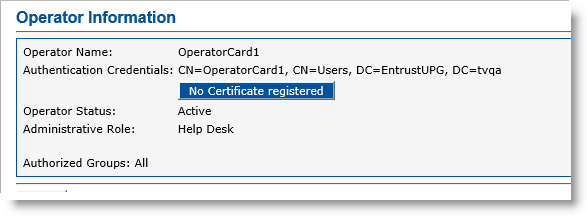
Note that when you upgrade to ActivID CMS 5.2 (or subsequent versions):
existing operators created using previous versions do not have enrolled certificates.
in order to sign JWT access tokens, a key with the label JWT_KEY must be created in the HSM. The.cfg files located in the HSM folder of the ActivID CMS package contain a description of this key that ActivID KMS can use to generate it.


