Using the Help Desk
The Help Desk tab enables you to access the main Help Desk page, where you can search for a device by:
-
User Attributes—Find a device for a specific user.
-
Device Attributes—Find a device by a serial number.
Search results appear in the table at the bottom of the Help Desk page. Using the Help Desk page, you can manage:
-
Users
-
Devices and their applications after issuance,
-
Device requests.
In the search results, when you click on a User ID (or Serial Number depending on the search performed), the Help Desk Overview page appears:
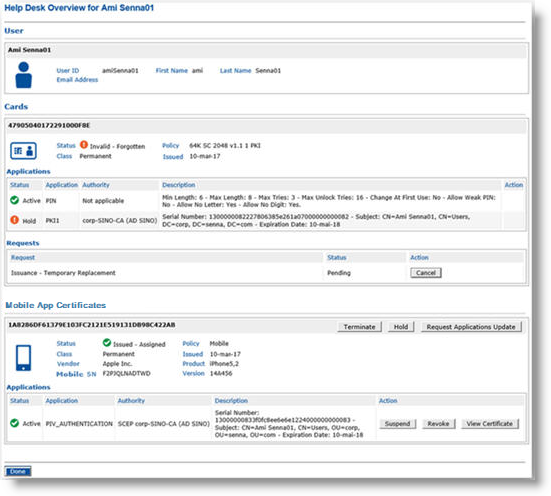
The User information is grouped in the top section, then each device associated with the user is displayed in a separate section, along with possible actions (if any). The actions available depend on your operator role and access rights, as well as the device status, and the device type. A user can have multiple active devices.
-
The certificate states displayed are obtained directly from the certificate authorities.
-
If you are using shared credentials, mobile app certificates can only be derived from physical smart cards.
Each device section (Cards, Mobile App Certificates, and Security Keys) has its own related Applications and Requests areas, with possible actions available in the associated Action column. These actions depend on your operator role and the credential or request status.
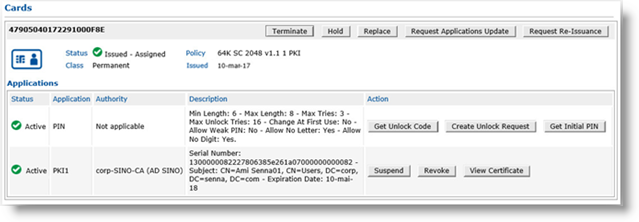
As an example, below is a Cards section displaying a physical smart card (OP_2.0 Smart Cards or PKCS#11 Devices):
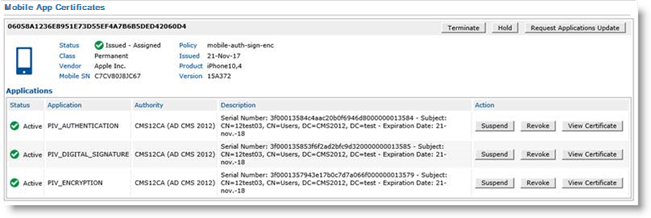
A Mobile App Certificates section includes additional details (vendor, product, version, mobile SN):
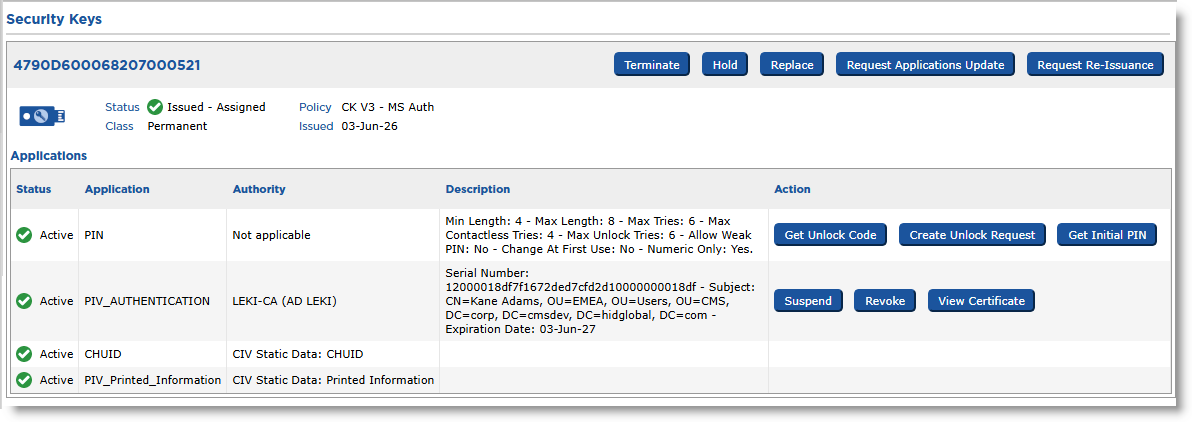
A Security Keys section displays the same information as for a physical smart card:
Help Desk Actions
The following actions are available for each enabled device type when the device itself is active:
| Device Type: | Smart Cards | Security Keys | Mobile Devices | |
|
OP_2.0 Smart Cards |
PKCS#11 Devices |
|||
| Help Desk Action: | ||||
|
Hold / Resume |
X |
X |
X |
X |
|
Create Unlock Request |
X |
X |
X |
|
|
Get Unlock Code |
X |
X |
|
|
|
Request Applications Update |
X |
X |
X |
X |
|
Request Re-issuance |
X |
X |
X |
|
|
Request Replacement |
X |
X |
X |
|
|
Terminate |
X |
X |
X |
X |
* Support for mobile smart cards using the HID Crescendo Mobile application has been deprecated starting with ActivID CMS 5.4 and removed in ActivID CMS 6.5.
For details on enabling support for devices, see Setting Parameters for Devices.
Topics in this section:


