Configuring Ports and Ciphers
Validation Authority runs a web server for both HTTP and HTTPS connections to Validation Authority. You can change the configured ports.
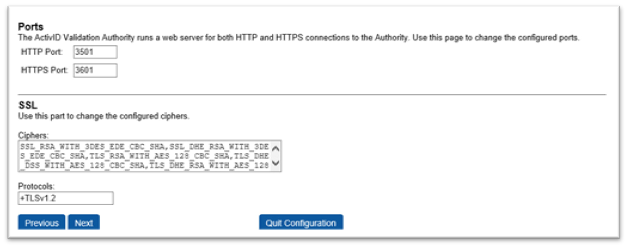
Two port numbers are used to make connections to the Validation Authority Management Console. Ports are used to control the web server behavior on which port to listen in on. By default, the server listens on the following ports:
-
3501 - HTTP web interface
-
3601 - HTTPS web interface
Note: On Linux, changing any of these ports to numbers less than 1024 will require that the server.sh script be executed as the 'root' super-user on Linux machines. This may weaken system security, so many high-security sites choose to run their internal servers on port numbers greater than 1024 and then externally map these addresses to port 80 through a load balancer or firewall. For security considerations, refer to the security tasks in Production Considerations section.
-
Change the HTTP Port or HTTPS Port, if desired.
-
Edit the SSL Ciphers and Protocols, if desired.
Note: You can change the configured ciphers either in this SSL section or update the server.xml configuration file manually. -
Click Next.


