Configure CAPI Settings
Use the CAPI settings to specify the response to be returned by the Validation Client to CAPI when specific situations occur that prevent it from providing a definitive certificate status. More information about these settings is provided in Section CAPI Plugin Configuration.
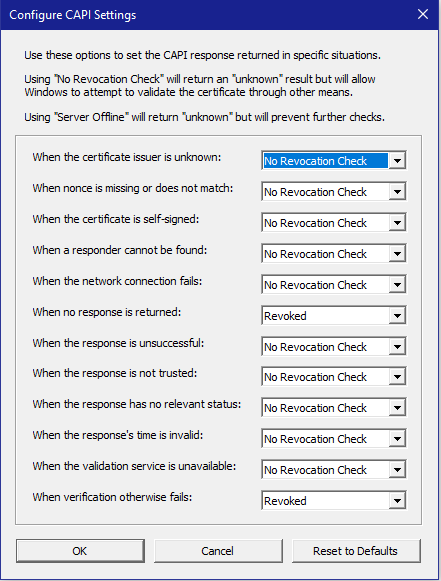
You should select CAPI settings that comply with your organization’s security policies. For example, you might select Revoked for all of the situations covered by the CAPI settings if your security policies require a definitive OCSP response for each validation request. By default, No Revocation Check is set for all of the CAPI settings, except for when no response is returned and when verification otherwise fails, which are set to Revoked.
To configure CAPI settings, complete the following steps:
-
Click Configure CAPI Settings. The Configure CAPI Settings dialog displays.
-
Use the drop-down lists to select the status returned to CAPI for the specific situation that can result in an OCSP Unknown response.
-
The return type Good indicates to CAPI that the certificate is valid, and no further validation is required.
-
The return type Revoked indicates to CAPI that the certificate is not valid and cannot be accepted.
-
The return type No Revocation Check indicates to CAPI that it should attempt to validate the certificate using any other methods it has available.
-
The return type Server Offline indicates to CAPI that it should not make any further attempts to validate the certificate.
The following table summarizes the CAPI settings that you can configure:
Issue CAPI settings When the
certificate issuer is
unknown
Specifies the response type that the Validation Client returns to CAPI when the Validation Client cannot find the certificate belonging to the issuer of the certificate being validated.
When nonce is missing or does not match
Specifies the response type that the Validation Client returns to CAPI when the Validation Client receives a response that includes either no nonce when one was expected or a mismatched nonce.
When the
certificate is self-signed
Specifies the response type that the Validation Client returns to CAPI when attempting to validate a self-signed certificate, which cannot be revoked.
When a responder cannot be found
Specifies the response type that the Validation Client returns to CAPI when the Validation Client is unable to identify a responder to query.
When the network connection fails
Specifies the response type that the Validation Client returns to CAPI when the Validation Client does not receive a response because of a network failure, including proxy errors.
When no response is returned
Specifies the response type that the Validation Client returns to CAPI when the Validation Client does not receive a properly formatted OCSP response.
When the response is unsuccessful
Specifies the response type that the Validation Client returns to CAPI when the Validation Client receives a response with a status other than “successful,” indicating that the responder could not or would not process the request.
When the response is not trusted
Specifies the response type that the Validation Client returns to CAPI when the Validation Client receives a response that is signed by a certificate that cannot be trusted.
When the response has no relevant status
Specifies the response type that the Validation Client returns to CAPI when the Validation Client receives a response that does not contain the revocation status of the requested certificate.
When the response time is invalid
Specifies the response type that the Validation Client returns to CAPI when the Validation Client receives a response that has a thisUpdate time that is in the future or a nextUpdate time in the past.
When the
validation service is unavailable
Specifies the response type that the Validation Client returns to CAPI when the CAPI Plug-In cannot communicate with the Validation Client service.
When verification otherwise fails
Specifies the response type that the Validation Client returns to CAPI when an internal error prevents the
Validation Client from obtaining a definitive response.
-
-
Click OK to save the changes.
Reverting to the Default CAPI Settings
To revert to the default CAPI settings, complete the following steps:
-
Click Reset to Defaults.
-
Click OK to revert to the default CAPI settings. Click Cancel to keep the changed CAPI settings.


