Viewing Status Reports
The web-based Validation Responder Status page allows you to view server status and validation request history. By default, this interface is available by SSL at the standard Validation Responder SSL port (3602).
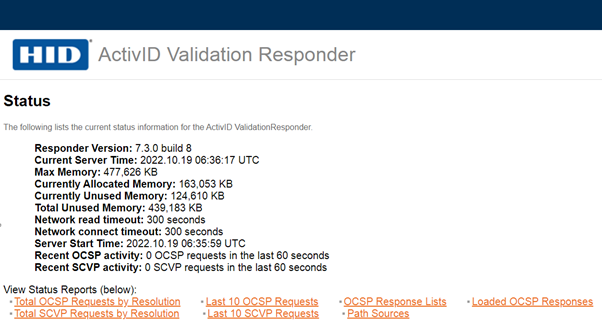
There are two ways to launch the Validation Responder Status page:
-
Using the URL: For example, if the Validation Responder is running on a machine named responder, then the following URL allows access to the Validation Responder Status Page: https://responder:3602/status.
-
On a Windows system, you can select Start > Programs > HID Global > Validation Responder > Responder Status.
The following information is available:
-
Responder Version—Validation Responder software version.
-
Current Server Time—Time on the Validation Responder clock.
-
Memory—Amount of server memory the Validation Responder has free out of the total amount of memory available on the Validation Responder.
-
Server Address—Server name and IP address.
-
Network read timeout—Timeout waiting for data from Validation Authority
-
Network connect timeout—Timeout establishing connection to Validation Authority
-
Server Start Time—Time at which the Validation Responder was started.
-
Recent OCSP activity—Number of OCSP validation requests made in the last 60 seconds.
-
Recent SCVP activity—Number of SCVP validation requests made in the last 60 seconds.
The following status reports are available:

Total OCSP Requests by Resolution
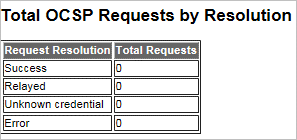
This section contains a summary of the OCSP requests this Validation Responder has serviced since its start time. The summary is organized by Request Resolution as follows:
-
Success
-
Relayed
-
Unknown credential
-
Error
OCSP Request History
This section displays the details of the 10 most recent requests this Validation Responder Appliance has processed. If there are fewer requests, then fewer will be listed.
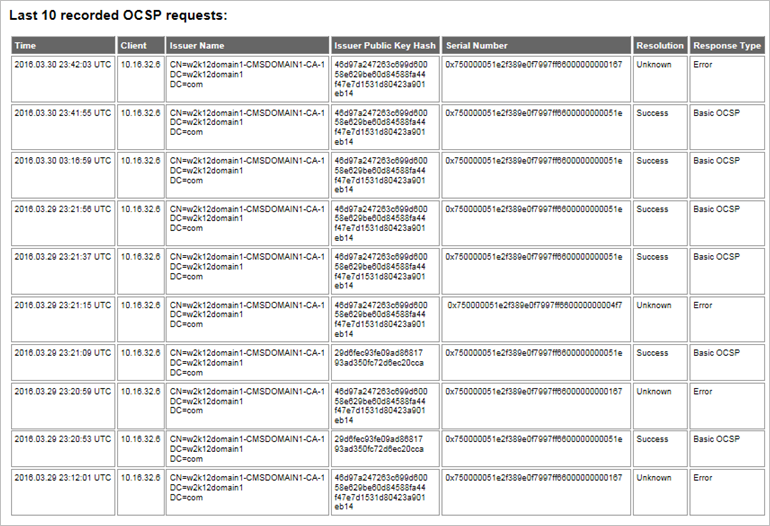
The table contains:
-
The Time at which the request was received,
-
The Client (IP address) of the client making the request,
-
The Issuer Name (the distinguished name) of the issuer of the certificate being queried,
-
The Issuer Public Key Hash.
-
The Serial Number of the certificate being queried,
-
The Resolution (outcome of the request using the terminology described in the Total OCSP Requests by Resolution section) ,
-
The Response Type that was returned.
When the issuer of the certificate being queried is not known, the hash of the issuer’s distinguished name (used in the query to identify the issuer) is shown in the Issuer column.
OCSP Response Lists
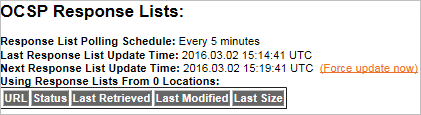
This section contains basic information about the OCSP Response Lists that the Validation Responder has loaded, including the following:
-
Frequency at which the OCSP response lists are updated
-
Time of the last update
-
Time of the next update
The OCSP response list Polling Schedule reflects the schedule that you configured during Validation Responder configuration. The list of locations being used as OCSP response list Sources reflects the OCSP response list sources that you configured during Validation Responder configuration.
-
Status indicates whether the Validation Responder has completed loading each OCSP response list.
-
Last Retrieved indicates the last time that the response list was downloaded. If the response list has not been downloaded since the Validation Responder started, N/A will be shown. This indicates that the Responder is using a locally cached copy of the response list.
-
Last Modified indicates the last time that the response list was modified by its creator. The Validation Responder will only download a response list if its last modified date is later than that of the locally cached copy.
-
Last Size indicates the size of the response list the last time it was downloaded.
In addition, this section shows the schedule on which the response lists are updated, the time of the last update, and the time of the next scheduled update.
The Response List Polling Schedule should reflect the schedule that you configured during Validation Responder configuration.
You can force the Validation Responder to re-poll each response list source immediately by clicking on the Force update now link. In order to prevent denial of service attacks, this link will be invisible for a minute after is has been clicked. After a minute has passed, you can refresh the page to re-enable the link.
Loaded OCSP Responses

This section contains basic information about the OCSP response lists loaded by the Validation Responder, organized by Issuer Name.
-
Issuer Name and Issuer Public Key Hash identify the certificate authority to which the response list pertains. For certificate authorities that hold more than one key pair, such as those that have performed a key rollover, there will be a separate list for each key pair.
-
List Type indicates the type of pre-generated OCSP response list that is loaded.
-
Entries indicates the number of individual OCSP responses contained in the response list.
Note: A single OCSP response can report on the status of more than one certificate, so the number of entries is not necessarily the same as the number of certificates whose status is contained in the response list. -
Storage Size indicates the amount of disk space used by the Responder to store the response list, including the list itself and an index used to provide fast access to the individual entries in the list.
-
Produced At indicates the time an individual OCSP response was produced in the response list.
-
This Update indicates the Update time in the individual OCSP responses in the response list.
-
Next Update indicates the next Update time in the individual OCSP responses in the response list.
The final row in the table contains the total number of OCSP responses in all loaded response lists and the total storage size of all loaded response lists.
If the proper information is displayed on the Validation Responder Status Page, then you have successfully completed the installation and configuration of this Validation Responder.
Total SCVP Requests by Resolution
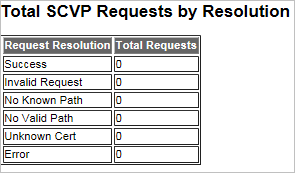
This section contains a summary of the SCVP requests this Validation Responder has serviced since its start time. The summary is organized by Request Resolution as follows:
-
Success
-
Invalid Request
-
No Known Path
-
No Valid Path
-
Unknown Cert
-
Error
SCVP Request History
This section displays the details of the 10 most recent requests this Validation Responder has processed. If there are fewer requests, then fewer will be listed.
The table contains
-
The time at which the request was received,
-
The IP address of the client making the request,
-
The subject distinguished name of the certificate being queried,
-
The subject distinguished names of any trust anchors included in the request and the outcome of the request (using the terminology described in the Total SCVP Requests by Resolution section).
Path Sources
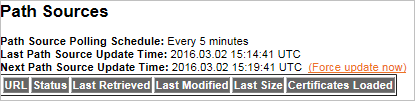
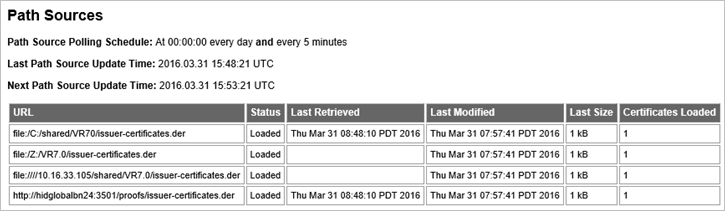
This section contains basic information about the Issuer Certificates that the Validation Responder has loaded.
The table shows a list of each individual path data source that the Responder is configured to load.
-
Status indicates whether the path data is loaded.
-
Last Retrieved indicates the last time that the path data was downloaded. If the path data has not been downloaded since the Responder started, the time will be blank. This indicates that the Responder is using a locally cached copy of the path data.
-
Last Modified indicates the last time that the path data was modified by its creator. The Responder will only download path data from a source if its last modified date is later than that of the locally cached copy.
-
Last Size indicates the size of the path data the last time it was downloaded.
In addition, this section includes the following:
-
Frequency at which the lists are updated,
-
Time of the last update, and
-
Time of the next update.
The Path Data response list Polling Schedule reflects the schedule that you configured during Validation Responder configuration. The list of locations being used as Path Data Sources reflects the sources that you configured during Validation Responder configuration. You can force the Responder to re-poll each path source immediately by clicking on the Force update now link. In order to prevent denial of service attacks, this link will be invisible for a minute after is has been clicked. After a minute has passed, you can refresh the page to re-enable the link.


