Uninstalling the Minidriver
There are few ways to easily uninstall the Crescendo 2300 Minidriver 1.3.
Using the original msi file in GUI
-
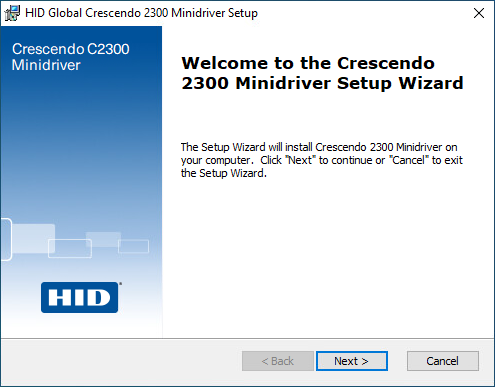
Run the HID Global Crescendo Minidriver 1.3.msi and click Next.
-
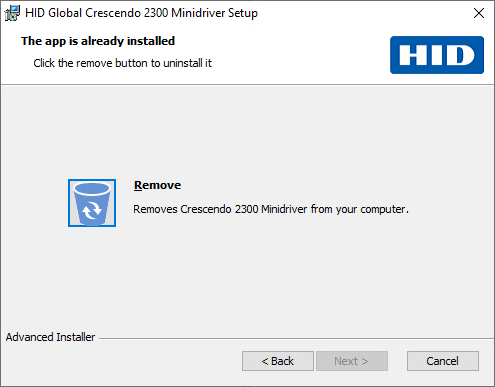
Click on Remove button.
-
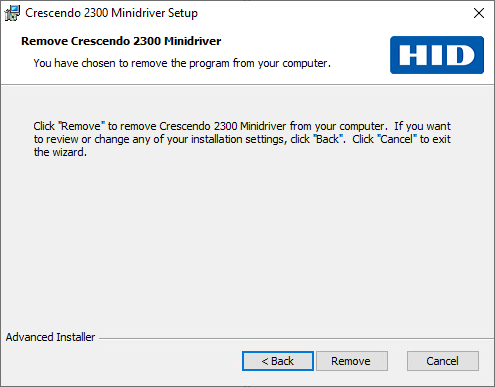
Click Remove.
-
User Account Control (UAC) is displayed, click Yes.
-
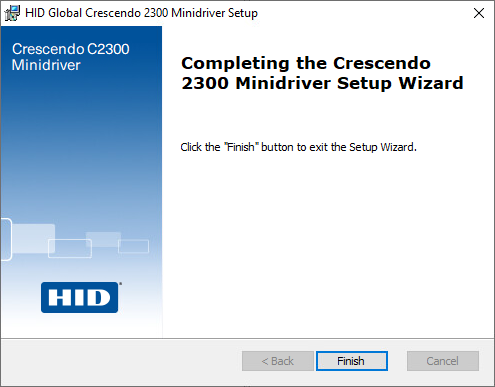
Click Finish to close the finish dialog box.
Using the msixec command in elevated Command Shell / Power Shell
Open Command Shell / Power Shell in elevated (admin) mode:
msixec.exe /x <path to the msi install file>
Using the Apps & features setting in Windows
-
Right-click on the Start button and select Apps and Features.

-
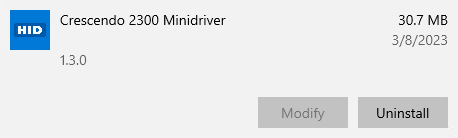
Find Crescendo 2300 Minidriver and click Uninstall.
-
Click the Uninstall button again.
-
User Account Control (UAC) is displayed, click Yes.
-
Windows Installer window is displayed, click Yes.
Uninstallation of the Crescendo Minidriver 1.2 from Windows server
On 2019 and 2022 servers, the DLLs are not removed automatically; the user has to remove the following DLLs manually:
Remove DLLs
On 2019 and 2022 servers, the DLLs are not removed automatically; the user has to remove the following DLLs manually:
- C:\Windows\System32\hidc2300md64.dll
- C:\Windows\SysWOW64\hidc2300md.dll
Delete Registry Keys
According to the OS, all registry keys are not deleted automatically and the user has to delete the registry keys.
The Registry Keys on x64 platforms sections list the keys which may still be present in the key registry.
Registry Keys on x64 platforms
"SOFTWARE\HID Global\SharedStore\RemanentDataStore\{479193D1-2A7A-4C6C-8A14-30F4607E5207}"
"SOFTWARE\HID Global\SharedStore\RemanentDataStore\{9E39E304-8DB0-4C43-A421-97F27202CD79}"
"SOFTWARE\HID Global\SharedStore\StoreList\{BED19EEC-4AFD-44D9-A7DD-B91DE78BC7E2}"
"SOFTWARE\HID Global\SharedStore\StoreList\{CC900D8F-5CC4-4FF8-AF7F-7F0FEF2ED8EF}"
"SOFTWARE\HID Global\SharedStore\StoreList\{DF0FDD04-6072-4280-83DF-E8FDFB369B5B}"
"SOFTWARE\HID Global\SharedStore\StoreList\{479193D1-2A7A-4C6C-8A14-30F4607E5207}"
"SOFTWARE\HID Global\SharedStore\StoreList\{9E39E304-8DB0-4C43-A421-97F27202CD79}"
"SOFTWARE\Microsoft\Cryptography\Calais\SmartCards\HID Global Crescendo C2300" "SOFTWARE\Microsoft\Cryptography\Calais\SmartCards\HID Global Crescendo C2300 CL" "SOFTWARE\Microsoft\Cryptography\Calais\SmartCards\HID Global Crescendo C2300 iCLASS CL" "SOFTWARE\Microsoft\Cryptography\Calais\SmartCards\HID Global Crescendo C3000" "SOFTWARE\Microsoft\Cryptography\Calais\SmartCards\HID Global Crescendo C3000 CL" "SOFTWARE\Microsoft\Cryptography\Calais\SmartCards\HID Global Crescendo Key" "SOFTWARE\Microsoft\Cryptography\Calais\SmartCards\HID Global Crescendo Key CL" "SOFTWARE\Microsoft\Cryptography\Calais\SmartCards\HID Global Crescendo Key V2" "SOFTWARE\Microsoft\Cryptography\Calais\SmartCards\HID Global Crescendo Key V2 CL"
"SOFTWARE\Wow6432Node\Microsoft\Cryptography\Calais\SmartCards\HID Global Crescendo C2300"
"SOFTWARE\Wow6432Node\Microsoft\Cryptography\Calais\SmartCards\HID Global Crescendo C2300 CL"
"SOFTWARE\Wow6432Node\Microsoft\Cryptography\Calais\SmartCards\HID Global Crescendo C3000"
"SOFTWARE\Wow6432Node\Microsoft\Cryptography\Calais\SmartCards\HID Global Crescendo C3000 CL"
"SOFTWARE\Wow6432Node\Microsoft\Cryptography\Calais\SmartCards\HID Global Crescendo Key"
"SOFTWARE\Wow6432Node\Microsoft\Cryptography\Calais\SmartCards\HID Global Crescendo Key CL"
"SOFTWARE\Wow6432Node\Microsoft\Cryptography\Calais\SmartCards\HID Global Crescendo Key V2"
"SOFTWARE\Wow6432Node\Microsoft\Cryptography\Calais\SmartCards\HID Global Crescendo Key V2 CL"
"SOFTWARE\Wow6432Node\Microsoft\Cryptography\Calais\SmartCards\HID Global Crescendo C2300 iCLASS CL"

“SOFTWARE\HID Global\C2300MD”


