Recovery Questions Credential
The Recovery Questions credential allows you to regain access to your Microsoft Windows account by answering a series a questions that have been previously configured.
You simply need to answer the three security questions selected during this enrollment process.
Set Up Your Recovery Questions
-
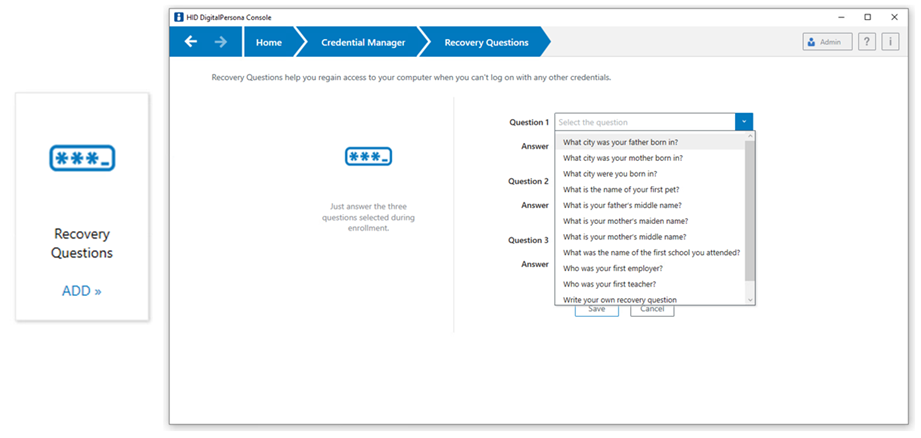
In the DigitalPersona Console, select Credential Manager, and click ADD on the Recovery Questions tile.
-
On the Recovery Questions page, select three security questions, and then enter an answer for each question.
You can also choose to write your own security questions by selecting that option at the bottom of the drop-down menu.
Important:Each answer must be unique. Providing the same answer for different questions is not supported.
The answers to Recovery Questions are not case-sensitive.
-
After completing the questions and answers, select Save.
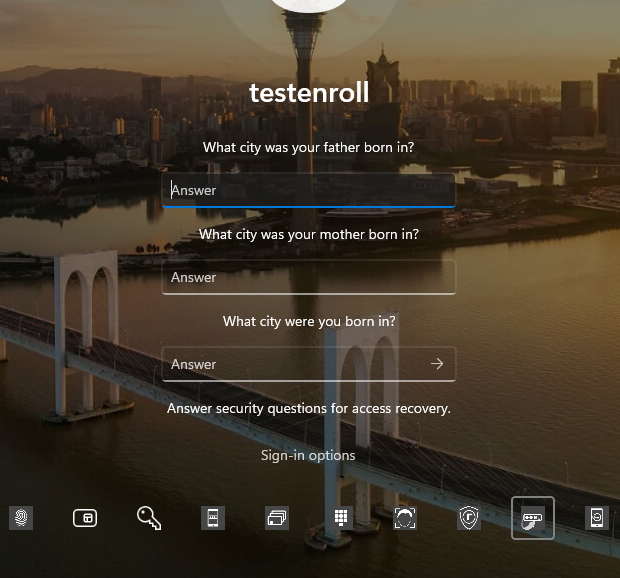
After your Recovery Questions credential has been enrolled, you can access your computer using them from a link on the Windows Logon screen.
Authenticate with Your Recovery Questions
To authenticate with your Recovery Questions credential at Windows Logon, select the Recovery Questions option and following the instructions to provide the enrolled answers:
Change Your Recovery Questions
-
Click CHANGE on the Recovery Questions tile.
-
On the Recovery Questions page, modify your existing answers.
You can also select different security questions, and then enter an answer for each question.
You can also choose to write your own security questions by selecting that option at the bottom of the drop-down menu.
Important:Each answer must be unique. Providing the same answer for different questions is not supported.
The answers to Recovery Questions are not case-sensitive.
-
After completing the questions and answers, select Save.
Delete Recovery Questions
-
Click CHANGE on the Recovery Questions tile.
-
In the upper right section of the page, click Delete Credential.
-
Confirm the deletion.


