Uninstalling ActivClient
Uninstallation Methods

Using the Installation Wizard
To uninstall HID ActivClient using the installation wizard:
-
Run the HID ActivClient installer.
-
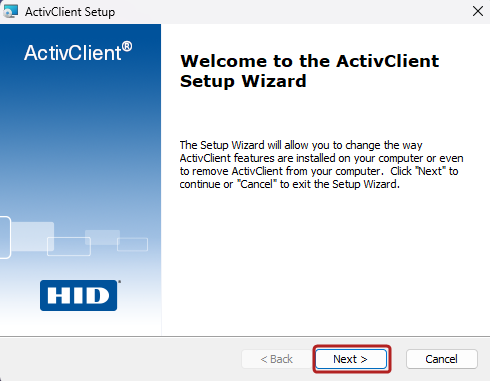
When the ActivClient Setup Wizard opens, click Next.
-
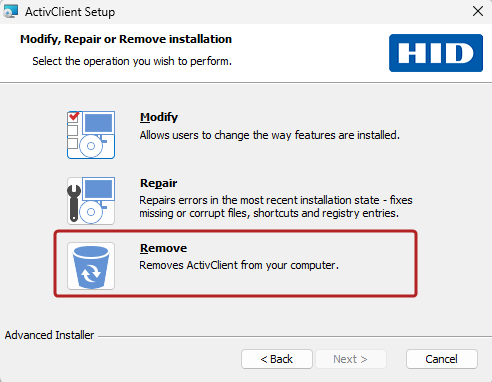
Click the Remove button, then click Next.
-
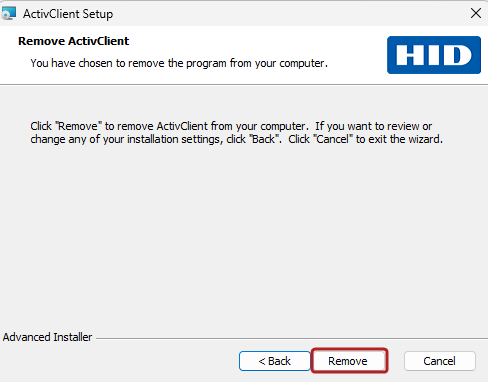
In the Remove ActivClient dialog, click Remove to confirm.
-
When prompted by User Account Control (UAC), click Yes.
-
Click Finish to close the dialog box.
Using Installed Apps (Windows 11)
To uninstall HID ActivClient on Windows 11:
-
Use any of these ways to open Installed apps:
-
Right-click the Start button and select Installed apps.
-
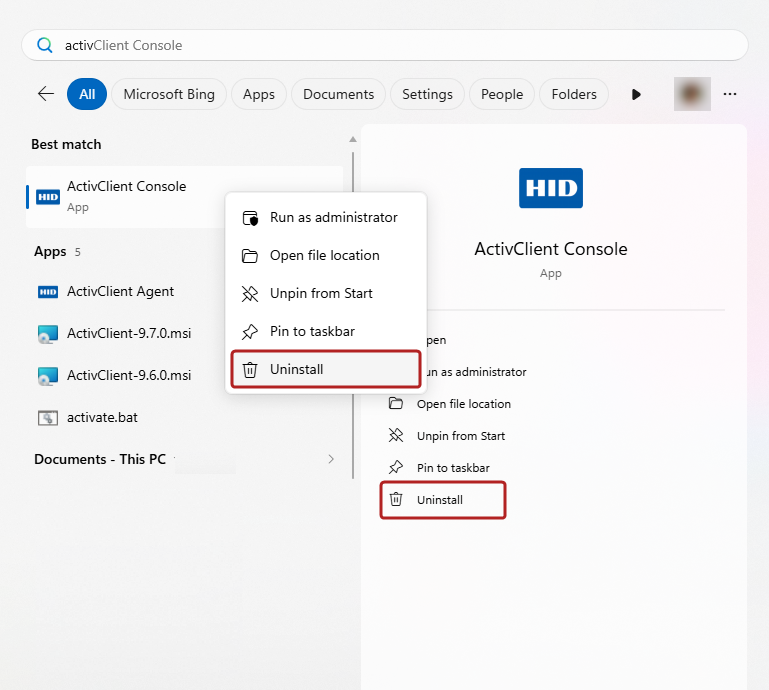
Click the Start button and begin typing "ActivClient". When ActivClient Console or ActivClient Agent appears under Best match, right-click it and select Uninstall, or click Uninstall in the right-hand pane.
-
-
In the list of installed applications, locate ActivClient.
-
Click the More options (
 ) button next to ActivClient and select Uninstall.
 -
Click Uninstall again to confirm.
Using Apps and Features (Windows 10)
To uninstall HID ActivClient on Windows 10:
-
Right-click the Start button and select Apps and Features.
-
Find and select HID ActivClient in the list.
-
Click Uninstall.
Using Programs and Features
To uninstall HID ActivClient:
-
Click the Start button.
-
Type "Control Panel" and open it.
-
Select Programs and Features. (If you don’t see the Programs and Features settings, change View by to “Small icons”).
-
Select HID ActivClient from the list.
-
Click Uninstall.
Using the Original MSI Installer from the Command Line
To uninstall HID ActivClient, use this command:
msiexec /x "<path>\<ActivClient_setup>"- <path> refers to the ActivClient setup MSI file path.
<ActivClient_setup> refers to the ActivClient setup MSI file name.
Quotation marks in the command are required if the path or file name contains spaces. They are optional otherwise but recommended for consistency.
SCCM or MSIEXEC Commands With the Product Code
You can uninstall HID ActivClient either locally or remotely from a group of computers with the Microsoft System Center Configuration Manager (SCCM) using the following command:
msiexec /x "<ProductCode>"To find the Product Code, run the following PowerShell command:
# Find the Product Code
Get-Package *activclient* | select -ExpandProperty fastpackagereferenceAutomation Using PowerShell
You can automate the uninstallation of HID ActivClient using a PowerShell script. This script will locate the Product Code and uninstall the corresponding version of HID ActivClient:
# Find the Product Code
$ProductCode = Get-Package *activclient* | select -ExpandProperty fastpackagereference

# Uninstall Application
msiexec /x $ProductCode
Uninstalling Selected Components
If you only need to remove specific HID ActivClient components, you can modify an existing installation.
Restoring Microsoft Settings
During ActivClient installation, ActivClient configures some Microsoft Windows policies to provide a full smart card experience (see Microsoft Policies Relevant to ActivClient).
During ActivClient uninstallation, these Microsoft policies are not updated. You can leave them as is as they have no impact if you do not use smart cards anymore, or they can also be relevant to other smart card deployments. Alternatively, you might want to disable these policies.
-
Launch the Microsoft Group Policy Editor (gpedit.msc).
-
Reset the following settings to desired values:
-
To propagate and apply the policy changes, run the gpupdate /force command on each domain client machine.