User Authentication
Component Overview
|
Component Package |
com.hid.olb.loginComponent |
|
User Interface |
Yes, the First Factor and MFA screens will be added based on the options selected in the Component Properties. |
| Platforms Supported | Web |
| Functionality | This component is used for user login. |
| Available from | Version 12.0.0 |
Server and Client App Properties
| Mandatory Server Properties | HID_HOST |
<HID Authentication Service Host> (e.g., test123.aaas.hidcloud.com) |
|---|---|---|
| HID_KONY_APP_KEY |
<App key of the fabric application> (e.g., h728h89031832jdy9292) |
|
| HID_KONY_APP_SECRET |
<App secret of the fabric application> (e.g., 89bv2894673792003jy2) |
|
| HID_IS_FETCH_USER_ATTRIBUTES |
<Identity provider service value> (e.g., false) Note:
If you set the identity provider service to DbxUserLogin (Custom Identity) instead of customHIDLogin, ensure its value is set to true. The default value is false. |
|
| HID_CIBA_API_PORT |
<Port for the CIBA Callback URL> (e.g., 443) Note:
In cases where the value is different from the usual 443, it is mandatory to add this server property and provide the port value. |
|
| HID_PUSH_LOGON_AUTH_TYPE |
<Push logon authenticator type> (e.g., AT_PASA) |
|
| HID_PUSH_LOG_CHANNEL |
<Channel ID for push> (e.g., CH_PASA) |
|
| HID_REDIRECT_URI | <Redirect url set for the FIDO tenant> | |
| HID_AS_CLIENT_ID | <Client Id for the tenant> | |
| HID_PASSWORD_AUTHTYPE | <Static Password Authenticator if other than AT_STDPWD> | |
| HID_OOB_SMS_OTP_AUTHTYPE | <OOB SMS Authenticator if other than AT_OOBSMS> | |
| HID_OOB_EMAIL_OTP_AUTHTYPE | <OOB Email Authenticator if other than AT_OOBEML> | |
| HID_DEVICE_TYPE | <Device type to be used for Approve if other than DT_TDSV4> | |
| HID_SECURE_OTP_AUTHTYPE | <HID Approve OTP Authenticator if other than AT_EMPOTP> | |
| HID_HARDWARE_OTP_AUTHTYPE | <Hardware Token OTP Authenticator if other than AT_OTP> | |
| HID_IDP_CHANNEL_ID |
<End user channel ID> (e.g., CH_EXTRAPP) |
|
| HID_API_VERSION | <This server property defines the API version for the Authentication Service and Appliance, ensuring that updated APIs are used. (The default value is 10 for Authentication Service and 3 for Appliance.)> | |
| HID_IS_MFA_REQUIRED |
<This setting enables the user to activate/deactivate the Multi-factor authentication (MFA)> (Default: true) |
|
| HID_CACHE_EXPIRY_TIME | 120 (by default) | |
| HID_SMS_MSG_TEMPLATE | <Use # as your OTP for authentication. DO NOT share this OTP with anyone> | |
| HID_IS_GATEWAY_ENABLED |
True: HID generates and sends the OTP. False: HID generates the OTP, but Infinity sends it. |
|
| HID_SMS_DEVICE_TYPE |
<The device type for SMS> Value: DT_OOBSMS (by default) |
|
| HID_EMAIL_DEVICE_TYPE |
<The device type for email> Value : DT_OOBEML (by default) |
|
| Mandatory Client App Properties | HID_IS_APPLIANCE | True / False |
Authentication Component Properties
| S.No. | Property Name | Allowed Values | Purpose |
|---|---|---|---|
| 1 | isRMSEnabled | Radio button to select (on/off) | This property determines whether Risk Management Sysytem (RMS) is active or not. |
| 2 | tmCookieTag | <RMS Cookie will have this value> | This property determines the value of RMS cookie for device tag. |
| 3 | tmCookieSid | <RMS Cookie will have this value> | This property determines the value of RMS cookie for session id. |
| 4 | adaptiveAuth | JSON object | This property determines the value as JSON object to choose adaptive auth based on RMS score. |
| 5 | isRMSReadOnly | Radio button to select (on/off) | This property determines whether RMS is read only or not. |
| 6 | ServiceName | Selection | Used to Get TDS Template for login (OLB_LOGIN is default value). |
| 7 | FirstFactor | "STATIC_PWD","SECURE_CODE",USER_ID_LESS ,“FIDO |
This property determines the first authentication factor to be used for the authentication. Currently, the component supports the following factors:
|
|
8 |
Multi-Factor Authentication (MFA) |
"SECURE_CODE" , "OTP_SMS","OTP_EML","APPROVE, “NO_MFA","OTP_HWT" |
This property determines the second authentication factor to be used for authentication after the first authentication factor. Currently, the component supports the following factors:
|
Authentication Component Functions
| Method | Description | Parameters |
|---|---|---|
| logoutOnClick | This method is used to logout | username, sessionId (optional empty by default) |
| getRmsSessionId | This method is used to fetch the RMS Session ID | N/A |
Authentication Component Events
| Event name | Description | Parameters |
|---|---|---|
| onSuccessCallback | Callback to be defined for successful login. | identity response |
| onFailureCallback | Callback to be defined for failure during login. | String (Error Response) |
| showLoading | The loader is triggered and displayed whenever a service call is initiated. | N/A |
| dismissLoading | The loader is triggered and dismissed whenever a service call is initiated. | N/A |
| changeContext | This is triggered when component screens change, indicating that updates to the form are necessary. |
String: context context reference: Copy
|
| contactSupport | contactSupport | String (Error Response) |
Authentication Component Flow
STATIC_PWD
-
On the login screen, the user must enter their username and password, then click Submit.
-
After successfully validating the user's static password, the component displays the screen to authenticate using the second authentication factor, based on the defined value of the MFA property:
HID Approve
- If the user has more than one registered HID Approve device, the list of devices is displayed.
- If user has only one registered HID Approve device, the user will receive a push notification directly.
- The user can either select a device to which to send Push notification or they can select to authenticate using an HID Approve Secure Code.
- On selecting the device, the user receives a Push notification on the selected device. The user can also select to authenticate using an HID Approve Secure Code.
- After approving the Push notification, user is directed to the next screen confirming that they have been successfully authenticated and can log out if required.
User receives an OTP either by SMS or by email based on the MFA selected.
On the next screen, the user enters the received OTP and clicks Confirm to complete the authentication.
After validating the OTP successfully, the user is directed to the next screen confirming that they have been successfully authenticated and can log out if required.
The user generates an OTP using their hardware token.
- On the next screen, the user enters the OTP and clicks Confirm to complete the authentication.
After validating the OTP successfully, the user is directed to the next screen confirming that they have been successfully authenticated and can log out if required.
SECURE_CODE
-
On the login screen, user must enter their username and Secure Code, then click Submit.
-
After successfully validating the user's Secure Code, the component displays the screen to authenticate using the second authentication factor, based on the defined value of the MFA property.
USER_ID_LESS
-
Onboard a user with any flow which includes registering mobile device. (e.g., SECURE_CODE in web or Mobile onboarding)
-
On the login screen, the User can see a button, click to generate QR code.
-
Scan the QR code with the registered mobile application.
-
Once approved by the user in the mobile application, the user will be logged in to the web application.
FIDO
-
On the login screen, the user must enter their username.
-
Users can authenticate using a FIDO authenticator/passkey through the web authentication platform
-
Once authenticated, the user will be logged in to the web application and redirected to the dashboard.
Authentication Component Services
Object Services
| ServiceName | DataModel | Mapping | Purpose | Input Parameters | Invoking |
|---|---|---|---|---|---|
|
HIDAuthService |
ApproveRequest |
initiate |
Send the Push notification to the HID Approve device. |
Username, deviceId |
HIDApproveInitiation > initiate |
|
HIDAuthService |
ApproveStatus |
poll |
Poll to the ApproveCallback service to fetch the status of user's response to the HID Approve Push notification. |
mfa_key (authRequest Id from the initiate service response) |
HIDPollConsensus > getHIDApprovalStatus |
|
HIDAuthService |
Devices |
searchDevices |
Get the list of devices associated with the user. |
username |
HIDSearchPushDevicesOrch > getDevices |
|
HIDAuthService |
OTPRequest |
sendOTPLogin |
Send the OTP (SMS/Email) to the user. |
userId, AuthenticatorType (AT_OOBSMS/ AT_OOBEML), AuthenticatorValue (OOB Device Type code : DT_OOBSMS/DT_OOBEML) , msgId , password , username |
HIDCustomOTPService > SendOTP |
| HIDAuthService | getScanToApproveQrData | getScanToApproveQrData | It will fetch data to generate QR code for login. | - | HIDGetScanToApproveQrData (1.0).getScanToApproveQrData |
| HIDAuthService | ValidateSecureCode | validateOtpForUserManagement | HIDOTPAuthServices > validateOTPAuth |
Fabric Services
| Names | Operation Name | Service Type | Description |
|---|---|---|---|
|
HIDClientIdentity |
- |
Identity |
Fetches Client Bearer Token |
|
HIDUserLogin |
- |
Identity |
End-user authentication with MFA validation |
|
HIDClientAuthIdentityWrapper |
getClientBearerToken |
Integration |
IntegrationWrapper of ClientIdentity |
|
HIDDependencyManager |
|
Integration |
Resolves the dependencies for HIDProcessor.jar. |
|
HIDHIDApproveInitiation |
Initiate |
Integration |
Sends an HID Approve Push notification to the user's registered device. |
|
HIDPollConsensus |
getHIDApprovalStatus |
Integration |
Java service to fetch the callback response of the HID Approve push notification. |
|
HIDOTPAuthServices |
hardwareOTPAuth |
Integration |
Validates the Hardware token OTP for the user. |
|
HIDOTPAuthServices |
validateOTPAuth |
Integration |
Validates the OOB (SMS/Email) OTP. |
|
HIDPasswordAuthServices |
passwordValidation |
Integration |
Validates the user's static password. |
|
HIDSearchServices |
SearchDeviceAuth |
Integration |
Lists the devices associated with the user. |
|
HIDSearchServices |
SearchUserAuth |
Integration |
Searches for the user. |
| HIDUserIdentityAttributes | getAttributes | Integration | Temenos Digital service to fetch the customer's identity attributes. |
|
HIDSearchPushDevicesOrch |
getDevices |
Orchestration |
Orchestration to fetch the userid and then gets the list of devices associated with the user. |
| HIDOTPServices | sendOOBLogin | Integration | Sends an OOB (SMS/Email) OTP to the user. |
| HIDIdentityService | login | Integration | Identity service endpoint. |
| HIDIdentityService | secondFactorLogin | Integration | Identity service endpoint for MFA |
| HIDGetScanToApproveQrData | getScanToApproveQrData | Integration | It will fetch data to generate QR code for login. |
| HIDFIDO | getTokenUsingAuthorizationCode | Integration | It will generate the token by transferring the generated authorization code. |
| HIDFIDO | getAuthenticationOptions | Integration | It will provide the registered credentials for the client to generate the assertion. |
| HIDFIDO | getAuthorizationCode | Integration | |
| HIDFIDO | authenticate | Integration | It will provide the assertion from the client which will then authenticate user. |
| HIDPushedAuthorizationRequest | PAR | Integration | It will generate the request_uri for subsequent calls. |
| HIDAuthenticatorPolicy | getPasswordPolicy | Integration | Provides the Password policy. |
| HIDCustomOTPService | sendOTP | Integration | Used to send OTP. |
| HIDOTPServiceKMSOrch | addOOBAndSendOTPAuthService, addOOBAndSendOTPAppliance , generateAndSendOTPAppliance, generateAndSendOTPAuthService, sendLoginOTPAppliance, sendLoginOTPAuthService | Orchestration | Used for adding OOB authenticator , generate OTP and sending OTP. |
| HIDSoapServices | indirectPrimaryAuthenticateDevice | Integration (Soap Service) | Generate and Send OTP |
| HIDOTPUtilServices | fetchPhoneNumber | Integration | Used to fetch Phone number of the user. |
| HIDOpenIDConfigService | FetchOpenIDConfig | Integration | Used to fetch the well known openID configurations. |
Java Services
| Service Name | Purpose | Dependencies | Called by (Service Name-Operation) |
|---|---|---|---|
|
HIDPollForConsensus |
Java service which keeps polling for 45 seconds to get the status of the HID Approve Push notification sent to the user. |
HIDPollConsensus-getHIDApprovalStatus |
|
| OTPDeliveryService | Java Service to decide which delivery gateway to use to send SMS | HID_SMS_MSG_TEMPLATE , IS_HID_GATEWAY_ENABLED , HID_OOB_SMS_OTP_AUTHTPYE, HID_OOB_EMAIL_OTP_AUTHTPYE, HID_SMS_DEVICE_TYPE , HID_EMAIL_DEVICE_TYPE | HIDCustomOTPService |
Listener Endpoints (HTTP Servlets)
| Name | URL | Purpose | Dependencies |
|---|---|---|---|
|
ApproveCallBackEndpoint |
https://hidglobal-dev.temenos-cloud.net/services/ApproveCallBackEndpoint |
Listen to the callback response sent by the HID Authentication Service for the user's response to the HID Approve Push notification. |
|
Authentication Pre/Post Processors
Authentication Pre Processors:
| Name | Description | Used by (ServiceName-Operation) |
|---|---|---|
| CustomMFAValidation | Validates second factor (MFA). Retrieves MFA session from cache using mfa_key, validates based on authType: APPROVE (push), FIDO, NO_MFA (step-down), OTP/SecureCode. Integrates with RMS for risk tracking. Removes MFA cache on success. | HIDIdentityService - secondFactorLogin |
| CustomValidateAuthentication | Primary first-factor authentication preprocessor. Parses login payload JSON (username/password), validates against HID auth services based on authType. Integrates with RMS for risk scoring/step-up decisions. Caches MFA session and returns mfa_meta when MFA enabled. | HIDIdentityService - login |
| FidoValidationPreprocessor | Sets authType to configured FIDO authentication type from server property HID_FIDO_AUTHTYPE, falling back to default FIDO_AUTHTYPE. | HIDFIDOOrch - authenticate |
| GetBearerTokenPreProcessor | Retrieves x-kony-app-key and x-kony-app-secret from server properties (KONY_APP_KEY, KONY_SECRET) and injects them into request headers for bearer token acquisition. | HIDClientAuthIdentityWrapper - getClientBearerToken |
| GetDevicesOrchPreProcessor | Validates transaction/message ID (msgId) from input against cache. If cached value is "true", sets transactionId and isLoginFlow attributes. Acts as guard for device search orchestration during login. | HIDSearchPushDevicesOrch - getDevices |
| GetScanToApproveQrDataPreProcessor | Builds JWT login_hint_token for Scan-to-Approve (QR code) flow. Populates claims with authpol, tds, device_type, createSession=1, mode=userid_less. | HIDGetScanToApproveQrData - getScanToApproveQrData |
| GetUserIdentityAttributesPreProcessor | Guards user identity attributes retrieval. Checks if sequenceFailed; if so, prevents service call. Otherwise passes username to service input for user attribute lookup. | HIDSearchPushDevicesOrch - getDevices |
| HIDApprovePreprocessor | Builds JWT login_hint_token for HID Approve (push notification). Populates claims with authpol, tds, channel, usercode, createSession, optional deviceid. Generates UUID client_notification_token. | HIDApproveInitiation - initiate |
| HIDIdentityServicePreProcessor | Extracts TransactionId from incoming payload's Meta object and stores it in cache (configurable TTL). Cached ID is later validated by GetDevicesOrchPreProcessor. | HIDIdentityService - login |
| HardwareOTPAuthPreprocessor | Sets authType to configured hardware OTP type from HID_HARDWARE_OTP_AUTHTYPE server property, falling back to default HW_OTP_AUTHTYPE. | HIDOTPAuthServices - hardwareOTPAuth |
| InitiateSecondFactorPreprocessor | Initiates second-factor OTP delivery by calling internal OTPTemp-send service with user credentials and email OTP auth type. Returns OOB_SENT status. | OTP Initiation |
| OTPValidationPreprocessor | Resolves correct OTP authentication type based on authType input (OTP_SMS, OTP_EML, or Secure Code). Maps to corresponding server property and sets channelId. | HIDOTPAuthServices - validateOTPAuth |
| PasswordValidationPreprocessor | Sets authType to configured password type from HID_PASSWORD_AUTHTYPE server property, falling back to default PWD_AUTHTYPE. | HIDPasswordAuthServices - passwordValidation |
| SearchDeviceAuthPreProcessor | Guards device search during authentication. Checks UserExist attribute; if user doesn't exist, sets sequenceFailed=true and stores error message, preventing further orchestration. | HIDSearchServices - SearchDeviceAuth |
Authentication Post Processors:
| Names | Description | Used by (ServiceName-Operation) |
|---|---|---|
| GetAuthCodePostProcessor | Parses JSON response to extract code and context fields from HID authentication service response. Returns error if auth code/context are unavailable. | HIDFIDO -getAuthorizationCode |
| GetBearerTokenPostProcessor | Extracts access_token from result, prepends "Bearer " prefix, and stores it as a request attribute for downstream services to use as an authorization header value. | HIDClientAuthIdentityWrapper - getClientBearerToken |
| GetDevicesOrchPostProcessor |
Checks if the device orchestration sequence failed (returns searchDevicesServiceError). For login flows, validates and removes transactionId from cache. Returns 400 if transactionId is missing |
HIDSearchPushDevicesOrch - getDevices |
| GetScanToApproveQrDataPostProcessor | Checks if error message (errmsg) exists in result. If present, ensures the error and HTTP status are propagated back. | HIDGetScanToApproveQrData - getScanToApproveQrData |
| GetUserIdentityAttributesPostProcessor | Checks opstatus of response. If non-zero (failure), marks orchestration sequence as failed by setting sequenceFailed=true and errMessage for downstream processors. | HIDSearchPushDevicesOrch - getDevices |
| HIDApprovePostprocessor | Handles HID Approve (CIBA push) flow. If auth_req_id is present, caches client_notification_token with key "CCNT" for later callback lookup. Otherwise propagates error. | HIDApproveInitiation -initiate |
| SearchDeviceAuthPostProcessor | Parses devices dataset records to extract and clean friendlyName, startDate, and expiryDate from raw composite string fields into individual clean values. | HIDSearchServices - SearchDeviceAuth |
| SearchUserAuthPostProcessor | Checks if user exists by examining totalResults and id. Sets UserExist request attribute to true/false for orchestration flow decisions. | HIDSearchServices - SearchUserAuth |
| TokenValidatorPostprocessor | Validates JWT tokens by calling JWTValidationManager.verifyToken() on id_token. Returns JWTTokenValidation=Success (200) or Failed (400). | HIDAuthentication - TokenValidator |
| ValidateMfaOrchPostProcessor | Orchestration post-processor for MFA validation. Checks sequenceFailed attribute; if true, propagates custom error message and sets opstatus=-1. | HIDIdentityService - secondFactorLogin |
Common Processor:
| Names | Description | Used by (ServiceName-Operation) |
|---|---|---|
| CheckUsernameFromSession | Check username from the server and check if this matches the passed username from the frontend or not . (Specifically for infinity user) |
|
HID Identity Service Configuration
This section describes how to configure the Infinity Identity service (DbxUserLogin) endpoints for the HID identity service (CustomHIDLogin) to perform login validation.
To work with this identity service, you must import the following components in the Quantum visualizer:
-
For web applications: Login component.
-
For mobile applications: MobileApproveSDK component.
Step 1: Server Properties
Name: HID_IS_FETCH_USER_ATTRIBUTES (Default value: false)
Description: This property controls the behavior of the identity provider service.
-
If the identity provider service is set to DbxUserLogin (Custom Identity): Set this property to true.
-
If the identity provider service is set to customHIDLogin (default): This property can be left as false (default value).
Step 2: Validate the endpoints
To validate the endpoints, log in to the Fabric Console and execute the HIDIdentityService/login integration service:
-
Open Fabric and select the Environments option from the left menu.
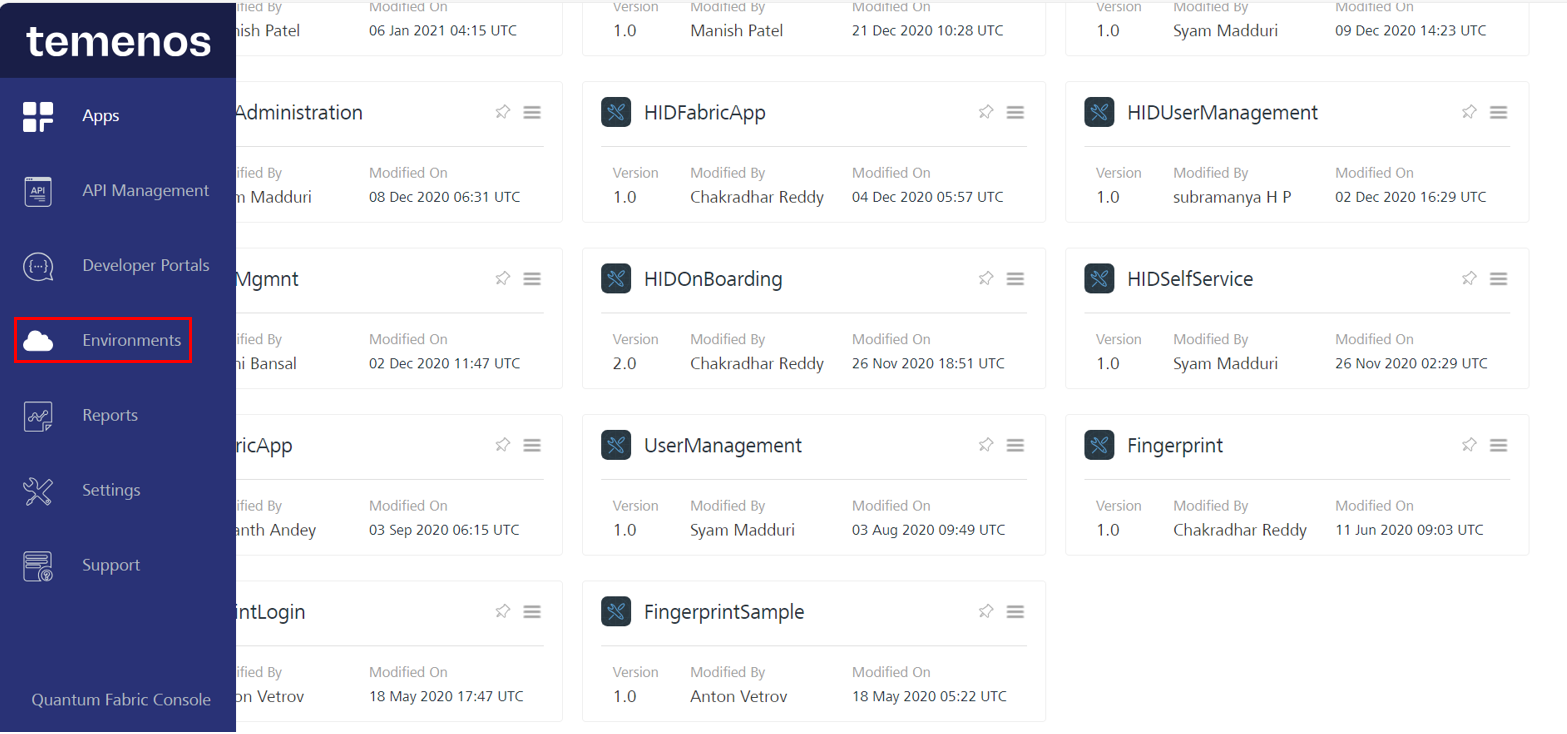
-
Select the App Services option.

-
Select Integration Services, search for HIDIdentityService, and select the login operation from the Select Options drop-down menu.
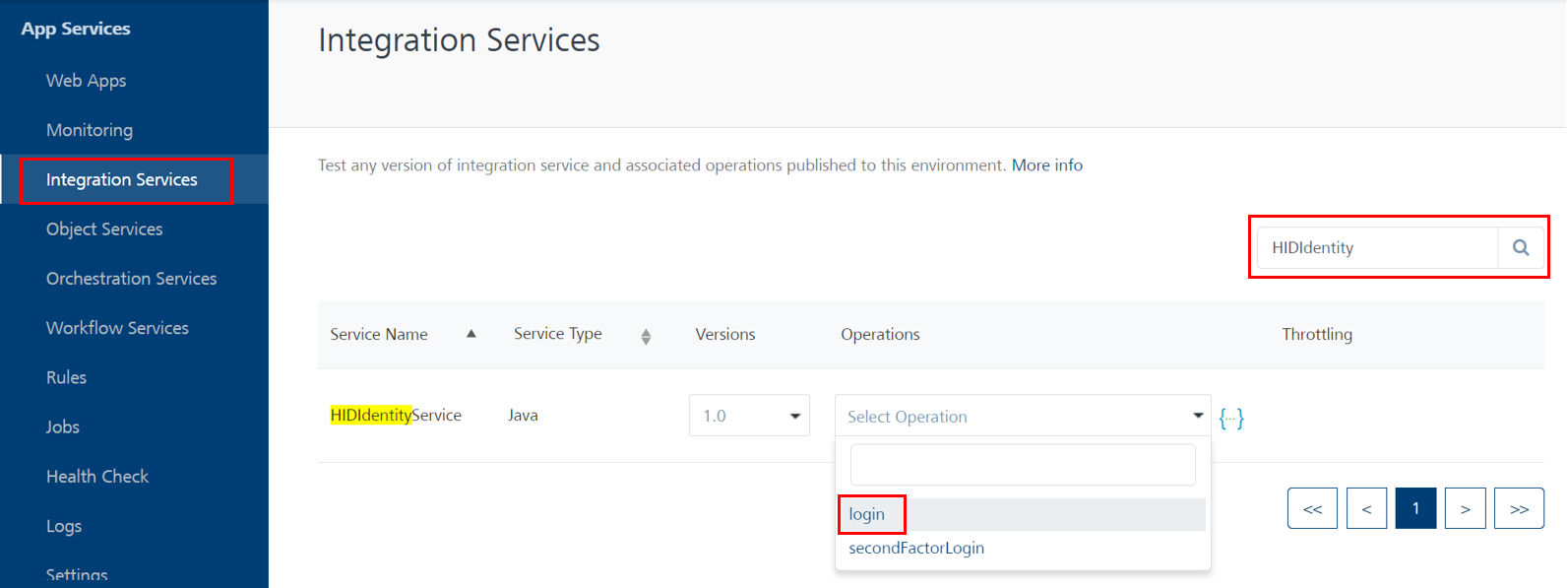
-
The following page will be displayed, allowing you to enter parameter values and receive a response.
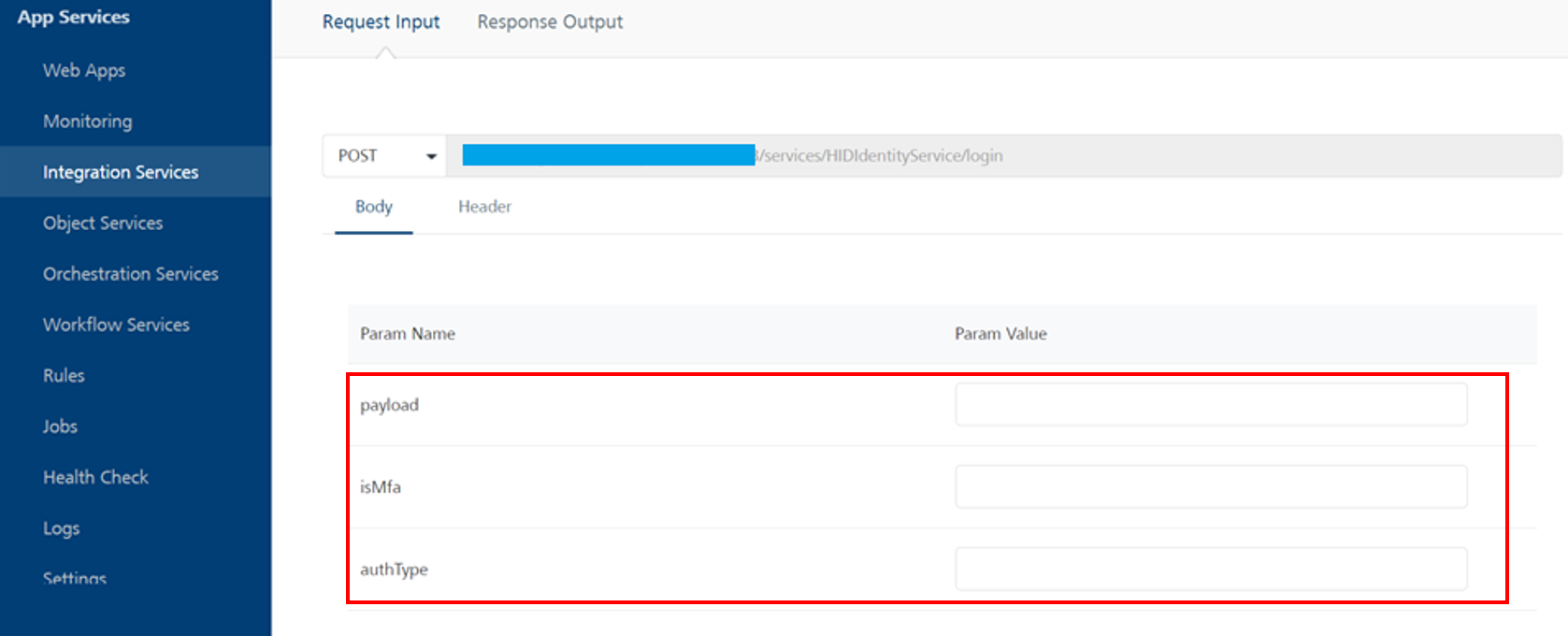
Parameters values to be passed:
-
Payload:
CopyPayload: (update your payloads accordingly){
"Meta": {
"EventType": "urn:com:temenos:security:event:login:v1",
"RiskScore": {
"Required": "0",
"Current": "0"
},
"TransactionId": "9090"
},
"urn:com:temenos:security:event:login:v1": {
"Scope": "LOGIN",
"Name": "Temenos Internet Banking",
"userid": "UpdateUsenameHere",
"password": "UpdatePasswordValueHere"
}
}Note:Update only the userid and password values within the payload.
-
userid: This value is the same as username.
-
password: This value is your password/secure OTP used for first-factor authentication.
-
-
isMFA: The value indicates whether your application supports multi-factor authentication (true) or single-factor authentication (false).
-
authType: It is dependent on the first factor of authentication.
-
For static password: STATIC_PWD
-
For secure code: SECURE_CODE
-
For OOB PIN: OTP_SMS_PIN
-
-
-
A successful response from the API would look as below with isMFA is set to true.
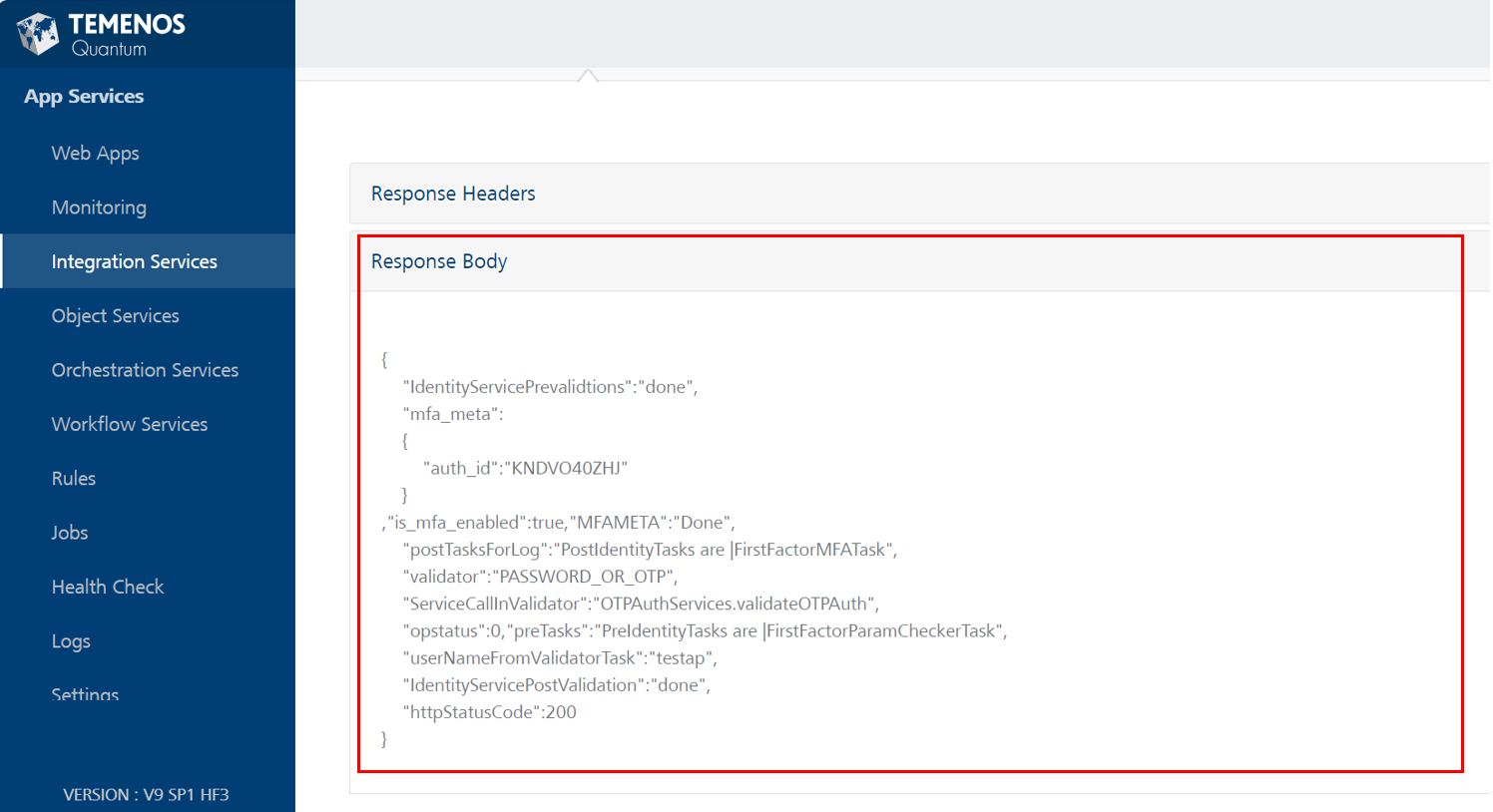
-
A successful response from the API would look as below with isMFA is set to false.
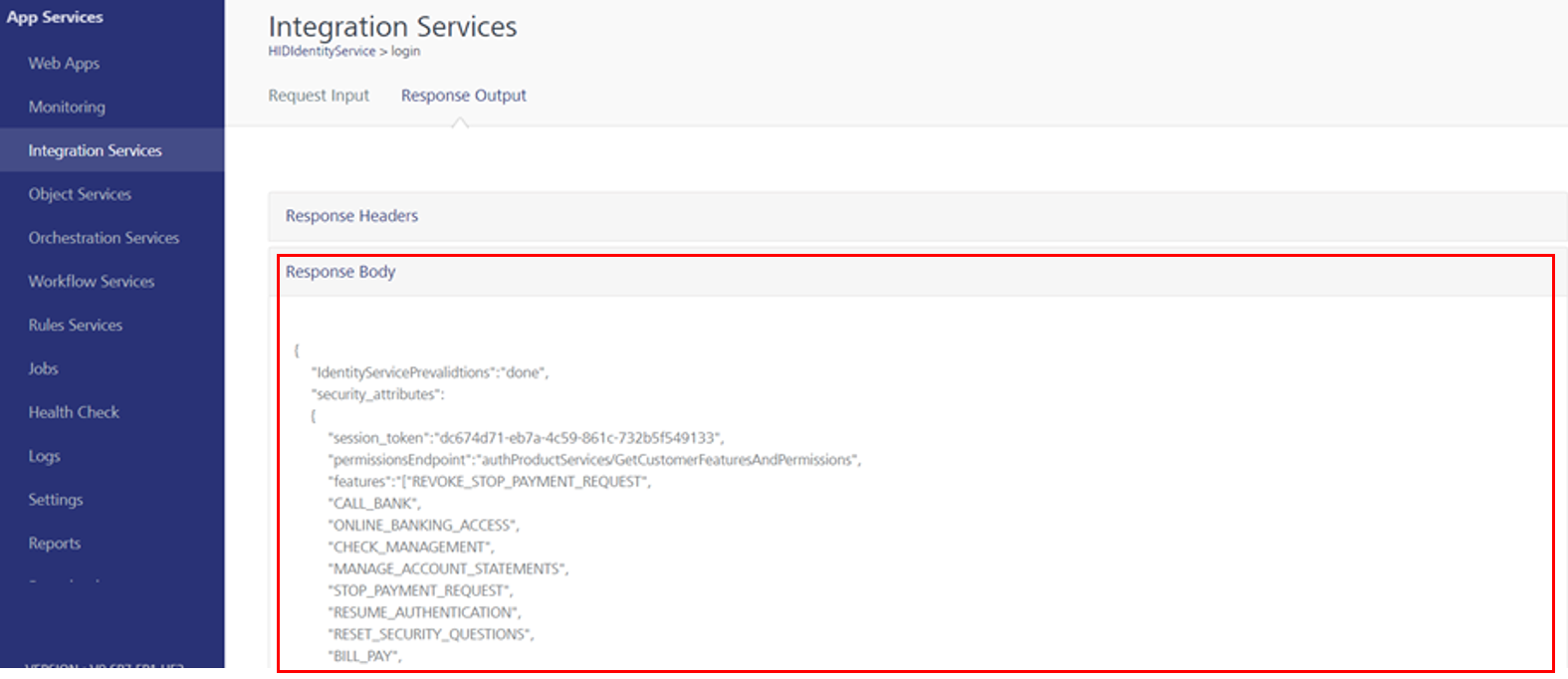
Step 3: Execute 'dbpProductServices'/'getCustomerIdentityAttributes' service for user_attributes
-
In the Fabric console, navigate to Integration Services and search for the getCustomerIdentityAttributes operation within dbpProductServices.
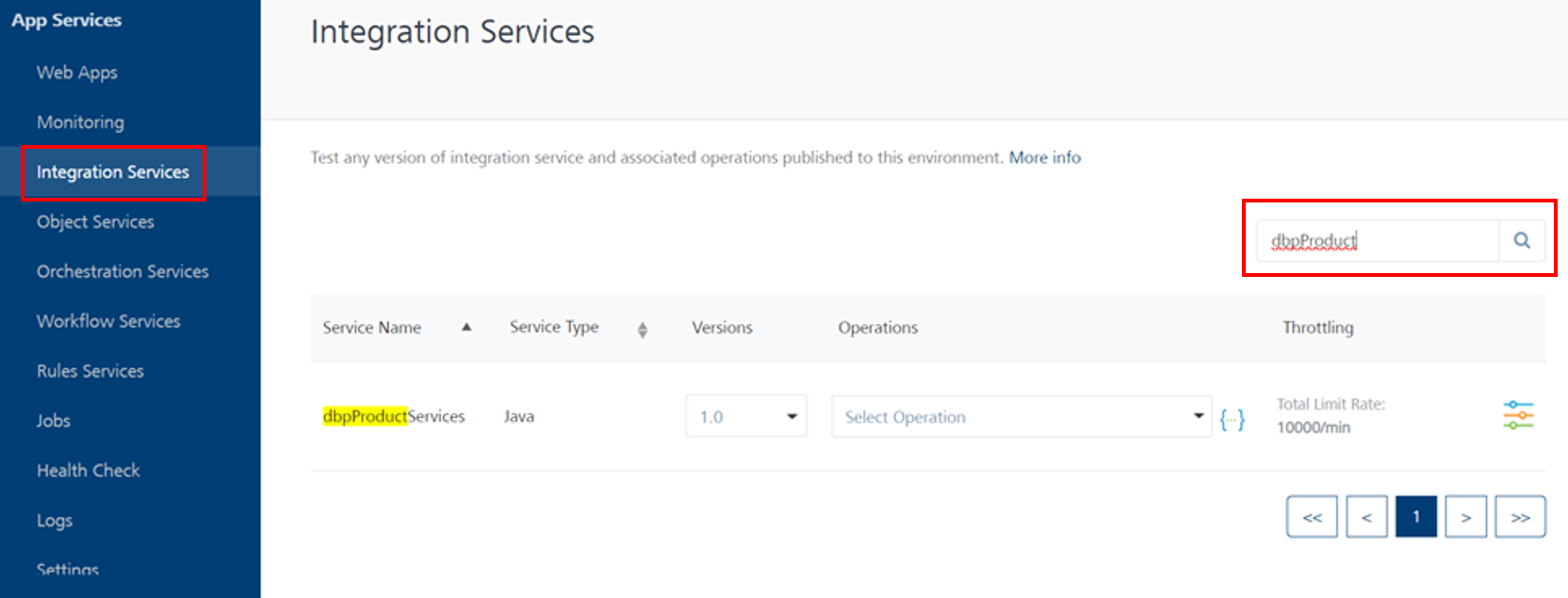
-
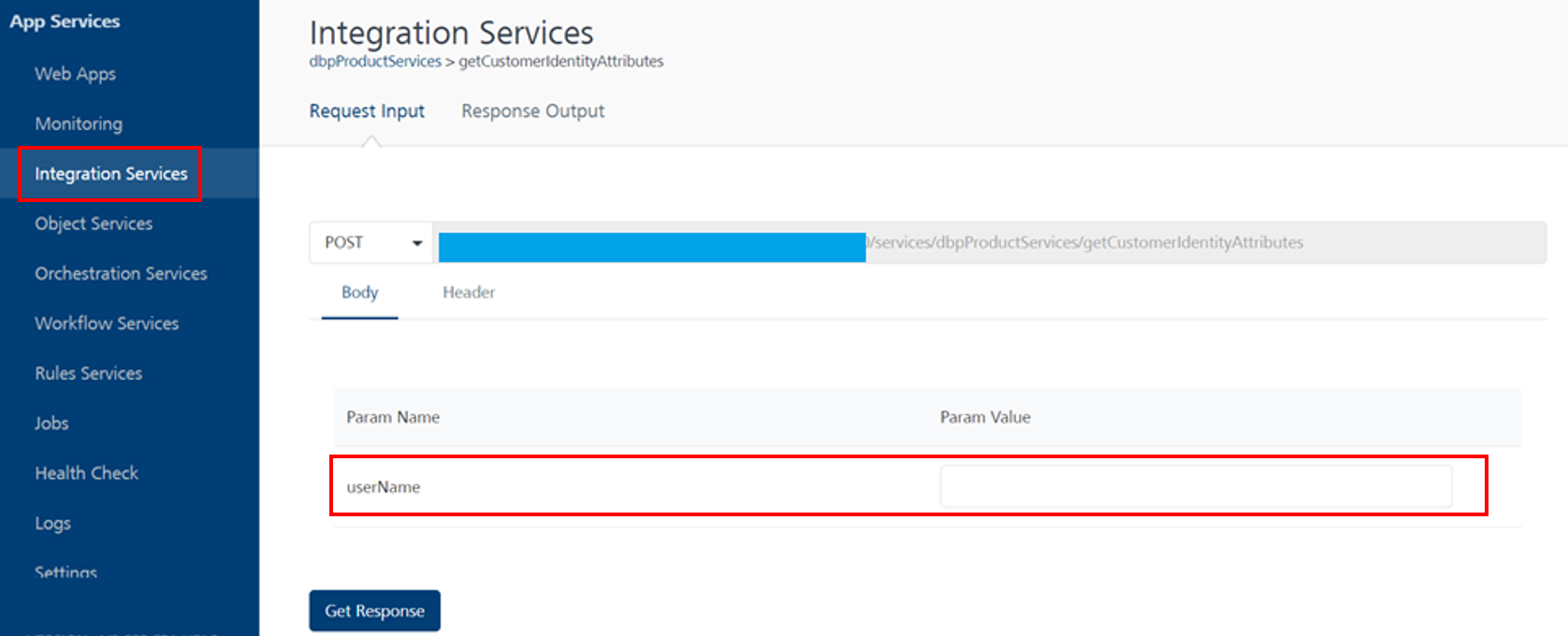
You will be able to see the below page where you can add parameter values and get a response.
 Note:
Note:-
userName must exist in the Infinity database.
-
Since the API uses anonymous app user security, include x-kony-app-key and x-kony-app-secret in the header.
-
Step 4: Configure the 'x-kony-app-key' and 'x-kony-app-secret' headers
Set these keys only if they haven't been set for HID Global services previously.
-
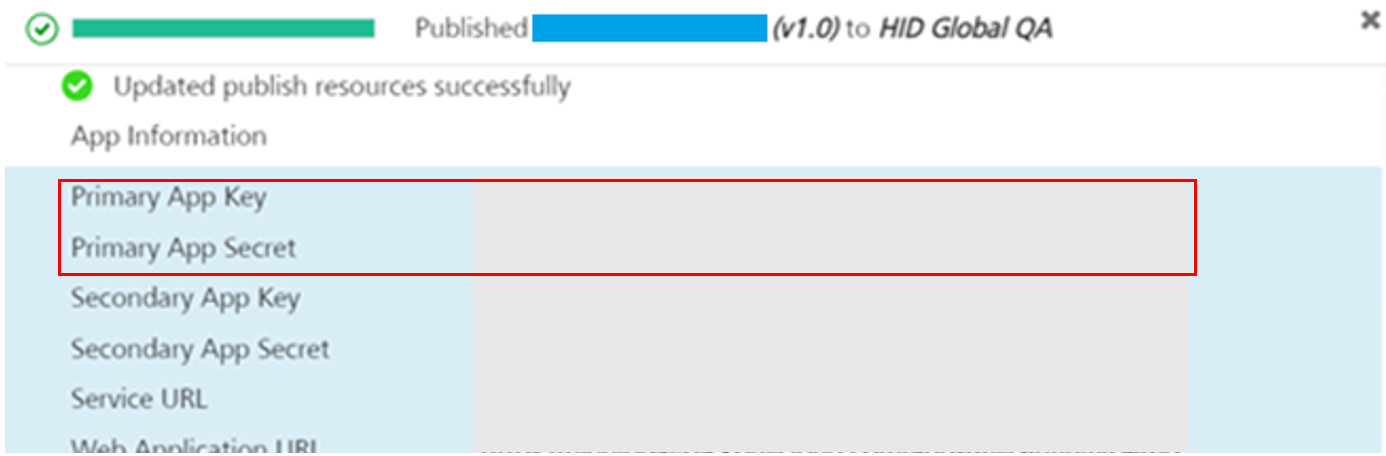
Select the app where you have the HID Global services available, and select the Publish tab.
-
Within the Server properties section, enter the App Key and App Secret values.
Use the Primary App Key and Primary App Secret for this configuration.
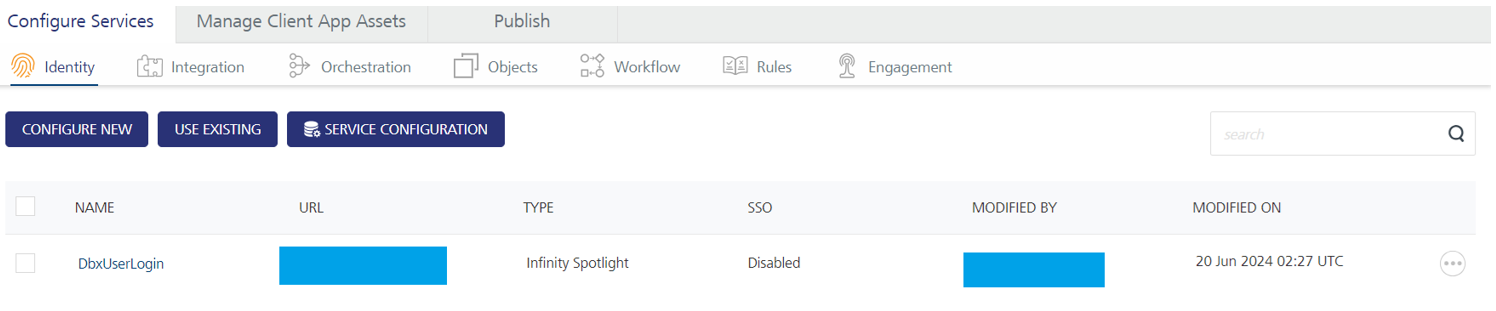
Step 5: Change DbxUserLogin type (from Infinity spotlight to Custom type)
-
Export the DbxUserLogin identity service from Fabric.
-
Extract the DbxUserLogin(v1.0).zip and you will find the services folder at the top level, as shown in the below image.

-
Open the Meta.json file (from location: ../Services/_Identity/DbxUserLogin/Meta.json) in the text editor and remove the subtype key and the corresponding value from the config object.

-
Inside the config object, add a new property named mfa_url.
-
Set the value of mfa_url to the Second-factor endpoint of the CustomHIDLogin identity service.
-
Modify the custom_idp_url property to point to the First-factor endpoint of the CustomHIDLogin identity service.
CopyBefore Changes
{
  "name" : "DbxUserLogin",
  "displayName" : "DbxUserLogin",
  "type" : "custom",
  "version" : "1.0",
  "metaPreference" : -1,
  "config" : "{
               \"pre_mfa_token_timeout\":10,
               \"header_params\":[\"x-kony-integrity\"],
               \"session_restrictions\":{\"session_restriction_type\":\"allow_any_number_of_sessions\"},
               \"sub_type\":\"customer360\",
               \"is_mfa_enabled\":true,
               \"provider_params\":{},
               \"body_params\":{},
               \"custom_idp_url\":\"https://abc.domain.com /services/DbxCustomerLogin \"
               }",
  "policyConfig" : "{\"def_user_status\":\"pending\",\"max_login_fail\":5}",
  "admissionPolicy" : "no_approval_needed",
  "identityMeta" : {
    "allow_sso" : false
  },
  "isIntegrityEnabled" : true,
  "ssoenabled" : false,
  "empty" : true
}CopyAfter Changes
{
  "name" : "DbxUserLogin",
"displayName" : "DbxUserLogin",
  "type" : "custom",
  "version" : "1.0",
  "metaPreference" : -1,
  "config" : "{
               \"pre_mfa_token_timeout\":10,
               \"header_params\":[\"x-kony-integrity\"],
               \"mfa_url\":\" https://abc.domain.com/services/HIDIdentityService\SecondFactorlogin",
               \"session_restrictions\":{\"session_restriction_type\":\"allow_any_number_of_sessions\"},
               \"is_mfa_enabled\":true,
               \"tracking_attribute\":\"no_tracking\",
               \"provider_params\":{},
               \"body_params\":{},
               \"custom_idp_url\":\"https://abc.domain.com /services/HIDIdentityService \"
               }",
  "policyConfig" : "{\"def_user_status\":\"pending\",\"max_login_fail\":5}",
  "admissionPolicy" : "no_approval_needed",
  "identityMeta" : {
    "allow_sso" : false
  },
  "isIntegrityEnabled" : true,
  "ssoenabled" : false,
  "empty" : true
} -
Save the changes, zip the Services folder, and rename it as DbxUserLogin(v1.0).zip.
-
Go to API Management in your fabric and import the updated service Zip file.
If you check the DbxUserLogin service after the successful import, you will be able to observe that the type of the service has changed to Custom.
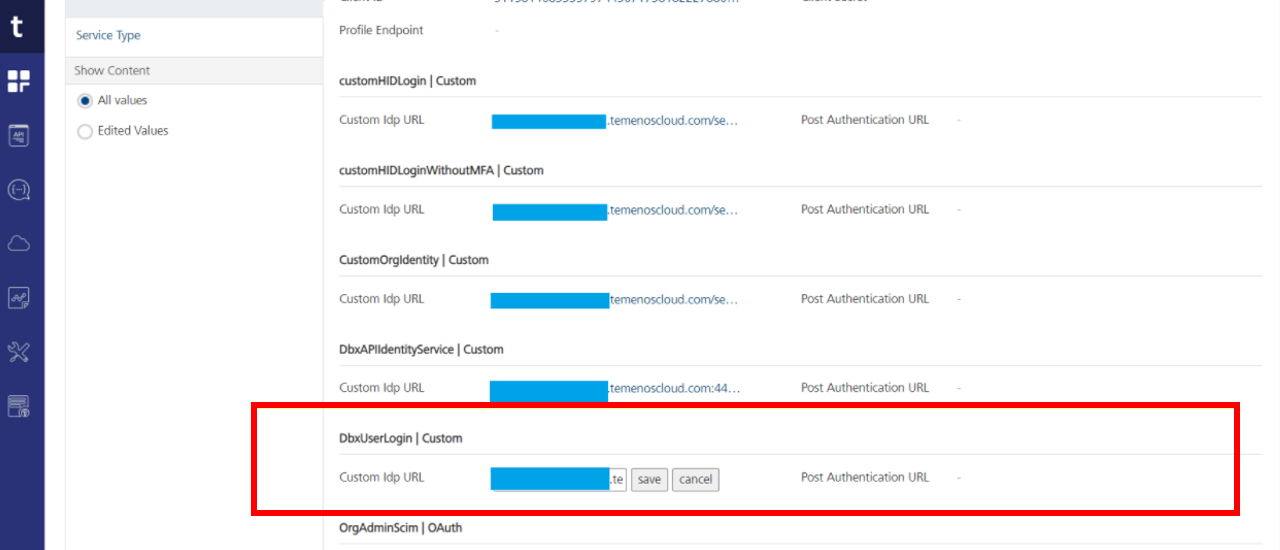
Step 6: Change the identity service endpoint in Publish tab
-
Open the Fabric app where DbxUserLogin Identity service is present.
-
Go to Publish Tab.
-
Click the Configure and Publish option below.
-
Expand the Service configuration and expand the Identity service configuration.
-
Update the custom idp URL with the First-factor endpoint of the DbxUserLogin.
-
Publish the Fabric application.
Troubleshooting Fabric Services
Refer to troubleshooting the User Authentication Fabric Services.
Risk-based User Authentication
HID Temenos Digital Component additionally supports an adaptive and risk-based authentication. It is optional i.e., You can enable or disable this functionality based on your needs.
HID Risk Management Solution provides this threat detection solution for real time risk-based authentication.
HID Temenos Digital Component enables you to easily integrate with the HID RMS Web component and use the risk-based Login flow as an add-on feature available as part of User Authentication (this section) component.
Refer HID RMS Web component - Login flow for more information.


