Onboarding Users
Component Overview
|
Component Package |
com.hid.olb.onboarding |
|
User Interface |
Yes, the First Factor and MFA screens will be added based on the options selected in the Component Properties. |
| Platforms Supported | Web |
| Functionality | This component is used for onboarding the user. |
| Available from | Version 12.0.0 |
Server Settings
| Mandatory Server Settings |
HID_HOST |
<HID Authentication Service Host> (e.g., test123.aaas.hidcloud.com) |
|---|---|---|
|
HID_TENANT |
<HID Authentication Service Tenant Id> (e.g., tf98f45g90843781907) |
|
|
HID_KONY_APP_KEY |
<App key of the fabric application> (e.g., h728h89031832jdy9292) |
|
|
HID_KONY_APP_SECRET |
<App secret of the fabric application> (e.g., 89bv2894673792003jy2) |
|
|
HID_SERVICES_URL |
https://<temenos-cloud-host>/services
|
|
| HID_REDIRECT_URI | <Redirect url set for the FIDO tenant> | |
| HID_AS_CLIENT_ID | <Client Id for the tenant> | |
|
HID_ACTIVATION_CODE_AUTHTYPE |
<Activation Code Authenticator if other than AT_ACTPWD> | |
|
HID_PASSWORD_AUTHTYPE |
<Static Password Authenticator if other than AT_STDPWD> | |
|
HD_OOB_SMS_OTP_AUTHTYPE |
<OOB SMS Authenticator if other than AT_OOBSMS> |
|
|
HID_OOB_EMAIL_OTP_AUTHTYPE |
<OOB Email Authenticator if other than AT_OOBEML> |
|
|
HID_DEVICE_TYPE |
<Device type to be used for HID Approve if other than DT_TDSV4> | |
| HID_FIDO_AUTHTYPE | AT_FIDO (by default) | |
| HID_ACT_EXPIRY_IN_DAYS |
<Set the expiration period for Activation Code Authenticator in days> (Default: 1) |
|
| HID_PWD_EXPIRY_IN_DAYS |
<Set the expiration period for Password Authenticator in days> (Default: 365) |
|
| HID_OFFSET_TIME |
<This server setting adjusts the time zone for Appliance> (Default: +00:00) Note:
|
|
| HID_PROVISION_HOST | <In case of appliance, this is the value of internal host> | |
| HID_API_VERSION |
<This server property defines the API version for the Authentication Service and Appliance, ensuring that updated APIs are used. (The default value is 10 for Authentication Service and 3 for Appliance.)> |
|
| HID_IS_MFA_REQUIRED |
<This setting enables the user to activate/deactivate the Multi-factor authentication (MFA)> (Default: true) |
|
| HID_CACHE_EXPIRY_TIME | 120 (by default) | |
| HID_SMS_MSG_TEMPLATE | <Use # as your OTP for authentication. DO NOT share this OTP with anyone> | |
| HID_IS_GATEWAY_ENABLED |
true: HID generates and sends the OTP. false: HID generates the OTP, but Infinity sends it. |
|
| HID_IS_APPLIANCE | HID is hosted in Appliance or Cloud. (e.g., true) | |
| HID_SECURE_OTP_AUTHTYPE | <Secure Code Authenticator if other than AT_EMPOTP> | |
| HID_OOB_SMS_OTP_AUTHTYPE | OOB SMS Authenticator Type (e.g., AT_OOBSMS) | |
| HID_SMS_DEVICE_TYPE |
<The device type for SMS> Value: DT_OOBSMS (by default) |
|
| HID_EMAIL_DEVICE_TYPE |
<The device type for email> Value : DT_OOBEML (by default) |
Onboarding Component Properties
| S.No. | Property Name | Allowed Values | Purpose |
|---|---|---|---|
| 1 | FirstFactor | "STATIC_PWD","SECURE_CODE", “FIDO”, "OTP_SMS" , "OTP_EML" |
This property determines the first authentication factor to be added to the user. Currently the first authentication factors supported are:
|
|
2 |
MFA |
"STATIC_PWD", "SECURE_CODE" ,"OTP_SMS","OTP_EML","APPROVE, “NO_MFA","OTP_HWT" |
This property determines the second authentication factor to be added to the user after the first authentication factor is created. Currently, the component supports the following factors:
|
Onboarding Component Functions
| Method | Description |
|---|---|
| resetUI | Method to reset the UI back to Activation Code Screen. |
Onboarding Component Events
| Event Name | Description | Parameters |
|---|---|---|
| showLoading | The loader is triggered and displayed whenever a service call is initiated. | N/A |
| dismissLoading | The loader is triggered and dismissed whenever a service call is initiated. | N/A |
| changeContext | This is triggered when component screens change, indicating that updates to the form are necessary. | String: context Copy context reference: |
| switchLogin | This is triggered when the component screen switches to the Login Screen and when the registration is successful. | String: status |
| passwordPolicy | This is triggered to get the Password Policy from the service to the form level. | Password Policy Response |
| activationCodeFailureCB | This is triggered to get the Failure server-side responses for the Activation Code Validation from the service to the form level. | String (Error Response) |
| addPasswordandMFAFailureCB | This is triggered to get the Failure server-side responses for the Static Password Setup from the service to the form level. | String (Error Response) |
| approveDeviceRegistrationCB | This is triggered to get the Device Registration Successful Response from the service to the form level. | String (Success Response) |
| approveDeviceFailureCB | This is triggered to get the Device Registration Failure Response from the service to the form level. | String (Error Response) |
| updateDeviceFriendlyNameOnboardingFailureCB | This is triggered to get the Update Device Friendly Name Failure Response – For Session Timeout and other Server Errors. | String (Error Response) |
| getUserCommunicationDetailsFailureCB | This is triggered when getUserCommunicationDetails returns a failure response. | String (Error Response) |
| getUserCommunicationDetailsContactSupportCB | This is triggered when `getUserCommunicationDetails` returns a failure response and the **Contact Support** button is enabled. When the user clicks the button, an event is sent to the front end with the string "Contact Support." | String (“Contact Support”) |
| addAndSendOOBFailureCB | This is triggered when the OTP is sent, and the OOB authenticator is added. If the service fails, it returns a server failure response. | String (Error Response) |
| addPasswordToUserFailedCB |
This is triggered to get the Failure server-side responses for the Static Password Setup from the service to the form level. (currently checking the session timeout scenario with this) |
String (Error Response) |
| validateOOBFailureCB | This is triggered when the OTP is validated, and the service fails, it returns a session timeout error from the server response. | String (Session Timeout Message) |
Onboarding Component Flow
STATIC_PWD
- In the first screen, the user provides their Username and Activation Code, then clicks Verify.
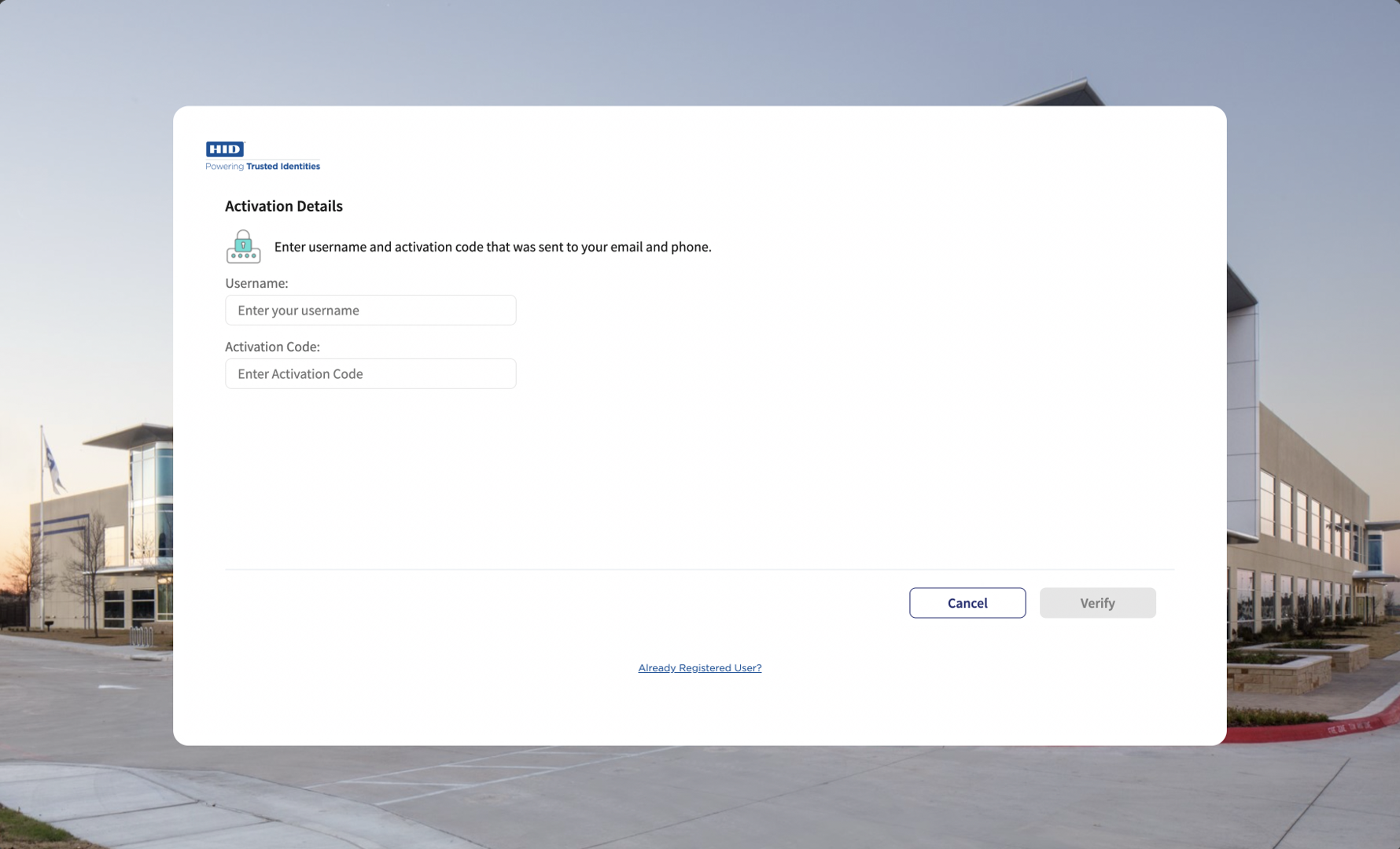
-
After the Activation Code is successfully validated, the screen for setting a new password is displayed.
Enter and confirm the new password for the user.
Note: The Password must comply with the Password policy.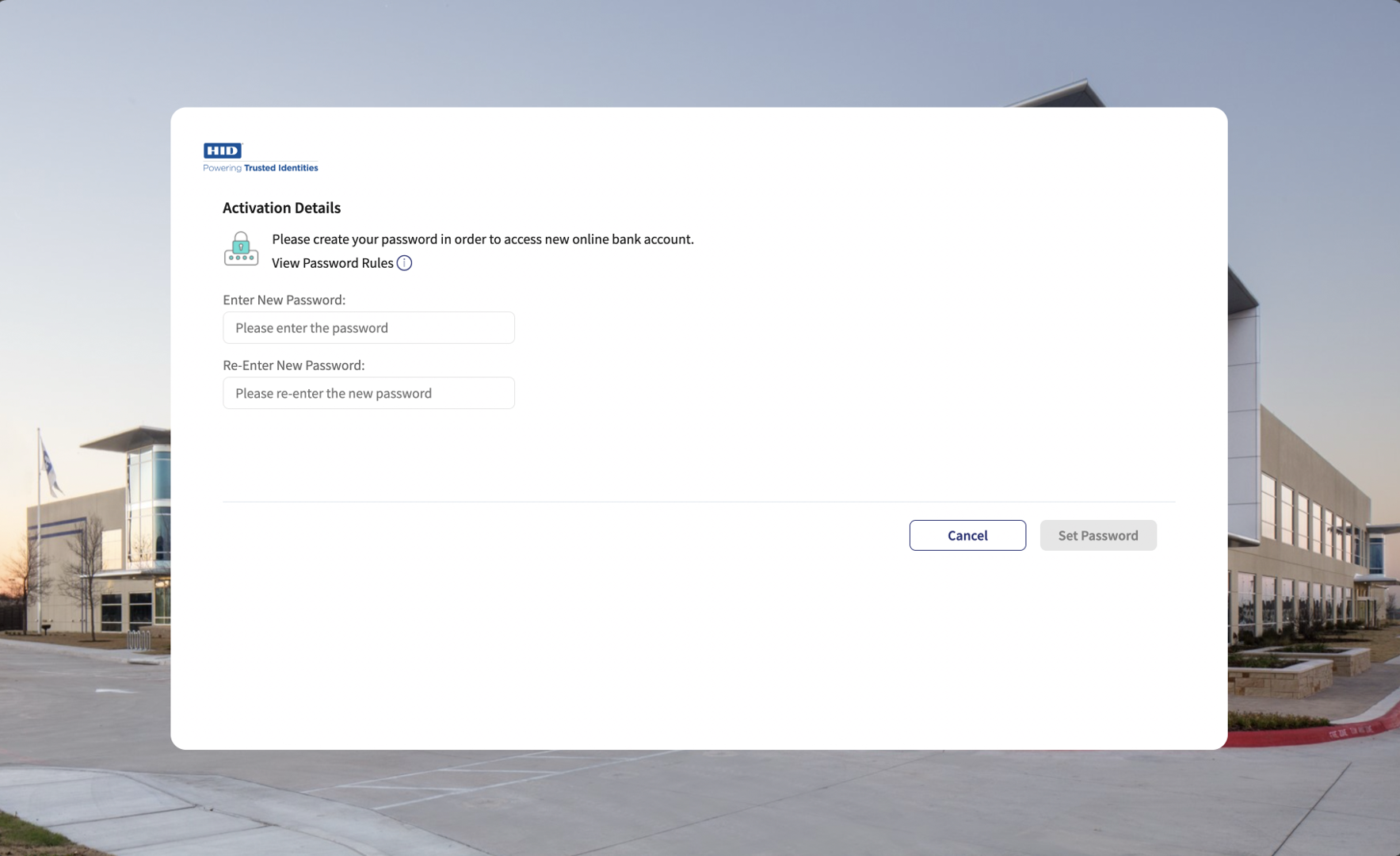
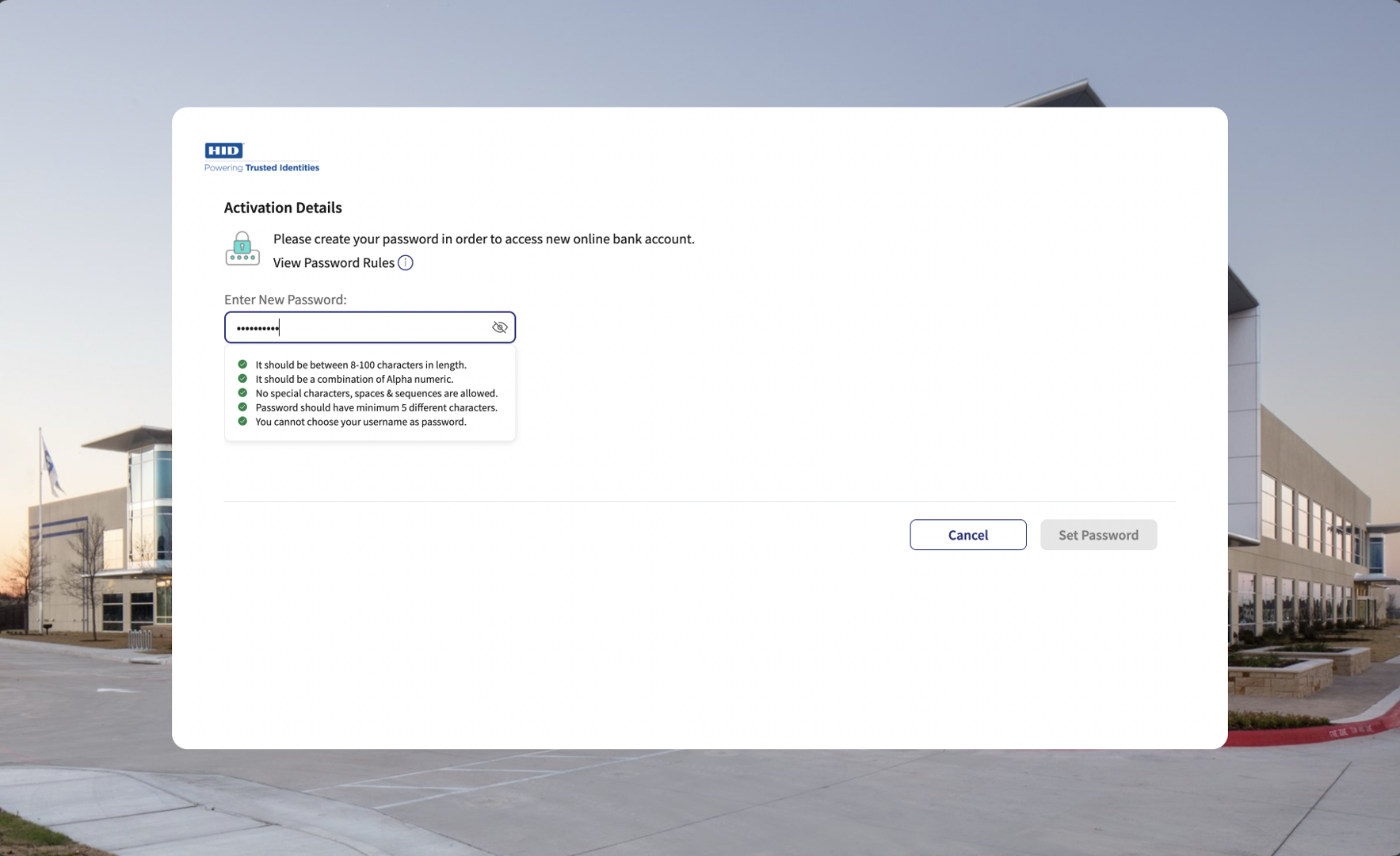
- Once the user has entered and confirmed the new password, click Set Password to create the password.
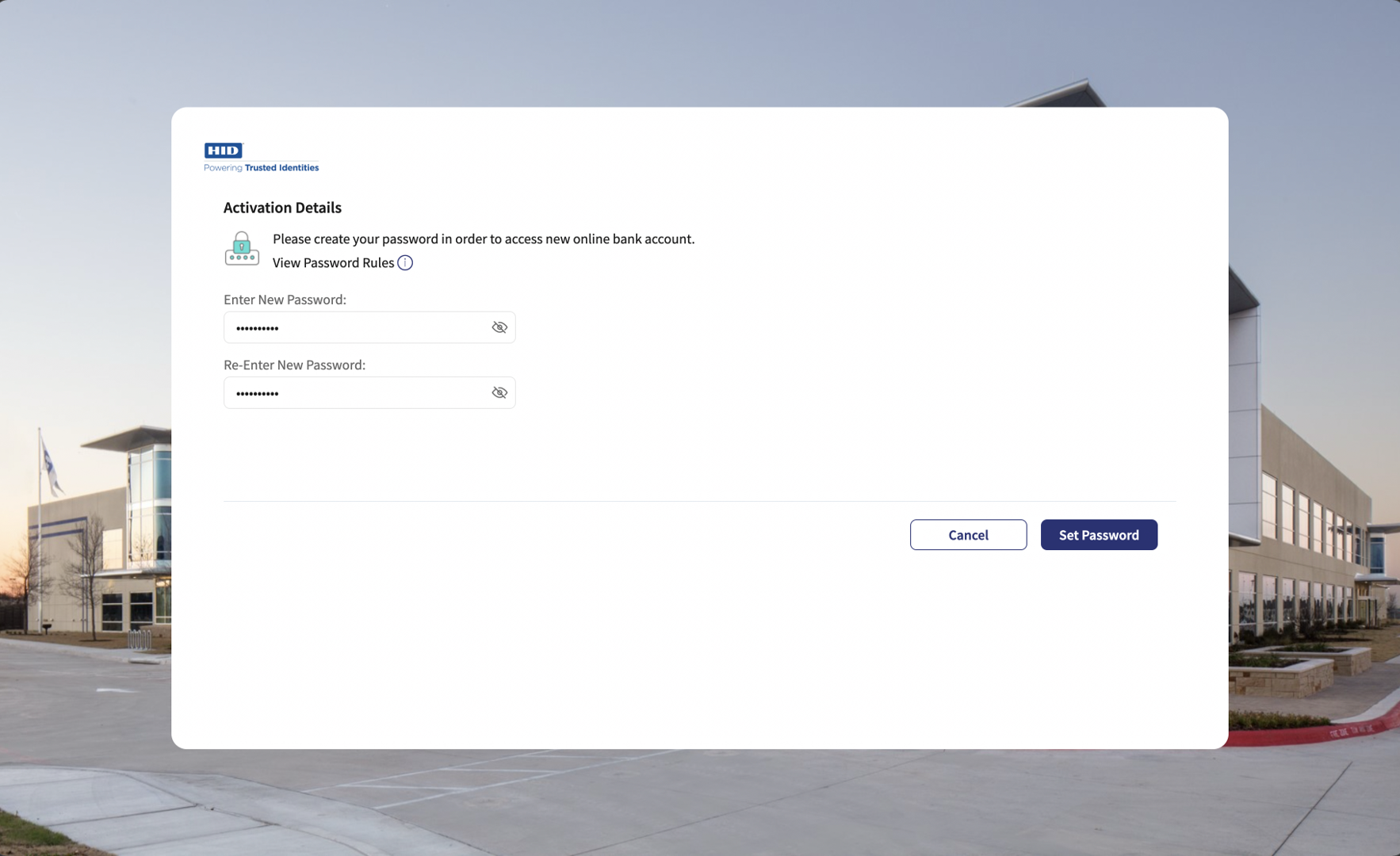
- After the Static password authenticator is successfully created, based on the defined value of the MFA property, the components adds the second authenticator for the user:
 Secure Code
The screen displays the options to register an HID Approve device using either the QR code or manual registration.
Registration via QR Code
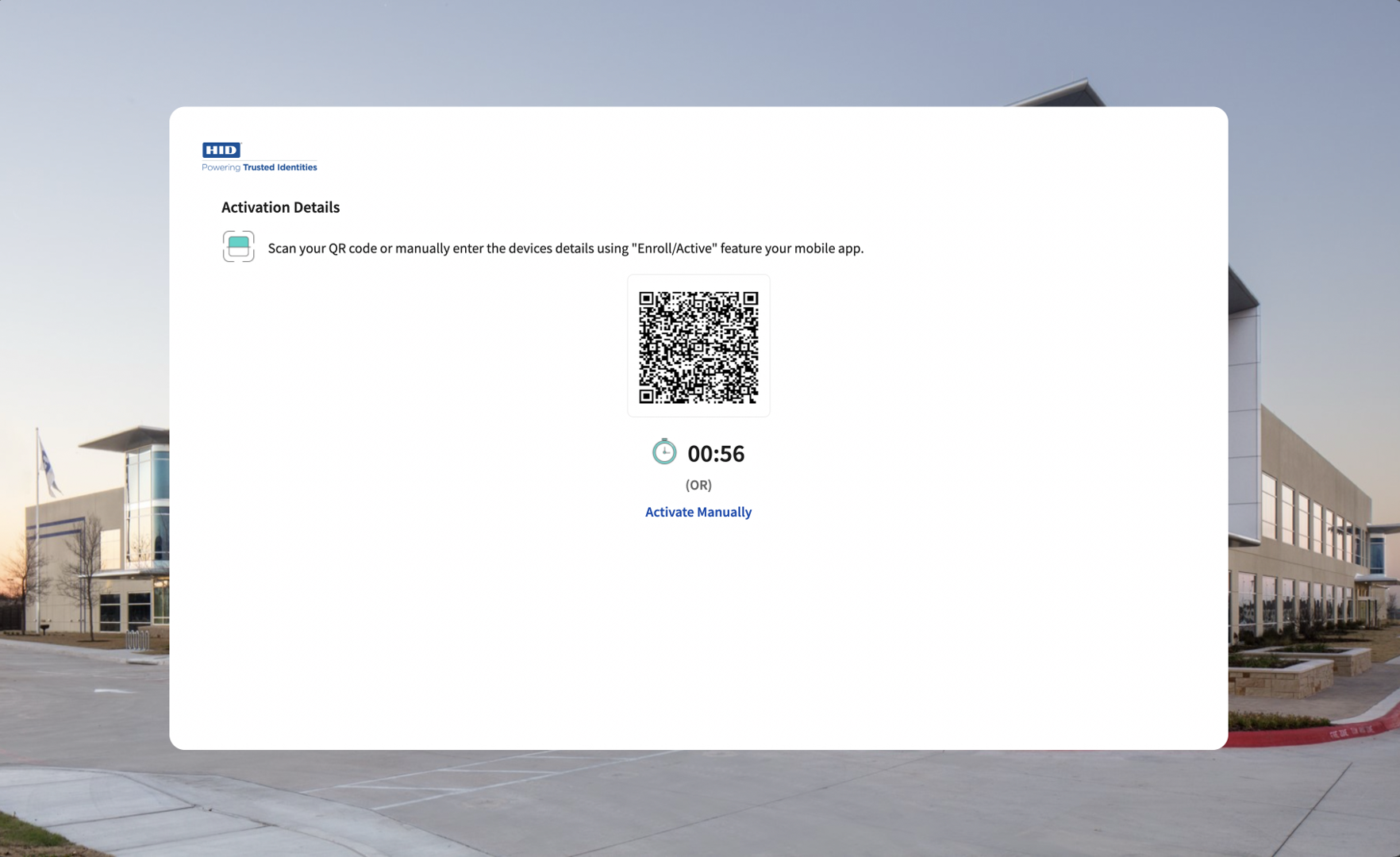
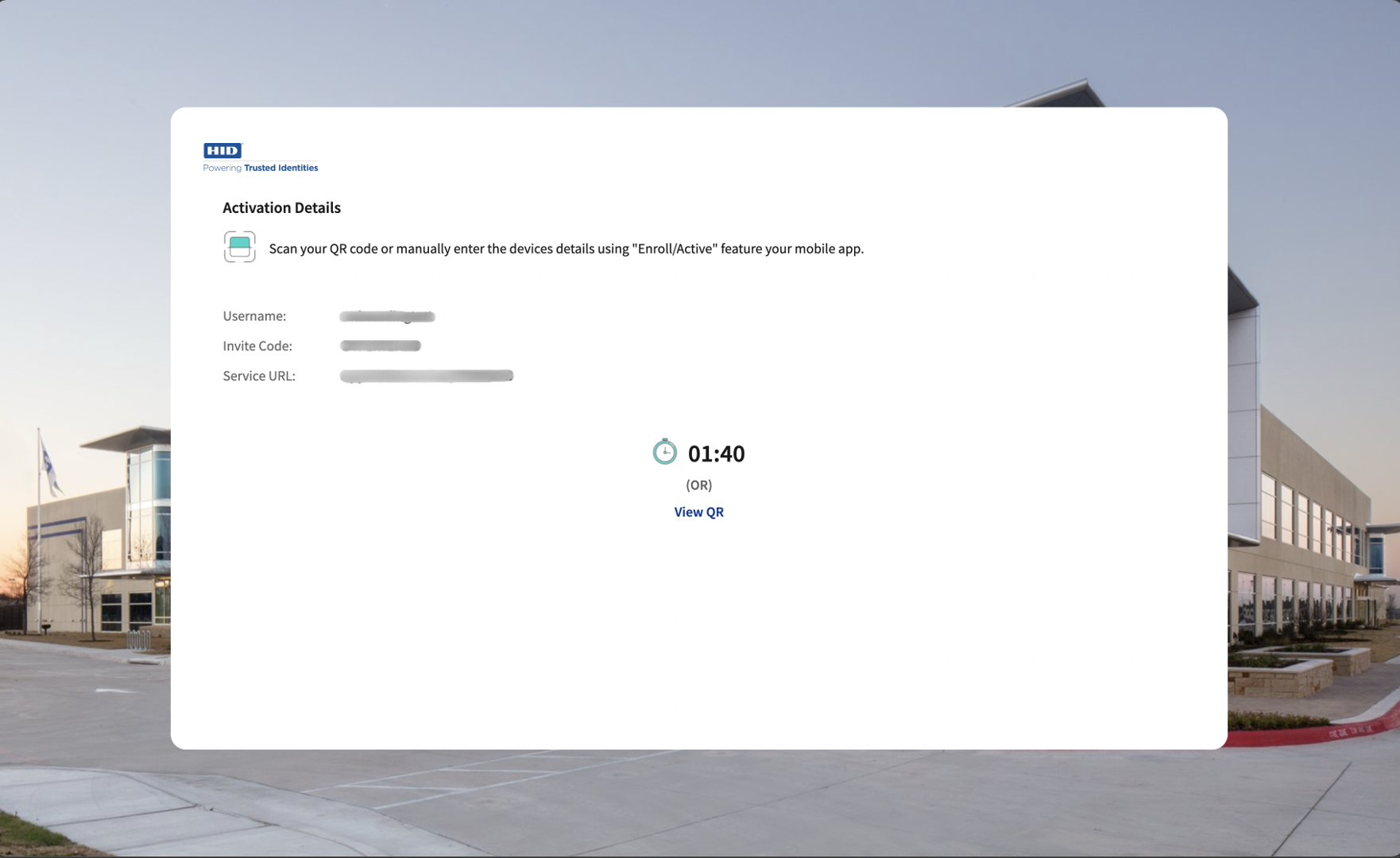
After the device is registered successfully, the user will be shown the screen to update the friendly name of the registered device.
Click Done to update the friendly name of the registered device.
Update friendly Name of the Registered Device Screen:
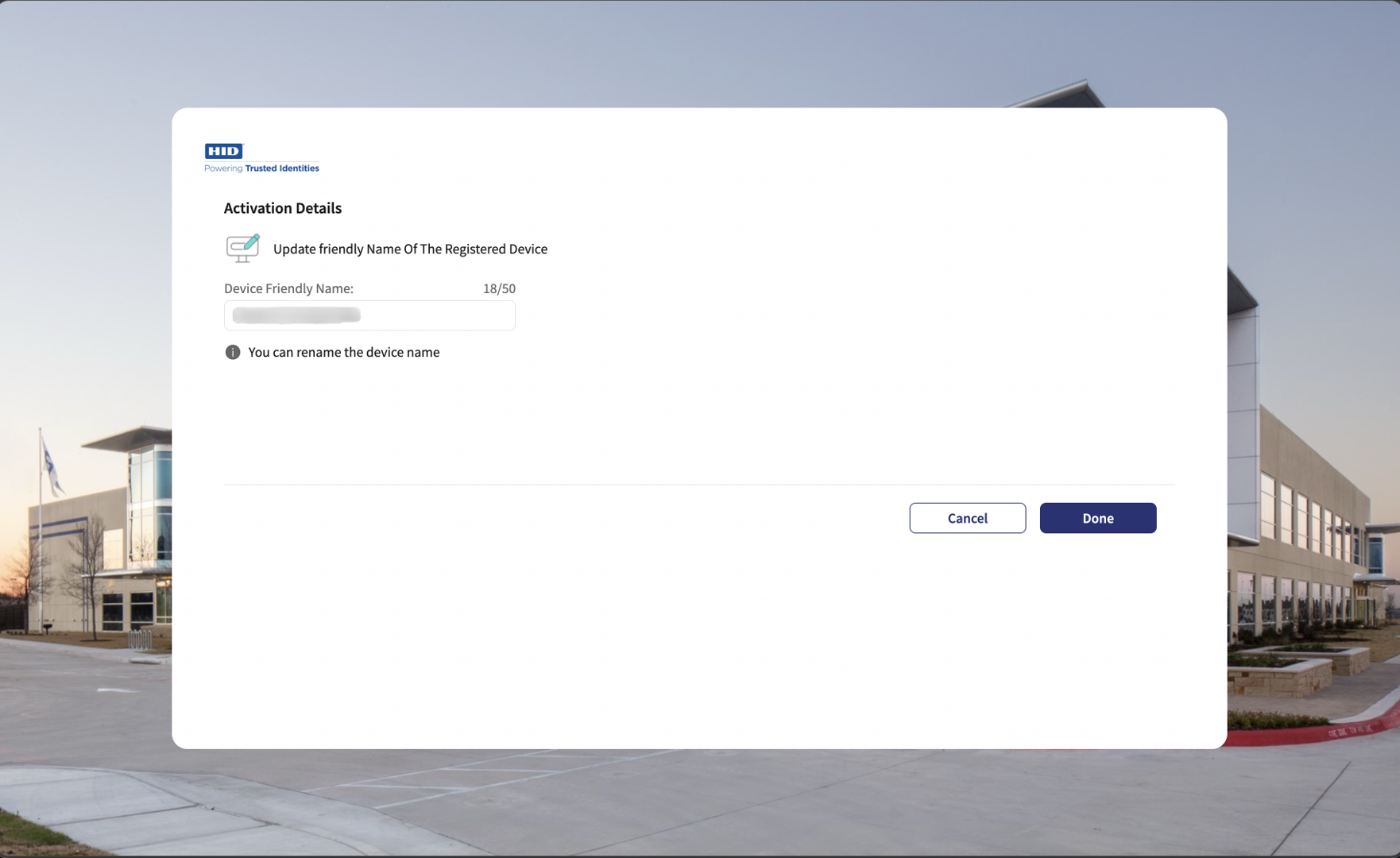
After Successfully updating the friendly name of the registered device, the user is directed to next screen confirming the successful onboarding.
HID ApproveThe screen displays the options to register an HID Approve device using either the QR code or manual registration.
Registration via QR Code
After the device is registered successfully, the user will be shown the screen to update the friendly name of the registered device.
Click Done to update the friendly name of the registered device.
Update friendly Name of the Registered Device Screen:
After Successfully updating the friendly name of the registered device, the user is directed to next screen confirming the successful onboarding.
OTP via SMS or EmailAfter adding the Out-of-Band (OOB) for SMS/Email authenticator to the user, the user receives an OTP either by SMS or by email based on the selected MFA option.
In the third screen, the user enters the received OTP to complete the onboarding process.
After validating the OTP successfully, the user is directed to next screen confirming the successful onboarding.
SECURE_CODE
-
On the first screen, user need to provide Username and activation code, then click Register Button.
-
After successfully validating the activation code, it will show the next screen to with QR code to register user on mobile app.
or
User can select the "Activate Manually" option to display the details to register device manually.
-
After the device is registered successfully, user will be directed to next screen to Update Device Friendly name of just registered device.
-
After the device friendly name of Device Updated successfully , User will be directed to next screen to show that the onboarding process is completed successfully.
OTP_SMS/OTP_EML (First Factor ) + Static Password (Second Factor)
-
In the first screen, the user provides their Username and Activation Code, then clicks Register.
-
After adding the Out-of-Band (OOB) for SMS/Email authenticator to the user, the user receives an OTP either by SMS or by email based on the selected MFA option.
-
In the third screen, the user enters the received OTP to complete the onboarding process.
-
After validating the OTP successfully, the component displays the screen to add a password for the user
-
In the screen, user enters and confirms a Password and clicks Submit.
-
After Adding the Password successfully, the user is directed to next screen confirming the successful onboarding.
FIDO
-
On the first screen, user will provide username and activation code and clicked on register button.
-
This will then show a popup to select the options with supported device to register the device.
-
User get register a new fido authenticator/passkey using the web authentication platform
-
Once done user will redirect to success screen with message and login button.
Onboarding Component Services
Object Services
| ServiceName | DataModel | Mapping | Purpose | Input Parameters | Invoking |
|---|---|---|---|---|---|
|
HIDObjects |
ActivationCodeValidation |
validateActivationCode |
Validate the user's activation code. |
filter (username), username, activationCode, authType |
HIDOnboardingValidation > ValidateUser |
|
HIDObjects |
AddOOBAuthenticator |
addOOBAuthenticator |
Add an OOB (SMS/Email) authenticator to the user. |
userId, AuthenticatorType (AT_OOBSMS/ AT_OOBEML), AuthenticatorValue (OOB Device Type code : DT_OOBSMS/DT_OOBEML) |
HIDScimAPIsOrg > addOOBAuthenticator |
|
HIDObjects |
AddPasswordAuthenticator |
addPasswordAuthenticator |
Add a static password authenticator to the user. |
username, userId, password, authType, Auth_Key |
HIDScimAPIsOrg > addPasswordAuthenticatorInt |
|
HIDObjects |
ApproveDeviceRegistration |
getInviteCode |
Provision the HID Approve device to the user and get the invite code to add the HID Approve device. |
userId, username, usernameWithRandomNo, Auth_Key |
HIDPushDeviceRegistrationOrch > getInviteCode |
|
HIDObjects |
HIDApproveInitiation |
initiateApprove |
Initiate the Push notification on the HID Approve device. |
username |
HIDApproveInitiation > initiate |
|
HIDObjects |
ApproveStatusPolling |
approveStatusPolling |
Poll to the ApproveCallback service to fetch the status of user's response to the HID Approve Push notification. |
mfa_key (authRequest Id from the initiateApprove service response) |
HIDPollConsensus > getHIDApprovalStatus |
|
HIDObjects |
DeviceRegistrationPolling |
deviceRegistrationPolling |
Poll to the DeviceRegistration Callback service to fetch the status of the HID Approve device registration. |
deviceId (device Id from the getInviteCode service response) |
HIDPollConsensus > getHIDDeviceRegistrationStatus |
|
HIDObjects |
SendOOB |
sendOOB |
Send the OOB (SMS/Email) OTP to the user. |
username, AuthenticatorType (AT_OOBSMS/AT_OOBEML)HID |
HIDOTPServices > sendOOB |
|
HIDObjects |
ValidateOOB |
validateOOB |
Validate the OOB (SMS/Email) OTP. |
username, AuthenticatorType (AT_OOBSMS/ AT_OOBEML), OTP |
HIDOTPService > validateOOB |
| HIDObjects | PasswordPolicy | getPasswordPolicy | Gets the policy for Static Password Authenticator. | none | HIDAuthenticatorPolicy > getPasswordPolicy |
| HIDObjects | AddAllOOBAuthNew | addAllOOBAuthenticators | Add an OOB(SMS/Email) authenticator, TX OOB, and Send OTP to the user. | userId, AuthenticatorType (AT_OOBSMS/ AT_OOBEML), AuthenticatorValue (OOB Device Type code : DT_OOBSMS/DT_OOBEML) | HIDScimApisOrch> AddAllOOBAuthenticators |
| HIDObjects | FIDOOnboarding | getCredentialOptions | It will fetch the configuration options to create FIDO credentials. | username | HIDFIDOOrch> getCredentialOptions |
| HIDObjects | FIDOOnboarding | registerCredential | It will register the user with FIDO Authenticator. | username, request_uri, id, rawId, clientDataJSON, attestationObject, csrf | HIDFIDO> registerCredential |
| HIDAuthService | FIDOAuthentication | authenticate | Authenticate the user with FIDO credential assertion and fetch the token. | username, request_uri, csrf, csrfx | HIDFIDOOrch> authenticate |
| HIDAuthService | FIDOAuthentication | getAuthenticationOptions | It will provide the registered credentials for the client to generate the assertion. | username, request_uri | FIDOOrch> getAuthenticationOptions |
| HIDObjects | addOOBAuthAndSendSMS | addOOBAuthAndSendSMS | Add an OOB (SMS/Email) authenticator to the user and send sms to the user. | userId, AuthenticatorType (AT_OOBSMS/ AT_OOBEML), AuthenticatorValue (OOB Device Type code : DT_OOBSMS/DT_OOBEML) , Auth_key , OOB_PIN | HIDCustomOTPService >SendOTP |
| HIDObjects | GetDevice | getDevice | Get Device Details. | deviceId , auth_key , corrrelationId | HIDUpdateFriendlyNamesOnboarding (1.0) > getDeviceOnboarding |
| HIDObjects | UpdateFriendlyName | updateFriendlyName | Update Device Friendly Name. | deviceId , friendlyName,auth_key,correlationId | HIDUpdateFriendlyNamesOnboarding (1.0) > updateFriendlyNamesOnboarding |
| Utility | CommunicationInformation | getUserCommunicationInfo | Fetch the Infinity user details such as email and MobileNumber to show on Screen when the OTP factres selected and used to send the OTP. | userName |
T24ISExtra (1.0).getUserCommunicationDetailsPreLogi |
Fabric Services
| Names | Operation Name | Service Type | Description |
|---|---|---|---|
|
HIDClientIdentity |
- |
Identity |
Fetches Client Bearer Token |
|
HIDActivationCodeService |
Login |
Integration |
Authenticates the Activation Code |
|
HIDClientAuthIdentityWrapper |
getClientBearerToken |
Integration |
IntegrationWrapper of ClientIdentity |
|
HIDDependencyManager |
|
Integration |
Resolves the dependencies for HIDProcessor.jar. |
|
HIDDeviceProvisionJava |
GetProvisonMsg |
Integration |
Fetches the Invite Code |
|
HIDApproveInitiation |
Initiate |
Integration |
Sends an HID Approve Push notification to the user's registered device. |
|
HIDPollConsensus |
getHIDApprovalStatus |
Integration |
Java service to fetch callback response of the HID Approve Push notification. |
|
HIDPollConsensus |
getHIDDeviceRegistrationStatus |
Integration |
Java service to fetch the callback response of the HID Approve device registration status. |
|
HIDOTPServices |
SendOOB |
Integration |
Sends an OOB OTP to the user. |
|
HIDOTPServices |
validateOOB |
Integration |
Validates an OOB OTP. |
|
HIDOTPServices |
validateOTP |
Integration |
Validates a Hardware OTP. |
|
HIDScimAPIs |
SearchUser |
Integration |
Searches for the user. |
|
HIDScimAPIs |
createNewDevice |
Integration |
Creates a new Device ID for the user. |
|
HIDScimAPIs |
getActivationCodeAuthenticator |
Integration |
An exclusive getAuthenticator service for the ValidateUser Orchestration service. This service does not work alone so use the getAuthenticator instead. |
| HIDAuthenticatorPolicy | getPasswordPolicy | Integration | Provides the Password policy. |
|
HIDScimAPIs |
updateDevice |
Integration |
Binds the new Device ID to the user. |
|
HIDScimAPIsOrg |
addOOBAuthenticator |
Integration |
Adds an OOB Authenticator to the user. |
|
HIDScimAPIsOrg |
addPasswordAuthenticatorInt |
Integration |
Adds a Password Authenticator. |
|
HIDOnbaordingValidation |
ValidateUser |
Orchestration |
|
|
HIDPushDeviceRegistrationOrch |
getInviteCode |
Orchestration |
Provisioning Push Device |
| HIDScimAPIsOrg | addOOBAuthenticatorForOrch | Integration | To add OOB authenticator (AT_OOBSMS/ AT_OOBEML) |
| HIDTransactionAuthServices | AddTXOOBAuthForOrch | Integration | To add Transaction OOB (TX_OOB) |
| HIDScimApisOrch | AddAllOOBAuthenticators | Orchestration | To add OOB authenticator, TX OOB authenticator, and to send OTP to the user. |
| HIDPushedAuthorizationRequest | PAR | Integration | It will generate the request_uri for subsequent calls. |
| HIDFIDO | getCredentialOptions | Integration | It will fetch the configuration options to create FIDO credentials. |
| HIDFIDO | registerCredential | Integration | It will register the user with FIDO Authenticator. |
| HIDFIDOOrch | authenticate | Orchestration | It will be consumed for authentication journey of the user. |
| HIDFIDOOrch | getAuthenticationOptions | Orchestration | It will provide the registered credentials for the client to generate the assertion. |
| HIDFIDOOrch | getCredentialOptions | Orchestration | It will fetch the configuration options to create FIDO credentials. |
| HIDCustomOTPService | sendOTP | Integration | Used to send OTP. |
| HIDOTPServiceKMSOrch | addOOBAndSendOTPAuthService, addOOBAndSendOTPAppliance , generateAndSendOTPAppliance, generateAndSendOTPAuthService, sendLoginOTPAppliance, sendLoginOTPAuthService | Orchestration | Used for adding OOB authenticator , generate OTP and sending OTP. |
| HIDSoapServices | indirectPrimaryAuthenticateDevice | Integration (Soap Service) | Generate and Send OTP for HID Appliance |
| HIDOTPUtilServices | fetchPhoneNumber | Integration | Used to fetch the Phone number of the user for the HID Appliance to send the OTP. |
| T24ISExtra | getUserCommunicationInfo | Integration | Note: Temenos Integration Service Fetch the Infinity user details such as email and MobileNumber to show on Screen when the OTP factres selected and used to send the OTP |
Java Services
| Service Name | Purpose | Dependencies | Called by (Service Name-Operation) |
|---|---|---|---|
|
DeviceProvision |
Java service to send the Device Provisioning request for HID Approve device registration and process the response to send the provisioning message. |
You need to configure following Server Properties:
|
HIDDeviceProvisionJava-getProvisonMsg |
|
HIDPollForConsensus |
Java service which keeps polling for 45 seconds to get the status of the HID Approve Push notification sent to the user. |
|
HIDPollConsensus-getHIDApprovalStatus |
|
PollForDeviceRegistrationStatus |
Java service which keeps polling for 45 seconds to get the status of the HID Approve device registration. |
|
HIDPollConsensus-getHIDDeviceRegistrationStatus |
| OTPDeliveryService | Java Service to decide which delivery gateway to use to send SMS | HID_SMS_MSG_TEMPLATE , IS_HID_GATEWAY_ENABLED , HID_OOB_SMS_OTP_AUTHTPYE, HID_OOB_EMAIL_OTP_AUTHTPYE, HID_SMS_DEVICE_TYPE , HID_EMAIL_DEVICE_TYPE | CustomOTPService |
Listener Endpoints (HTTP Servlets)
| Name | URL | Purpose | Dependencies |
|---|---|---|---|
|
ApproveCallBackEndpoint |
https://hidglobal-dev.temenos-cloud.net/services/ApproveCallBackEndpoint |
Listen to the callback response sent by the HID Authentication Service for the user's response to the HID Approve Push notification. |
|
|
DeviceRegistrationCallBackEndpoint |
https://hidglobal-dev.temenos-cloud.net/services/DeviceRegistrationCallBackEndpoint |
Listen to the callback response sent by the HID Authentication Service for the user's response to the HID Approve Device registration request (either by scanning QR code or manually registration) |
None (Listener endpoint URL is already being sent in Device Provisioning request as cb_url). |
Onboarding Pre/Post Processors
Onboarding Pre Processors:
| Names | Description | Used by (ServiceName-Operation) |
|---|---|---|
| ActivationCodeAuthentcatorPreProcessor | Validates user exists and has activation code authenticator. Checks userExists and AuthExists attributes; sets authType from HID_ACTIVATION_CODE_AUTHTYPE server setting. | HIDOnboarding - ActivationCodeAuthenticator |
| ActivationCodeLoginPreProcessor | Prepares activation code login. Checks if prior sequence step failed; sets authType from HID_ACTIVATION_CODE_AUTHTYPE and stores username in request attributes. | HIDOnboarding - ActivationCodeLogin |
| ActivationCodePreProcessor | Computes activation code validity dates (startDate/expDate) using configurable ACT_EXPIRY_TIME. Applies timezone offset and sets authType from settings. | HIDOnboarding - CreateActivationCode |
| AddAllOOBAuthenticatorsPrePreprocessor | Validates Auth_Key against cached userId hash. If valid, passes username, userId, and factor into request attributes for adding all OOB authenticators in batch. | HIDOnboarding - AddAllOOBService |
| AddHWAuthenticatorPreProcessor | Checks if prior sequence failed; sets AuthenticatorType from HWT_AUTHTYPE server setting and adds correlation ID header. | HIDOnboarding - AddHWAuthenticator |
| AddOOBAuthenticatorPreProcessor | Adds OOB authenticator (SMS or Email). Checks password was added successfully, resolves authenticator type and device type from settings based on AT_OOBSMS/AT_OOBEML. Nullifies OOB_PIN if password not required. | HIDOnboarding - AddOOBAuthenticator |
| AddPasswordPreProcessor | Validates Auth_Key against cached userId hash. Computes password start/expiry dates using PWD_EXPIRY_TIME config. Sets authType from HID_PASSWORD_AUTHTYPE. | HIDOnboarding - AddPassword |
| AddSMSOOBAuthenticatorPreProcessor | Adds SMS/Email OOB authenticator. Resolves authenticator type and device type from settings. Similar to AddOOBAuthenticatorPreProcessor but without password-exists check. | HIDOnboarding - AddSMSOOBAuthenticator |
| AddTXOOBPreProcessor | Simple sequence gate for Transaction OOB addition. Checks sequenceFailed flag; if false, allows operation to proceed. | HIDOnboarding - AddTXOOB |
| AssociateHWDevicePreprocessor | Associates hardware device with user. Validates totalResults to confirm devices found, sets DeviceId (trimming trailing char) and loop_count. | HIDOnboarding - AssociateHWDevice |
| CreateDevicePreProcessor | Computes start date and expiry date (current + configured YEARS), sets deviceType from HID_DEVICE_TYPE server setting. | HIDOnboarding - CreateDevice |
| DeviceProvisionPreProcessor | Retrieves DeviceId from request attributes (set by prior step); fails if DeviceId is missing. Sets deviceType from HID_DEVICE_TYPE. | HIDOnboarding - DeviceProvision |
| GetAuthenticatedTokenPreProcessor | Validates server-csrf-token from csrfx request attribute and adds it to request headers. Returns 400 if token is missing. | HIDOnboarding - GetAuthenticatedToken |
| GetDevicePreProcessor | Validates auth_key against cached deviceId. If key matches, allows get-device operation to proceed. | HIDOnboarding - GetDevice |
| GetInviteCodePreProcessor | Validates Auth_Key against cached userId hash. Sets isOnboardingFlow=true and adds X-Correlation-ID header. | HIDOnboarding - GetInviteCode |
| OOBAuthenticatorPreprocessor | Checks sequenceFailed, resolves authenticator type (SMS/Email) from settings, sets channelId from HID_IDP_CHANNEL, and nullifies password if not required. | HIDOnboarding - OOBAuthenticator |
| OrgAdminPreprocessor | Retrieves org admin credentials (HID_ORG_ADMIN_USERNAME, HID_ORG_ADMIN_PASSWORD) from server settings and injects them as parameters. Fails if either is missing. | HIDOnboarding - OrgAdminLogin |
| PARPreProcessor | Retrieves client_id and redirect_uri from server settings (HID_CLIENT_ID, HID_REDIRECT_URI). Fails if either is empty. | HIDOnboarding - PAR |
| PasswordValidationPreprocessor | Validates access_token exists in request attributes and sets it as Authorization header. Returns 401 if missing. | HIDOnboarding - PasswordValidation |
| RegisterCredentialsPreProcessor | Validates server-csrf-token from input (csrf param) and sets it in headers. Adds X-Correlation-ID header. | HIDOnboarding - RegisterCredentials |
| SendOOBLoginPreprocessor | Validates transaction ID (msgId) from cache, resolves OOB authenticator type (SMS/Email), sets channelId, nullifies password if not required. | HIDOnboarding - SendOOBLogin |
| UpdateFriendlyNamePreProcessor | Validates auth_key against cached deviceId. If valid, allows device friendly name update to proceed. | HIDOnboarding - UpdateFriendlyName |
Onboarding Post Processors:
| Names | Description | Used by (ServiceName-Operation) |
|---|---|---|
| ActivationCodeAuthenticatorPostProcessor | Validates activation code authentication result. Checks if code is expired (active=false), failed threshold reached (≥3 consecutive failures), or already consumed (consecutiveSuccess > 0). Marks sequence as failed with appropriate error messages. | HIDOnboarding - ActivationCodeAuthenticator |
| ActivationCodeLoginPostProcessor | If id_token is present, marks validation as success and clears the token. Otherwise marks validation as failure with "incorrect activation code" error. | HIDOnboarding - ActivationCodeLogin |
| AddAllOOBAuthenticatorsPostProcessor | Final orchestration postprocessor for adding all OOB authenticators. Validates cacheAuthKey, removes cache on completion (factor="" or "2"), and returns aggregated error info if any step in the sequence failed. | HIDOnboarding - AddAllOOBAuthenticators |
| AddAuthenticatorsPostProcessor | Checks whether a static password authenticator already exists. If isPasswordAdded is false, returns error indicating password already exists. | HIDOnboarding - AddAuthenticators |
| AddPasswordPostProcessor | Handles result of adding a password authenticator. Detects duplicate password (SCIM uniqueness error or errorCode 1103) and sets isPasswordAdded=false. Removes cache on successful factor-2 completion. | HIDOnboarding - AddPassword |
| AddSMSOOBAuthenticatorPostProcesso | Processes result of adding SMS OOB authenticator. If successful, searches for SMS-type devices and updates their friendly name, start date, and expiry date via HIDUpdateFriendlyNames service. | HIDOnboarding - AddSMSOOBAuthenticator |
| AddTXOOBAuthenticatorPostProcessor | Processes result of adding Transaction OOB authenticator. If successful, searches for transaction-type devices and updates their friendly name, start date, and expiry date via HIDUpdateFriendlyNames service. | HIDOnboarding - AddTXOOBAuthenticator |
| AssociateHWDevicePostProcessor | Checks if the sequence has failed in a prior step. If so, returns error with "ServiceFailed" param. Otherwise marks sequence as not failed. | HIDOnboarding - AssociateHWDevice |
| AuthenticatePostProcessor | Extracts server-csrf-token header from the integration response and stores it as csrfx attribute. Returns error if headers are missing. | HIDOnboarding - Authenticate |
| CreateDevicePostprocessor | Extracts DeviceId from the create device response and sets it as a request attribute. If DeviceId is empty, stores the error detail message for downstream processors. | HIDOnboarding - CreateDevice |
| CustomTokenOrch | Extracts org admin access token and builds custom session/security attributes with Bearer token for orchestration identity login. | HIDOnboarding - CustomTokenOrch |
| GetAuthenticatedTokenPostProcessor | Parses the raw JSON response to extract code and context fields (OAuth authorization code flow). Returns error if JSON parsing fails or both values are empty. | HIDOnboarding - GetAuthenticatedToken |
| GetCredentialOptionsPostProcessor | Extracts server-csrf-token header from integration response and adds it to result. Returns 400 error on failure. | HIDOnboarding - GetCredentialOptions |
| GetDevicePostProcessor | Checks device status after retrieval. If opstatus ≠ 0 or status ≠ "ACTIVE", removes the auth_key from cache (invalidating the session). | HIDOnboarding - GetDevice |
| GetInviteCodePostProcessor | Retrieves device provision details (provisioning message). Validates cacheAuthKey and removes cache for onboarding flow. Returns errors if DeviceId or provisionMsg is empty. | HIDOnboarding - GetInviteCode |
| OOBAuthenticatorPostProcessor | Final postprocessor for OOB send operation. Removes transactionId from cache, then checks if OOB was sent successfully. Returns 401 error if OTP sending failed. | HIDOnboarding - OOBAuthenticator (SendOOB) |
| PARPostProcessor | Handles PAR response. Extracts request_uri and sets it as a request attribute. Marks sequence as failed if request_uri is empty. | HIDOnboarding - PAR |
| RegisterCredentialsPostProcessor | Handles FIDO/WebAuthn credential registration result. If error is "empty response received" (204 response), returns success (201). Otherwise passes through the result. | HIDOnboarding - RegisterCredentials |
| ScimErrorHandlerCommon | Empty/placeholder common SCIM error handler utility class. Currently returns null with no implementation. | N/A (Utility) |
| SearchHWDevicePostProcessor | Extracts device IDs from resources dataset, concatenates them pipe-delimited, and stores count + IDs as request attributes for downstream use. | HIDOnboarding - SearchHWDevice |
| SearchUserPostProcessor | Validates user search results: checks if user exists (totalResults > 0, active=true). Also checks if the activation code authenticator already exists for the user. | HIDOnboarding - SearchUser |
| SendOOBPostProcessor | Intermediate OOB send postprocessor. If not already failed, checks OOB_SENT status. If empty, marks sequence as failed with "send OTP failure" error. | HIDOnboarding - SendOOB |
| UpdateDevicePostProcessor | Handles device update response. If detail_updateDevice is present (error), clears DeviceId and sets error message for downstream GetInviteCode processor. | HIDOnboarding - UpdateDevice |
| UpdateFriendlyNamePostProcessor | Removes auth_key from cache after updating device friendly name, cleaning up the authentication session. | HIDOnboarding - UpdateFriendlyName |
| ValidateUserPostProcessor | Final orchestration postprocessor for user validation. If failed, returns 400 error. On success, generates UUID auth key, caches it (configurable expiry), and returns it to client. | HIDOnboarding - ValidateUser |


