Transaction Signing
Component Overview
|
Component Package |
com.hid.olb.TransactionSigningFlow |
|
User Interface |
Yes, MFA Screens will be added newly depends on the factor. |
| Platforms Supported | Omnichannel (Web & Mobile) |
| Functionality | This component is Non-UI version of the Transactions Details Screen. |
| Available from | Version 12.0.0 |
Server and Client App Settings
| Mandatory Server Settings | HID_KONY_APP_KEY |
<App key of the fabric application> (e.g., h728h89031832jdy9292) |
|---|---|---|
| HID_KONY_APP_SECRET |
<App secret of the fabric application> (e.g., 89bv2894673792003jy2) |
|
| HID_HOST |
<HID Authentication Service Host> (e.g., test123.aaas.hidcloud.com) |
|
| HID_TENANT |
<HID Authentication Service Tenant Id> (e.g., tf98f45g90843781907) |
|
| HID_PUSH_TRANSACTION_AUTH_TYPE |
Push Authenticator type for Transaction. (e.g., AT_TDS) |
|
| HID_PUSH_TXN_CHANNEL |
Channel ID Transaction. (e.g., CH_TDS) |
|
| HID_TRANSACTION_AUTH_TYPE | Transaction Authenticator (e.g., AT_TXOOB) | |
| HID_IS_APPLIANCE | HID is hosted in Appliance or Cloud. (e.g., true) | |
| HID_OOB_SMS_OTP_AUTHTYPE | OOB SMS Authenticator Type (e.g., AT_OOBSMS) | |
| HID_SMS_DEVICE_TYPE | OOB SMS Device Type (e.g., DT_OOBSMS) | |
| HID_IS_GATEWAY_ENABLED | Determines HID gateway to send the OTP or customer’s gateway. (e.g., false – If customer uses own gateway.) | |
| HID_SECURE_OTP_AUTHTYPE | <Secure Code Authenticator if other than AT_EMPOTP> | |
| Mandatory Client App Settings | HID_DEVICE_TYPE | Device Type. (e.g., DT_TDSV4) |
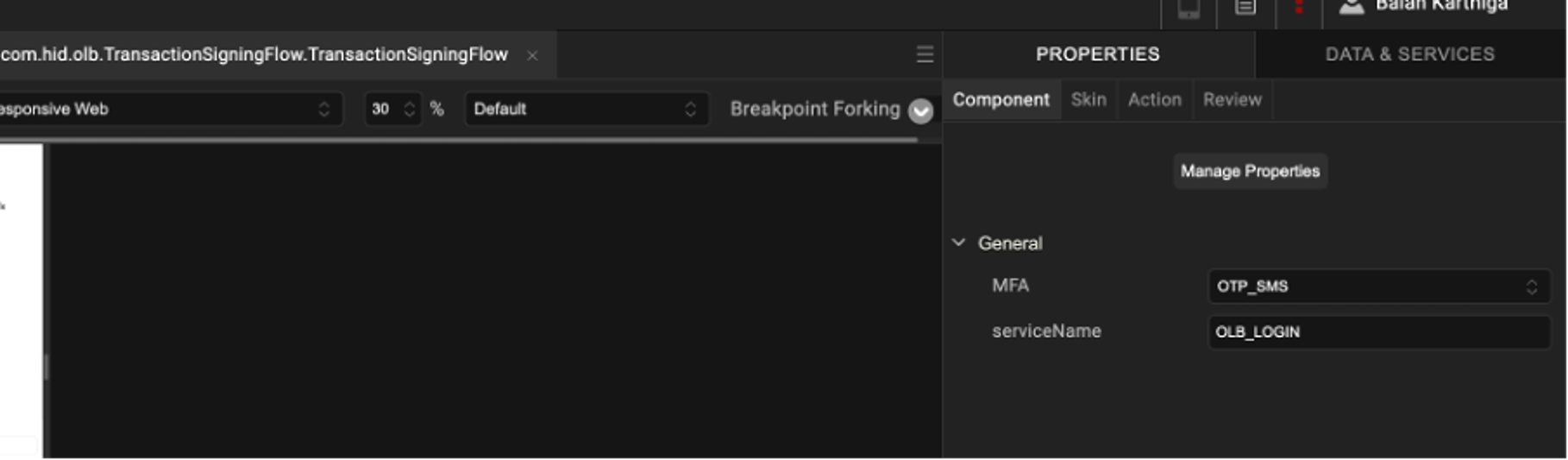
Transaction SigningComponent Properties
| S.No. | Property Name | Purpose |
|---|---|---|
|
1 |
MFA |
This property is used to select MFA for Transaction Signing (e.g., APPROVE, SECURE_CODE, OTP_SMS). |
| 2 | serviceName | This property is used to define a transaction message by Temenos. |
Transaction Signing Component Public Functions
| Function Name | Description | Parameters | Return Type |
|---|---|---|---|
| showTSScreen | This function is used to display the Transaction Signing MFA UI. |
paymentData Copy
Example:
|
N/A |
| showDeviceList | This function is used to show the list of devices to select during Approve flow. | N/A | N/A |
| showPaymentAlert | This function is used to show the alert popup on screen when threshold is reached, internal service issues occur, or RMS payment decline scenarios happen. | N/A | N/A |
Transaction Signing Component Events
| Event name | Description | Parameters |
|---|---|---|
| backToPayments | Navigates back to the Payments screen. | N/A |
| approveStatusApproved | Raised when approval is successful. | N/A |
| showLoading | Triggered to show loader during service calls. | N/A |
| onDismissLoading | Triggered to dismiss an active loader. | N/A |
| showDeviceConfirmation | Determines whether to show device list or direct approval. | deviceCount |
| contactSupport | Raised when push threshold is reached. | N/A |
| showPaymentApprovalAlertPopup | Raised when secure code threshold is reached. | N/A |
| showServerError | Raised when push threshold is reached. | “errorReason” |
| offlineTSSuccess | Raised when TS with OCRA OTP Signed – Success Callback. | N/A |
| validateSMSOTPSuccess | Raised when TS with SMS OTP Signed – Success Callback. | N/A |
Transaction Signing - Approve Workflow
In the OOTB Infinity Web application, the user enters the payment details and clicks Approve to initiate the transaction.
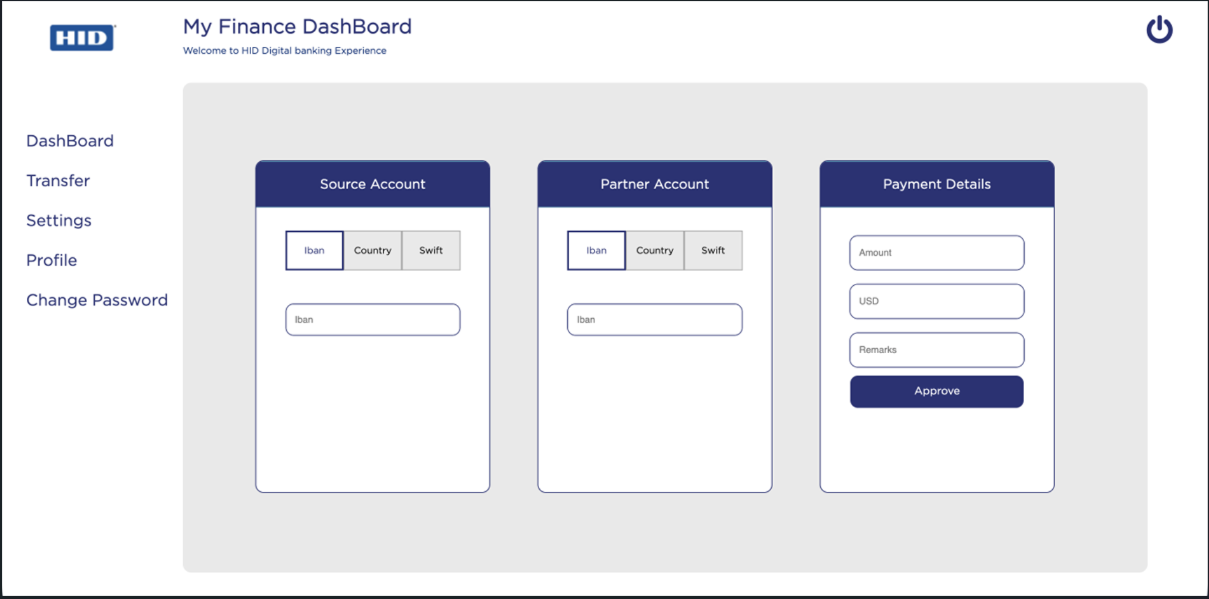
Single Device Approval
-
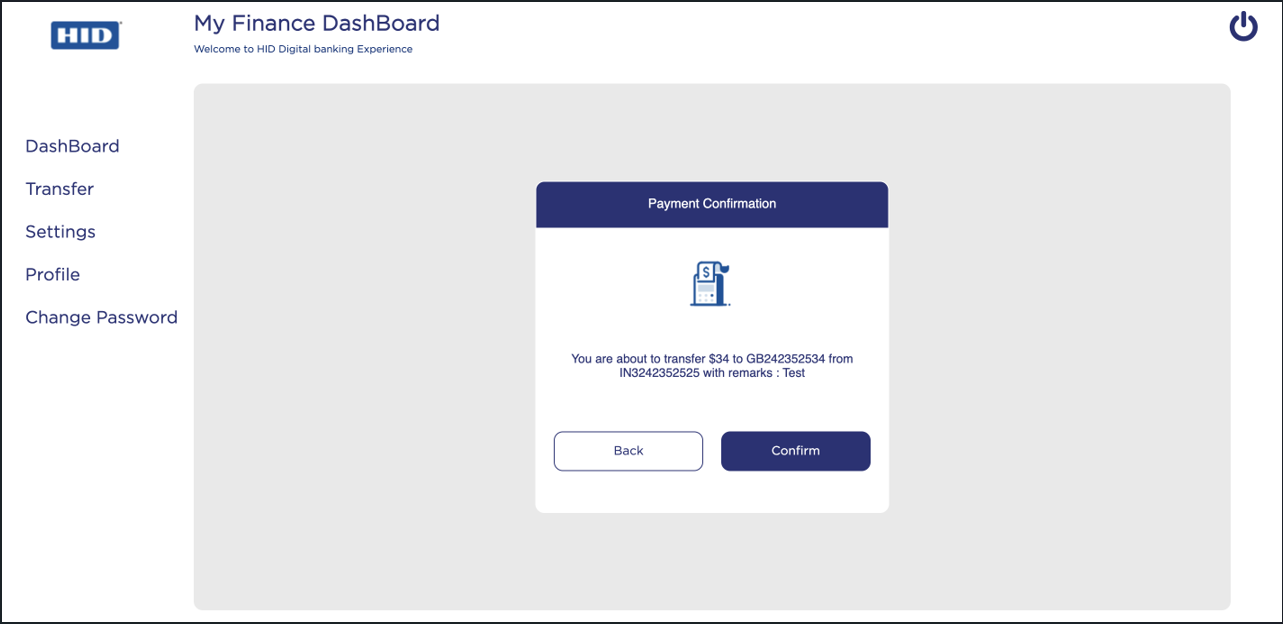
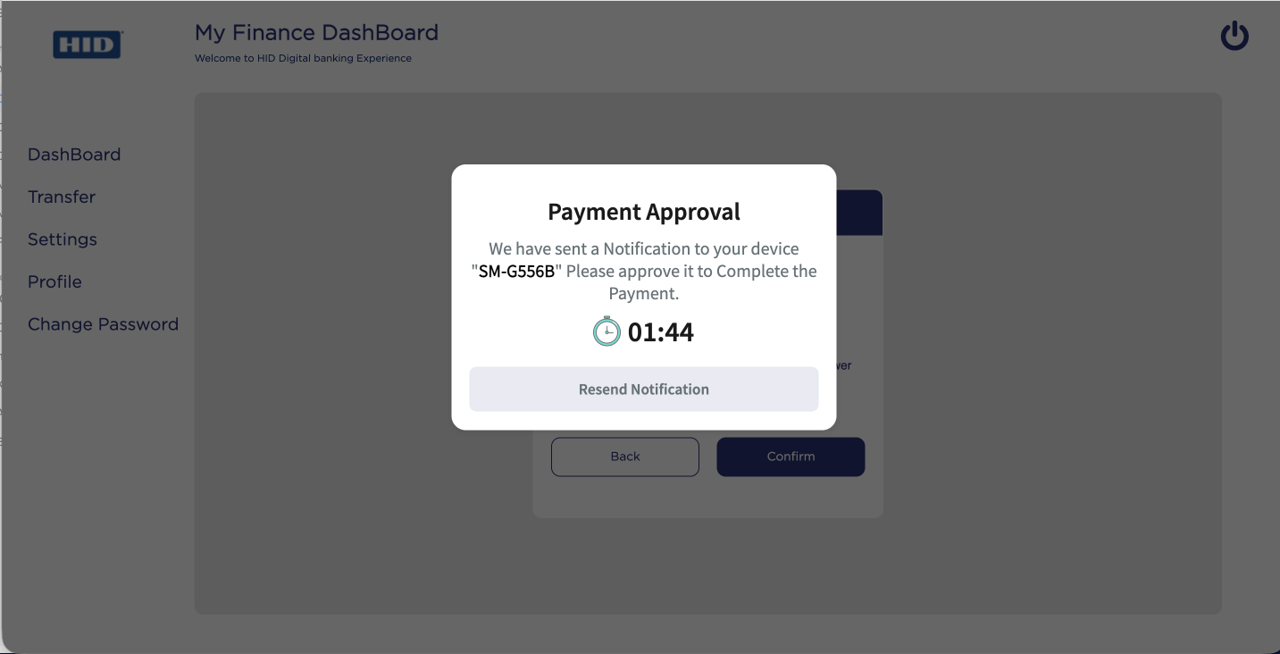
When the user clicks Confirm on the OOTB Payment confirmation screen, the Payment Approval screen with a timer is displayed.
-
A push notification is sent to the registered mobile device.
If you did not receive the notification, click Resend Notification to receive the notification again.
-
The user can Approve or Decline the push notification on the mobile device.
Once approved, you will receive a Payment Success notification.
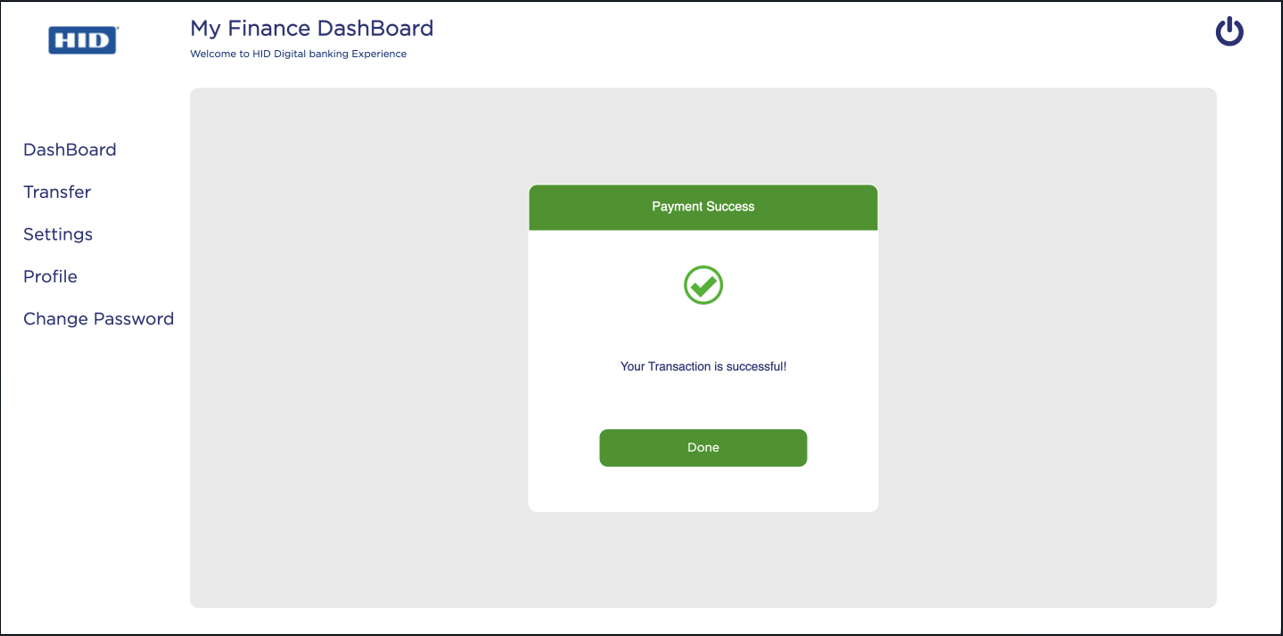
Multi-Device Approval
-
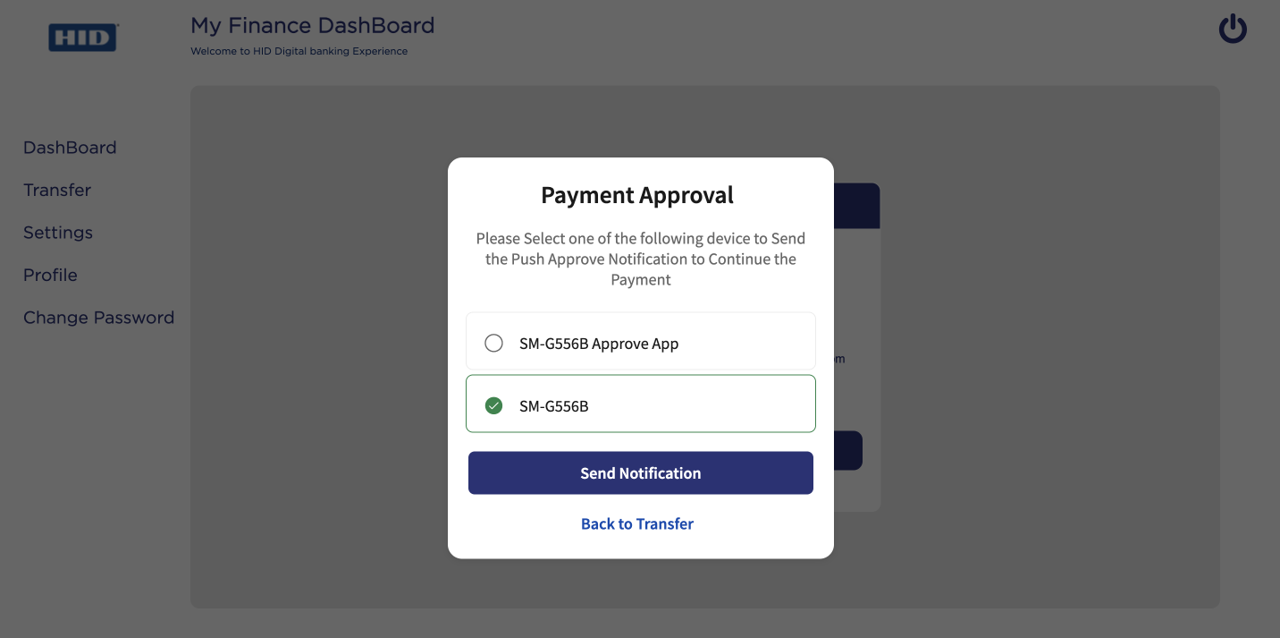
When the user clicks Confirm, the Payment Approval screen with a list of registered devices is displayed.
-
From the list of displayed devices, select the device to which you want to send the push notification.
-
Click Send Notification. A push notification is sent to the selected device.
If you want to return to the OOTB Payments (initial) screen, click Back to Transfer option.
-
The user can Approve or Decline the push notification on the device.
Once approved, you will receive a Payment Success notification.
Transaction Signing - Secure Code Workflow
-
In the OOTB Infinity Web application, the user enters the payment details and clicks Secure Code to initiate the transaction.
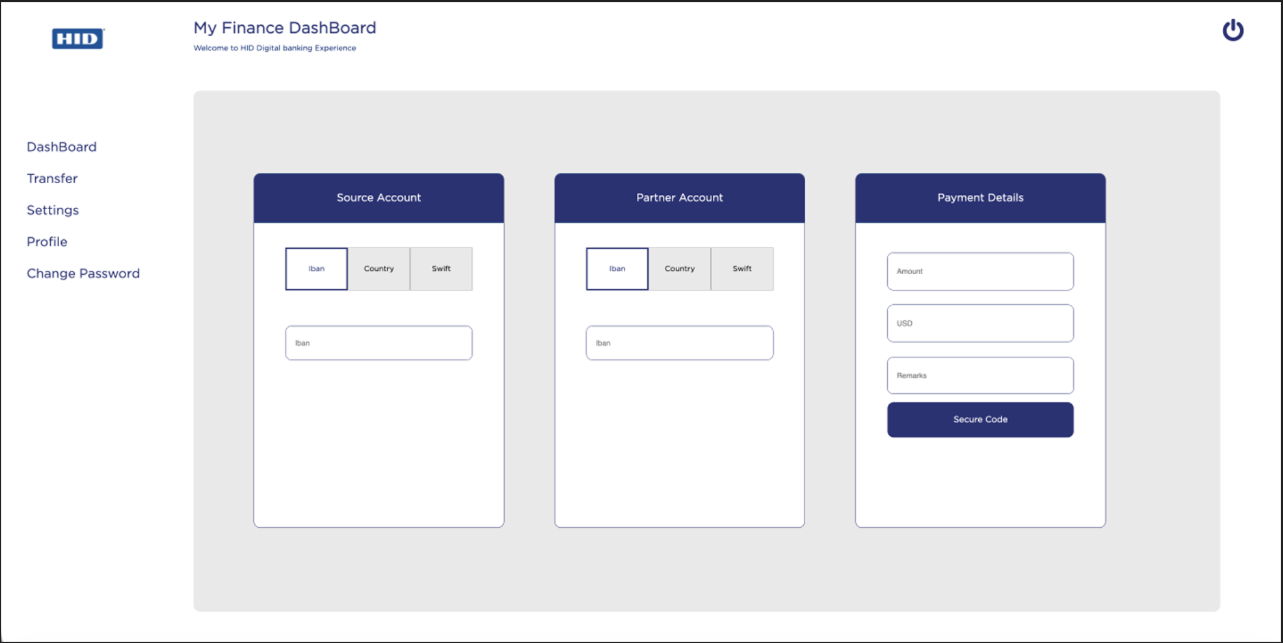
-
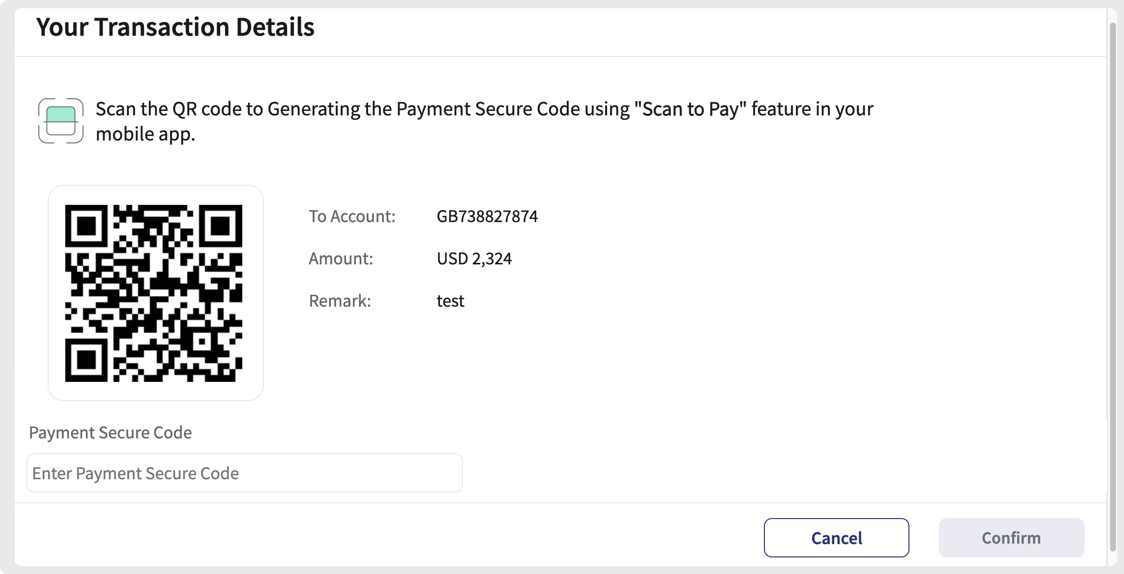
When the user clicks the Confirm button on the Payment Confirmation screen, a QR code is displayed. The QR code is generated using the transaction details such as account, amount, and remarks, along with manual entry details.
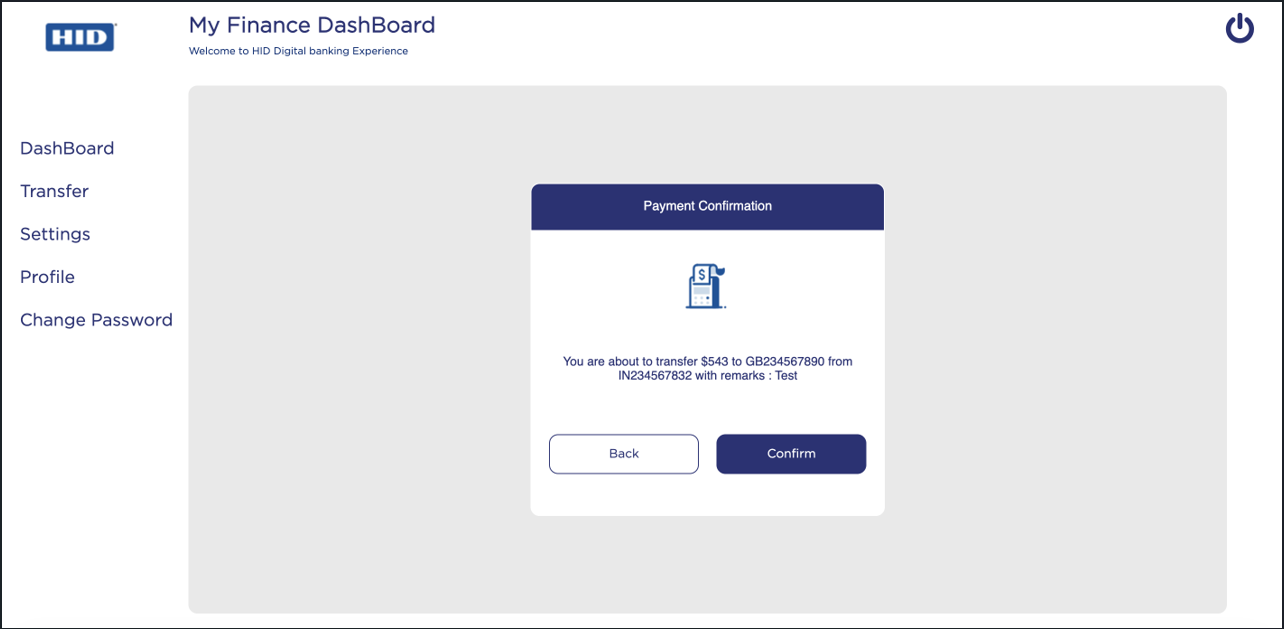
-
The user opens the HID Approve mobile application or MobileBanking App and selects the Scan to Pay option or manually enters the account, amount, and remarks to generate an OCRA OTP.
-
The user enters the generated OCRA OTP in the Payment Secure Code field and clicks Confirm to start the transaction process.
Once the transaction is successful, you will receive a Payment Success notification.
Note:-
If the entered Secure Code is incorrect, an error message is displayed for the incorrect secure code.
-
If the number of incorrect attempts exceeds the configured threshold, the system displays a Payment Approval alert stating that the threshold has been reached.
-
If the Secure code is validated successfully, it will trigger an event to Form.
-
Transaction Signing - OTP SMS Workflow
-
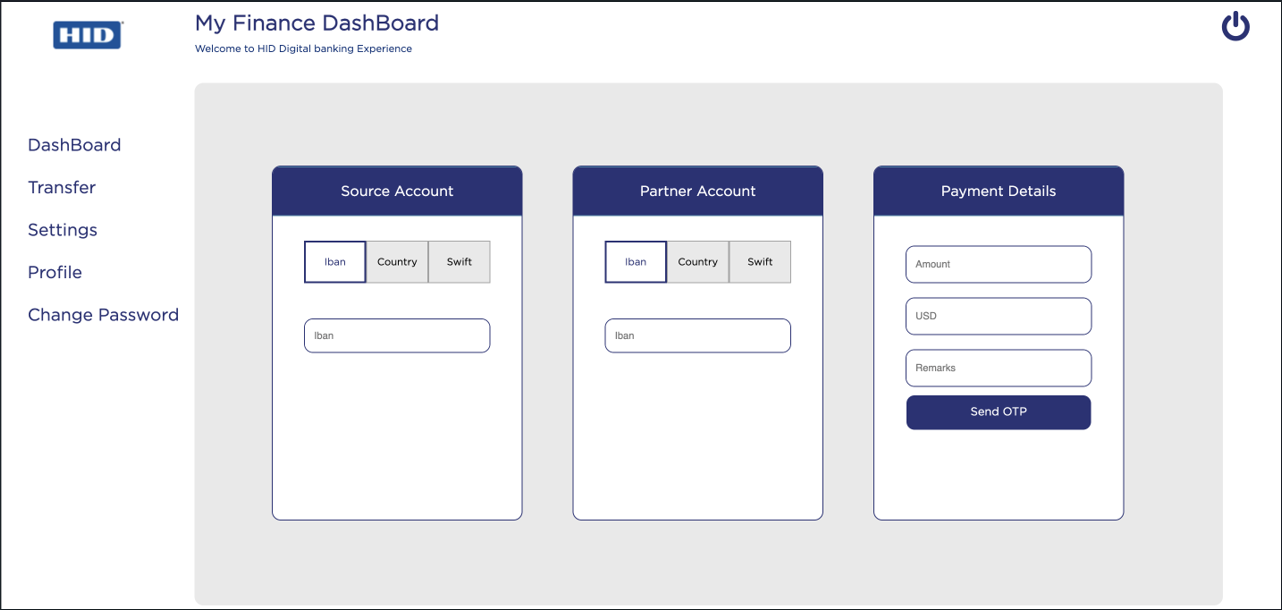
In the OOTB Infinity Web application, the user enters the payment details and clicks Send OTP to initiate the transaction.
-
When the user clicks the Confirm button on the Payment Confirmation screen, the system invokes the Fetch Infinity User Details API to get the Infinity user Communication details(phone and email) and trigger an OTP SMS to the registered mobile number.
-
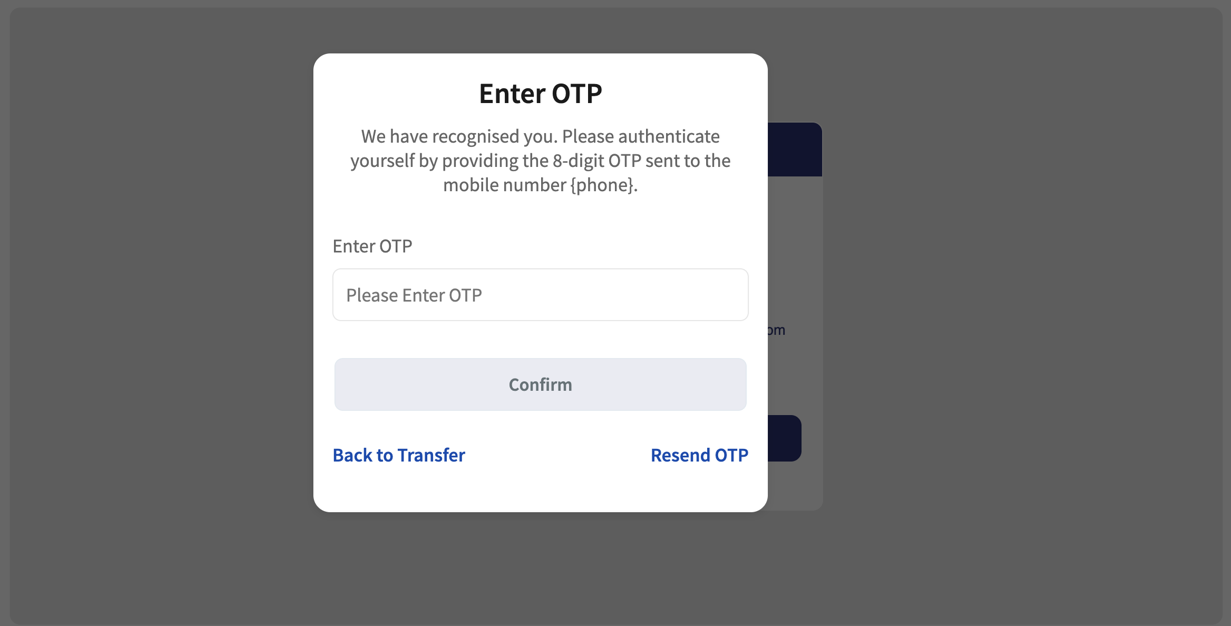
The OTP input popup screen is displayed, enter the received OTP and click Confirm.
-
The entered OTP is validated, and the callback response is passed to the form level for transaction processing.
Once the transaction is successful, you will receive a Payment Success notification.
Note:-
If the Send OTP threshold is reached, an alert popup is displayed informing the user that the maximum number of OTP requests has been exceeded.
-
If an incorrect OTP is entered, an error message is displayed for the incorrect OTP.
-
If the Send OTP operation fails due to middleware issues, invalid parameters, or insufficient privileges, an error popup is displayed with "Resend OTP" and "Back to Transfer" options.
-
Object Services
| ServiceName | DataModel | Mapping | Purpose | Input Parameters | Invoking |
|---|---|---|---|---|---|
|
HIDTransactionSigning |
SignatureValidation |
validateSignature |
Offline transaction signing that validates the Transaction details. |
username, password (Secure Code), authType (Default) ClientID (Default) |
HIDChallengeValidationService(1.0). signatureValidation |
|
HIDTransactionSigning |
ApproveTransactInitiate |
approveTransactInitiate |
Initiate the Push notification on the HID Approve device. |
username |
HIDTxnSigningApproveInit(1.0).initiate |
|
HIDTransactionSigning |
ApproveStatus |
poll |
Poll to the ApproveCallback service to get the status of the user's response to the HID Approve Push notification. |
mfa_key (authRequest Id from the initiateApprove service response) |
HIDPollConsensus(1.0).getHIDApprovalStatus |
| HIDTransactionSigning | Devices | searchDevices | Get the list of devices associated with the user. | username | HIDSearchDevices(1.0).getDevices |
| HIDTransactionSigning | GetHostAndTenant | getServiceURL | Fetches Host and Tenant Values from Server Settings. | NA | HIDGetHostAndTenant(1.0).getServiceURLAndDomain |
| HIDAuthService | OTPRequest | sendOTP | Used to send the OTP. | username, AuthenticationType | HIDSendOTPService (1.0).sendOTP |
| HIDAuthService | ValidateOtp | validateOtp | Used to validate the OTP. |
username, password, authType |
HIDOTPServices (1.0).validateOOB |
| Utility | CommunicationInformation | getUserCommunicationInfo | Fetch the Infinity user details such as email and MobileNumber to show on Screen when the OTP factres selected and used to send the OTP. | userName | T24ISExtra (1.0).getUserCommunicationDetailsPreLogin |
Fabric Services
| Names | Operation Name | Service Type | Description |
|---|---|---|---|
|
HIDClientIdentity |
- |
Identity |
Fetches the Client Bearer Token. |
|
HIDClientAuthIdentityWrapper |
getClientBearerToken |
Integration |
IntegrationWrapper of ClientIdentity. |
|
HIDDependencyManager |
|
Integration |
Resolves the dependencies for HIDProcessor.jar. |
|
HIDTxnSigningApproveInit |
Initiate |
Integration |
Sends an HID Approve Push notification to the user's registered device. |
|
HIDPollConsensus |
getHIDApprovalStatus |
Integration |
Java service to fetch the callback response of the HID Approve Push notification. |
| HIDChallengeService | generateChallenge | Integration | Service generates a Secure Code . |
| HIDChallengeValidationService | validate | Integration | Validates the Secure Code obtained from the HID Approve app after validating challenge Secure Code. |
|
HIDChallengeValidationService |
signatureValidation |
Integration |
Validates the transaction details with the Secure Code obtained from the HID Approve app. |
| SearchServices | searchDeviceAuth | Integration | Lists the devices associated with the user. |
| GetHostAndTenant | getServiceURLAndDomain | Integration | Fetches Host and Tenant Values from Server Settings |
| HIDSendOTPService | sendOTP | Integration | Used to send the OTP . |
| HIDOTPServices | validateOOB | Integration | Used to validate the OTP. |
| T24ISExtra | getUserCommunicationDetailsPreLogin | Integration | Note: Temenos Integration Service Fetch the Infinity user details such as email and MobileNumber to show on Screen when the OTP factors selected and used to send the OTP. |
| HIDOTPServiceKMSOrch | generateAndSendOTPAppliance | Orchestration | Used to generate OTP and send otp via Temenos KMS Service in HID Appliance. |
| HIDOTPServiceKMSOrch | generateAndSendOTPAuthService | Orchestration | Used to generate OTP and send otp via Temenos KMS Service in HID Auth Cloud environment . |
Listener Endpoints (HTTP Servlets)
| Name | URL | Purpose | Dependencies |
|---|---|---|---|
|
ApproveCallBackEndpoint |
https://hidglobaltest.konycloud.com:443/services/ApproveCallBackEndpoint |
Listen to the callback response sent by the HID Authentication Service for the user's response to the HID Approve Push notification. |
|
Transaction Signing Pre/Post Processors
| Names | Description | Used by (ServiceName-Operation) |
|---|---|---|
|
TransactioSigningApprovePreprocessor |
Forms the payload for the HID Approve Push notification. |
HIDTxnSigningApproveInit - initiate |
| SignatureValidationPreprocessor | Updates custom AuthType if configured. | HIDChallengeValidationService - signatureValidation |
| AddCorrelationIdPreProcessor | Adds the correlation ID to the API request to keep track of flow. | HIDChallengeValidationService - signatureValidation |
| TDSTemplatePreProcessor | Used to update the Infinity tds message from Temenos OOTB services. | HIDTxnSigningApproveInit - initiate |
| OOBAuthenticatorPreprocessor | Updates custom AuthType if configured. | HIDOTPServices - validateOOB |
| CheckUsernameFromSession | Passes the username from the session to the request. | HIDSearchServices - SearchUserAuth |
| SearchDeviceAuthPreProcessor | Checks the user exists or not. | HIDSearchServices - SearchDeviceAuth |
| TransactionSigningApprovePostProcessor | Checks the auth_req_id and push it into cache. | HIDTxnSigningApproveInit - initiate |
| GetDevicesOrchPostProcessor | Checks the Auth_Key cache is present else throws error response. | HIDSearchDevices - searchDevices |
| SearchUserAuthPostProcessor | Checks the user exists or not. | HIDSearchServices - SearchUserAuth |


