User Management
The user management functions allow users to manage their authenticators.
Component Overview
|
Component Package |
com.hid.olb.userManagement and com.hid.rms.olb. nonFinancialComponent |
|
User Interface |
Yes, New screens for Device management, Register new Devices, MFA screens, Change Password, Update Email & Password. |
| Platforms Supported | Web |
| Functionality | This component is to handle the Device Management, Register new devices, Register FIDO Device, Change Password, MFA factor, update email and update mobile. |
| Available from | Version 12.0.0 |
Server Settings
| Mandatory Server Settings |
HID_KONY_APP_KEY |
<App key of the fabric application> (e.g., h728h89031832jdy9292) |
|---|---|---|
|
HID_KONY_APP_SECRET |
<App secret of the fabric application> (e.g., 89bv2894673792003jy2) |
|
|
HID_SERVICES_URL |
https://<kony-account-host>/services
|
|
| HID_PASSWORD_AUTHTYPE |
<Static Password Authenticator> (e.g., AT_STDPWD) |
|
| HID_API_VERSION |
<This server property defines the API version for the Authentication Service and Appliance, ensuring that updated APIs are used. (The default value is 10 for Authentication Service and 3 for Appliance.)> |
|
| HID_IS_MFA_REQUIRED |
<This setting enables the user to activate/deactivate the Multi-factor authentication (MFA)> (Default: true) |
|
| HID_CACHE_EXPIRY_TIME | 120 (by default) | |
| HID_SMS_MSG_TEMPLATE | <Use # as your OTP for authentication. DO NOT share this OTP with anyone> | |
| HID_IS_GATEWAY_ENABLED |
true: HID generates and sends the OTP. false: HID generates the OTP, but Infinity sends it. |
|
| HID_SMS_DEVICE_TYPE |
<The device type for SMS> Value: DT_OOBSMS (by default) |
|
| HID_EMAIL_DEVICE_TYPE |
<The device type for email> Value : DT_OOBEML (by default) |
|
| HID_USER_GROUP |
<Group Value for the Client> Value : UG_ROOT (by default) |
User Management Component Properties
| Property Name | Purpose | HID Component name |
|---|---|---|
|
isRMSEnabled |
This property determines whether a Risk Management System (RMS) is active or not. |
Radio Button (On/Off) |
|
Username |
This property is used to set the username to the component. |
|

Non-Financial Component Properties
| Property Name | Allowed Values | Purpose |
|---|---|---|
| thresholdScore | Numeric Values | This property determines threshold score of Risk Management Sysytem (RMS). |
| tmCookieTag | <RMS Cookie will have this value> | This property determines the value of RMS cookie for device tag. |
| tmCookieSid | <RMS Cookie will have this value> | This property determines the value of RMS cookie for session id. |
| ServiceName | String Value | Used to Get TDS Template for User Management (OLB_LOGIN is default value) |
| SecondFactor | "NO_MFA","APPROVE","OTP_SMS" ,“OTP_EML” , "OTP_HWT" |
This property determines the second-factor authentication method to be used during authentication when an additional authentication step is required. Currently, the component supports the following authentication factors:
|
| Multi-Factor Authentication (MFA) | "STD_PWD","APPROVE","OTP_SMS" ,“OTP_EML” , "OTP_HWT" |
This property determines the second authentication factor to be added to the user after the first authentication factor is created. Currently, the component supports the following factors:
|
Self-Service Component Functions
| Method Name | Prerequisites | Input Parameters | Event | Purpose |
|---|---|---|---|---|
|
getUserDevices |
None |
Username |
getDevicesSuccess, getDevicesFailure |
Display the devices associated with the user. |
|
editFriendlyName |
getUserDevices
|
DeviceId, NewFriendlyName |
EditFriendlyNameSuccess, error |
Update the device friendly name. |
|
changeDeviceStatusOnClick |
getUserDevices |
DeviceId, Status |
onUpdateDeviceStatusSuccess, onUpdateDeviceStatusFailure |
Change the device status. |
|
changePasswordOnClick |
None |
Username, OldPassword, New Password |
OnPasswordChangeSuccess, onPasswordChangeFailure |
Change the user's password. |
|
registerApproveOnClick |
None |
Username |
OnDeviceRegSuccess, onDeviceRegFailure |
Register a new device for the user. |
|
onPollingSuccess |
registerApproveOnClick |
RegisterApproveOnClick response |
|
Poll is the device registration was a success or failure |
|
getPasswordPolicy |
None |
|
OnPasswordPolicySuccess, onPasswordPolicyFailure |
Get instructions (password policy) for new the password while changing the password. |
| searchUserAttributes | None | username | searchAttributesSuccess , searchAttributesFailure | To get the user attributes (Email & Phone number). |
| updateAttributes | searchUserAttributes | Username ,email, mobile, Firstname , Lastname | updateAttributesSuccess, updateAttributesFailure | To Update the user attributes (Email & Phone number). |
Public Component Functions
| Function Name | Purpose |
|---|---|
|
loadUserManagement (Function) |
Load the userDevices and Password policy. |
|
userName (Variable) |
Pass the username to get userDevices and PasswordPolicy. |
| unassignDevice (deviceId) | Unassign the device before deleting it. |
| deleteDevice (deviceId) | Delete the device once it is successfully unassigned. |
| manageDeviceStatusSuccess | To handle the device status success method. |
| removeDeviceStatusSuccess | To handle the remove device status method. |
| changePasswordStatusSuccess | To handle the change password status success method. |
| changePasswordStatusFailure | To handle the change password failure method to call the component method. |
| analyzeAction | To handle the RMS actions. |
| updateActionInRMS | To Update the RMS actions. |
| stepUpAuthentication | To authenticate the user with step up factors. |
| resetUIFields | To reset the Component UI Fields. |
| deviceRename | To Rename the device in Component. |
| manageDeviceStatus | To Manage the status of the device in Component. |
| removeDeviceStatus | To Remove device in Component. |
| changePasswordStatus | To handle the change password status in Component level. |
| showMFAScreen | To show the MFA only for user authentication in Component. |
| changePasswordVisiblity | To show the changepassword component in form level. |
| updateAttributesStatus | To update the attributes and get the status in the form level. |
| updateAttributesVisiblity | To show the Update Email and Mobile Number UI in form level. |
| registeredDevicesVisiblity | To show the registered devices from component in the form level. |
| loadChangePasswordUI | To show the changepassword component in form level. |
| getUserAttributes | To get the user attributes in the form level. |
| updateAttributes | To update the attributes in the form level. |
| deviceRenameStatus | To get the device Rename status in component level. |
Public Component Events
| Event Name | Description | Parameters |
|---|---|---|
| showLoading | To Show the loader | N/A |
| dismissLoading | To dismiss the loader | N/A |
| deviceRename | To Rename device | context,rowData, isRMSEnabledValue, usernameValue, sessionId |
| manageDeviceStatus | To Suspend/Reactivate the device | context,rowData, isRMSEnabledValue, usernameValue, sessionId, actionType, newStatus |
| removeDeviceStatus | To remove the device | context,rowData, isRMSEnabledValue, usernameValue, sessionId, actionType, newStatus |
| changePasswordStatus | To Change the Password | usernameValue, oldPassword ,newPassword, correaltionId, actionType, isRMSEnabledValue, sessionID |
| deleteSuccess | Delete method handles | N/A |
| setDevice | Set the device actions | response |
| deleteFailure | Failure event for delete device | N/A |
| suspendFailure | Failure event for suspend device | N/A |
| deviceRenameStatus | To rename device in component | context, response |
| manageDeviceStatusSuccess | To Manage status of device in component level. | context, response |
| removeDeviceStatusSuccess | To remove the device in component level | deviceId, response |
|
changePasswordStatus Success |
To change the password in component level | response |
| changePasswordStatusFailure | Failure actions exposed | response |
| showMFAScreenStatusCheck | MFA Failure & Succes event | response |
| deviceRenameFailure | Failure actions exposed | action |
| deviceActiveFailure | Failure actions exposed | action |
| deviceSuspendFailure | Failure actions exposed | action |
| deviceDeleteFailure | Failure actions exposed | action |
| changePasswordFailure | Failure actions exposed | action |
| showMFAScreenStatusCheckPwd | Password action success/Failure | response |
| updateAttributesValue | To update the Email or Mobile Number attributes value | isRMSEnabled,username,sessionId,action_type |
| manageDevice | To handle the device status | messageType, responseMsg |
User Management - Workflow
In the OOTB Infinity Web application, when a user performs user management, the authentication and corresponding workflow is initiated.
Register New Devices
-
Navigate to the "Registered Devices" page and click Register New Device button.
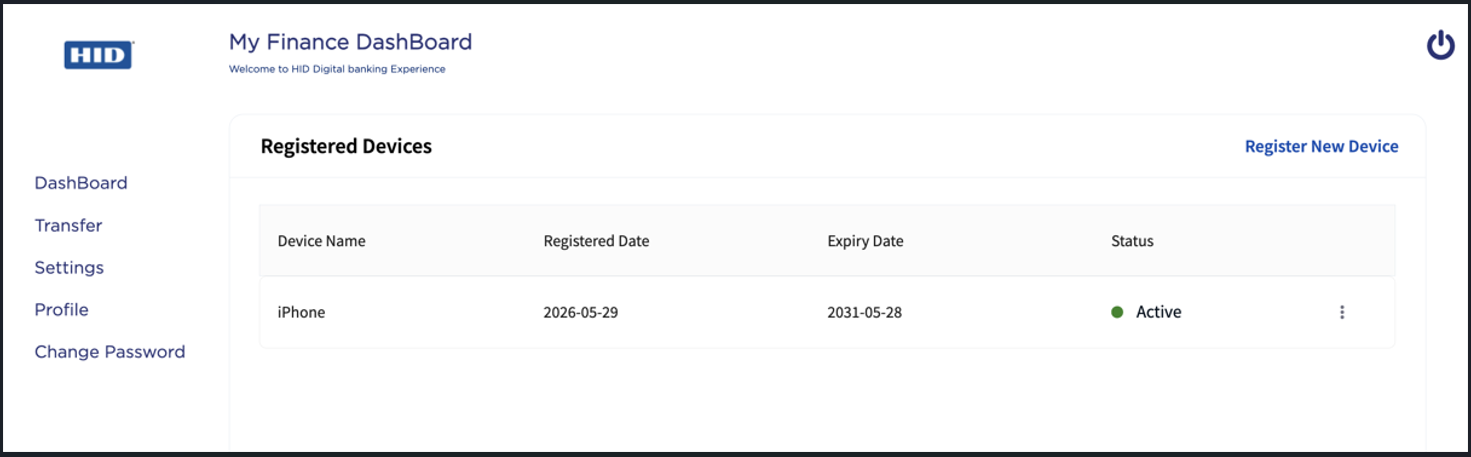
-
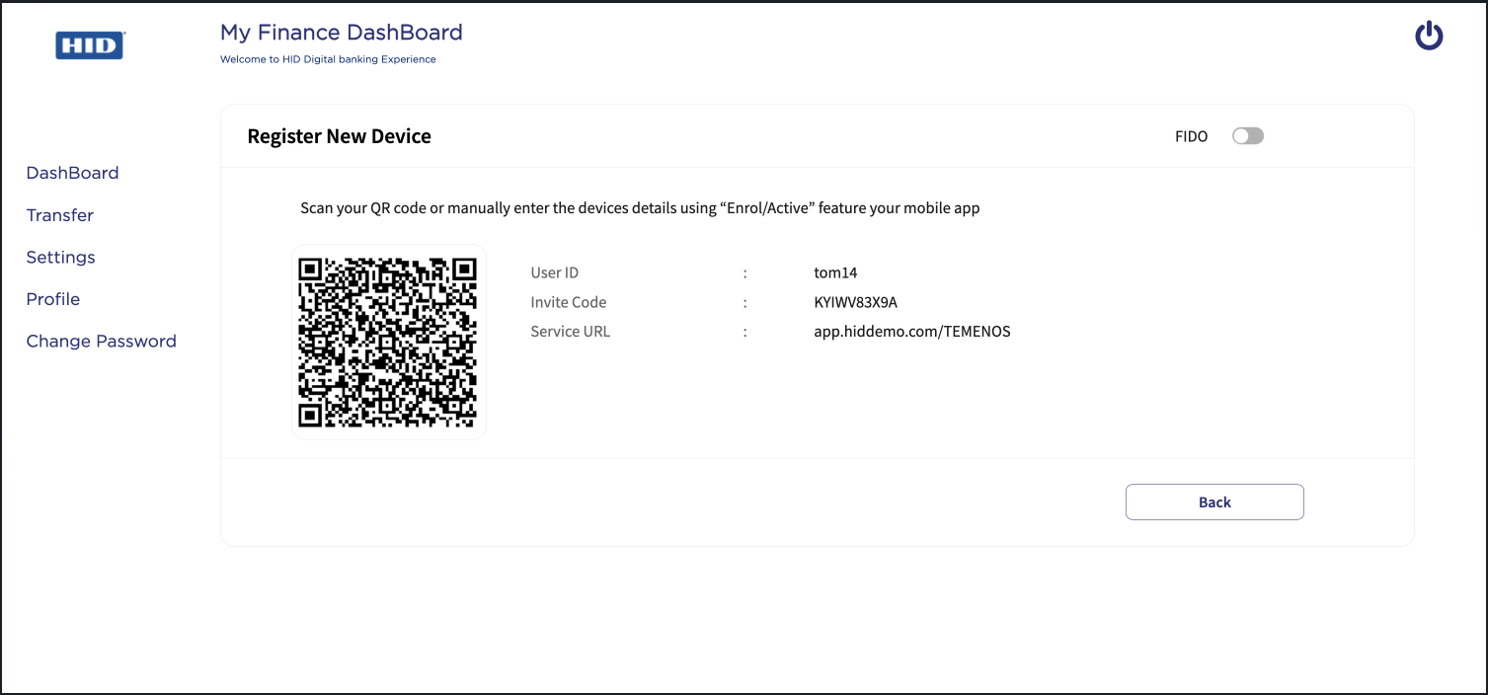
The page displays the options to register the new device using either the QR code or Manual Invite Code.
Scan the QR code to automatically populate the device details, or manually enter the device details using the invitation code in your mobile app.
-
You can also register a new device using a FIDO security key (shown in the top-right corner of the screen above).
Enable the FIDO toggle and follow your browser instructions to complete the registration.
-
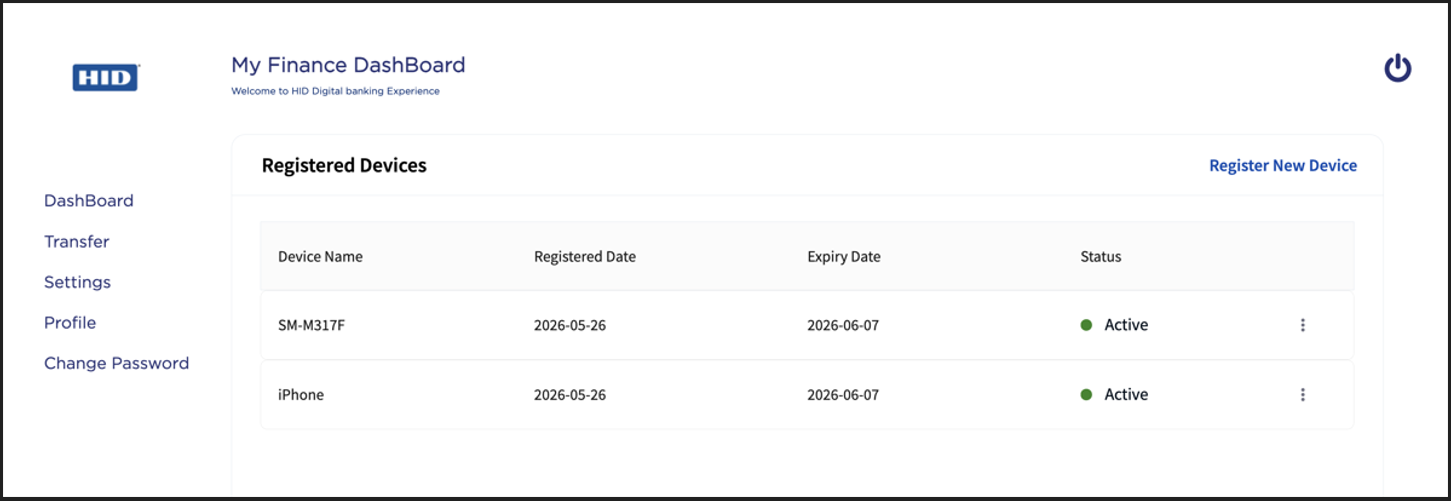
Once the registration process is completed, you will get a message confirming that your device has been registered successfully.
The newly registered device appears in the list of registered devices.
Edit Device Name
-
Navigate to the "Registered Devices" page.
-
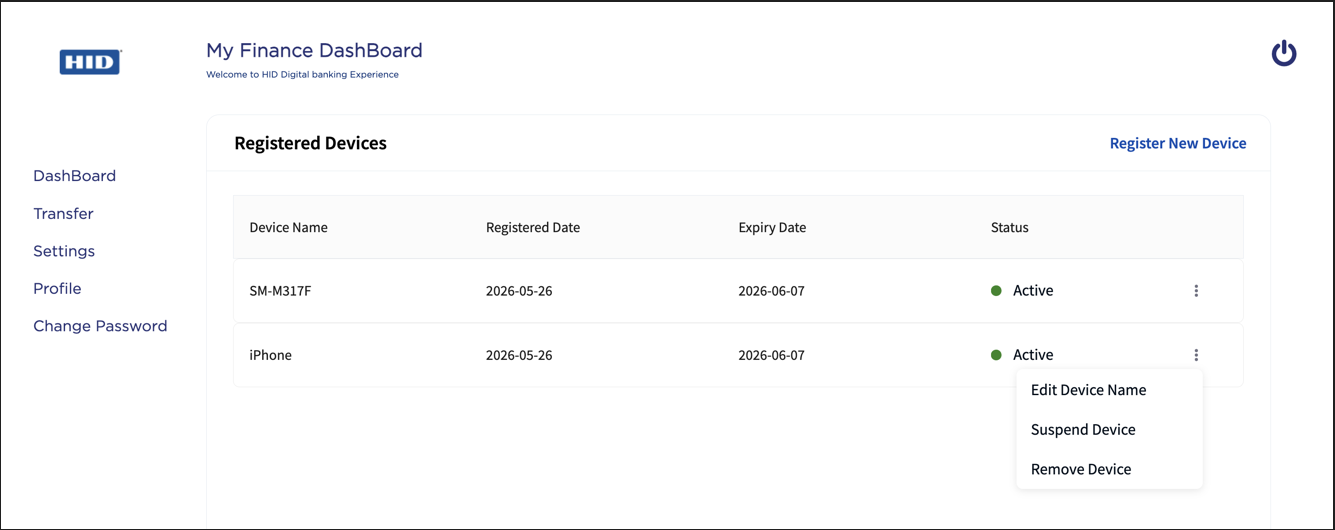
From the list of registered devices, choose a device you want to edit the device name.
Click on Edit Device Name shown in the action menu (
 ).
).
-
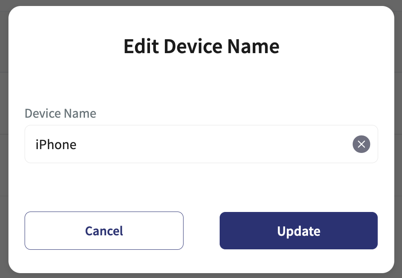
"Edit Device Name" pop-up appears, enter your new device name and click Update.
-
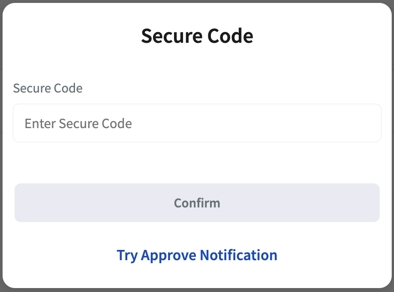
Once you click Update, you will be prompted for authentication.
Validate your identity using one of the configured Multi-Factor Authentication methods, such as Approve Notification, Secure Code, OTP (SMS/Email), or Static Password.
-
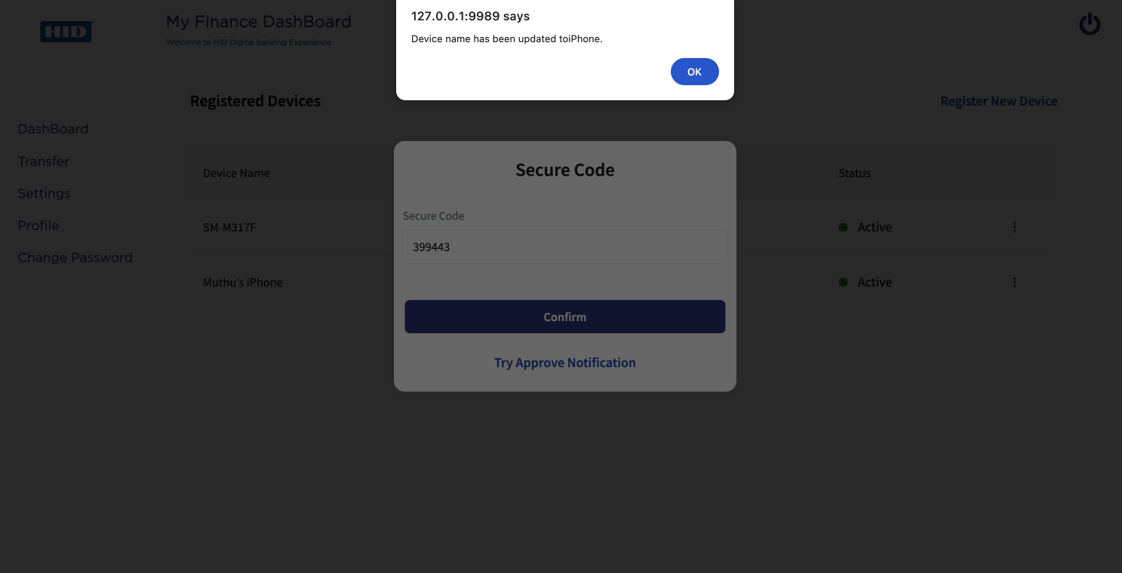
Once authenticated, you will get a message confirming that your device name has been updated.
Suspend Device
-
Navigate to the "Registered Devices" page.
-
From the list of registered devices, choose a device you want to suspend.
Click on Suspend Device shown in the action menu (
).
-
When you choose to suspend the device, you will be prompted for authentication.
Validate your identity using one of the configured Multi-Factor Authentication methods, such as Approve Notification, Secure Code, OTP (SMS/Email), or Static Password.
-
Once authenticated, you will get a message confirming that your device name has been suspended.
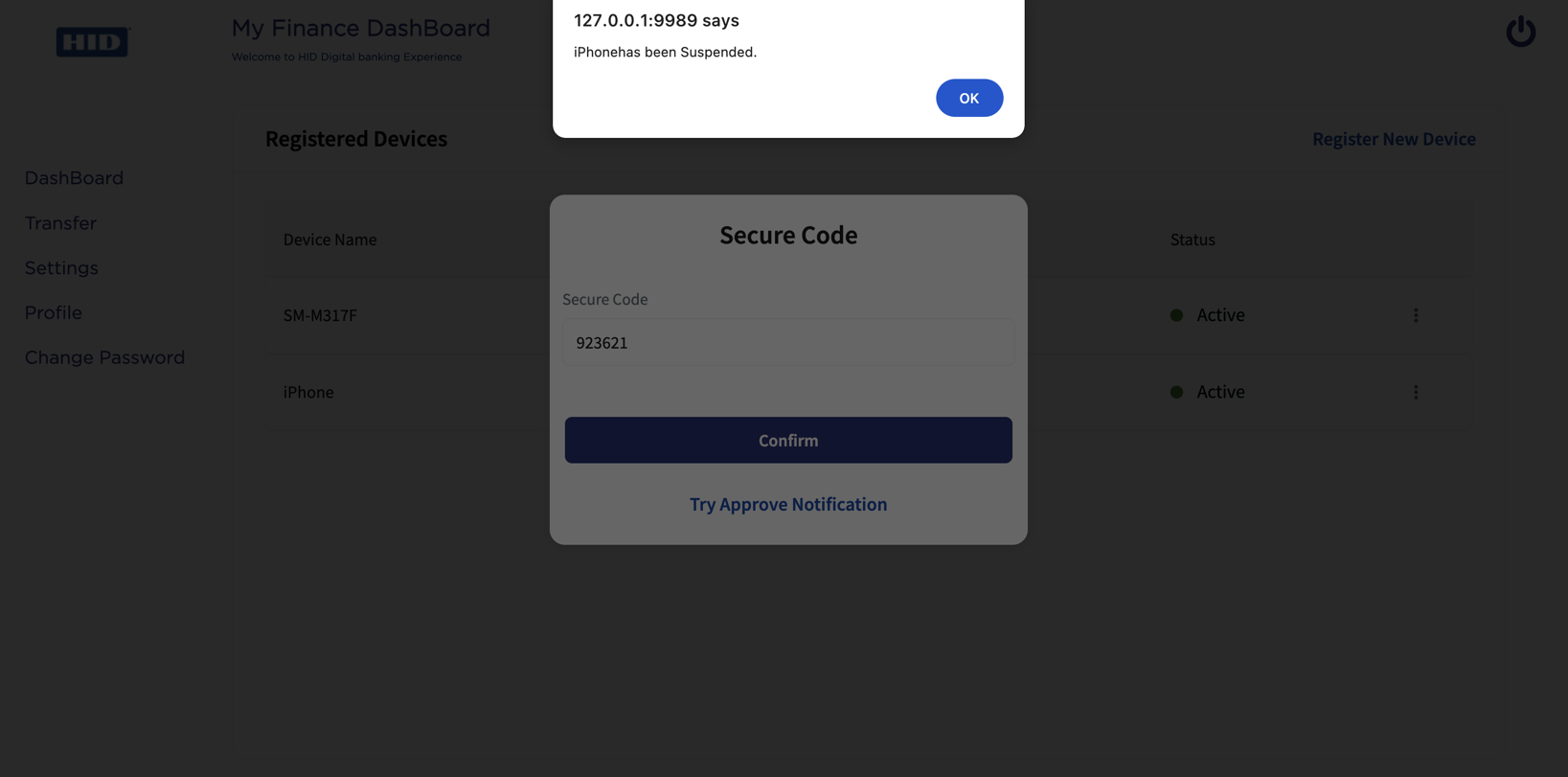
In the list of registered devices, the status is updated to "Suspended".
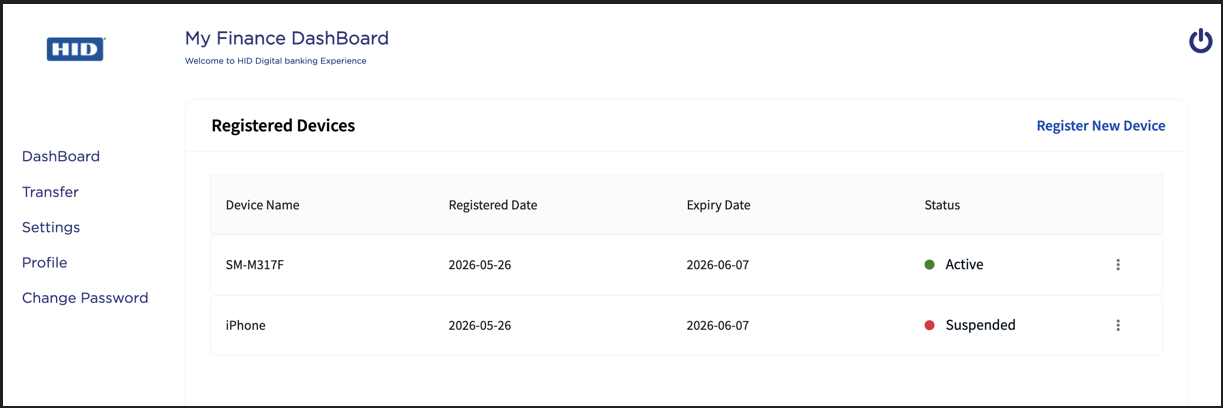
Remove Device
-
Navigate to the "Registered Devices" page.
-
From the list of registered devices, choose a device you want to remove.
Click on Remove Device shown in the action menu (
).
-
When you choose to remove the device, you will be prompted for authentication.
Validate your identity using one of the configured Multi-Factor Authentication methods, such as Approve Notification, Secure Code, OTP (SMS/Email), or Static Password.
-
Once authenticated, you will get a message confirming that your device name has been removed successfully.
The removed device no longer appears in the list of registered devices.
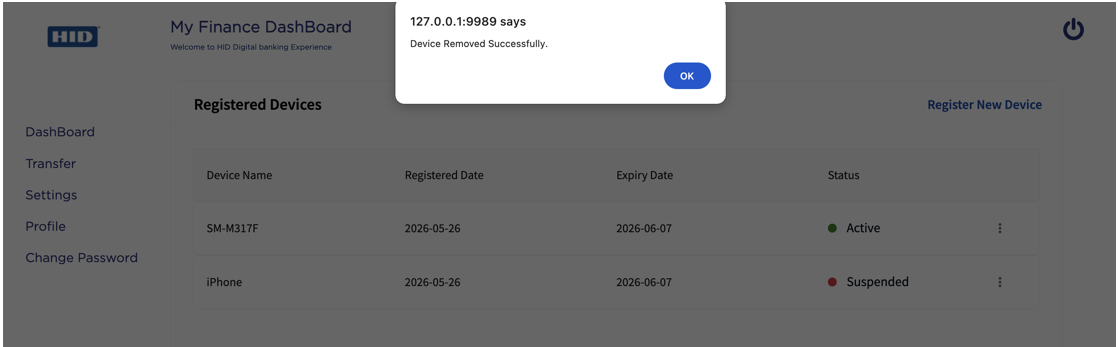
Change Password
-
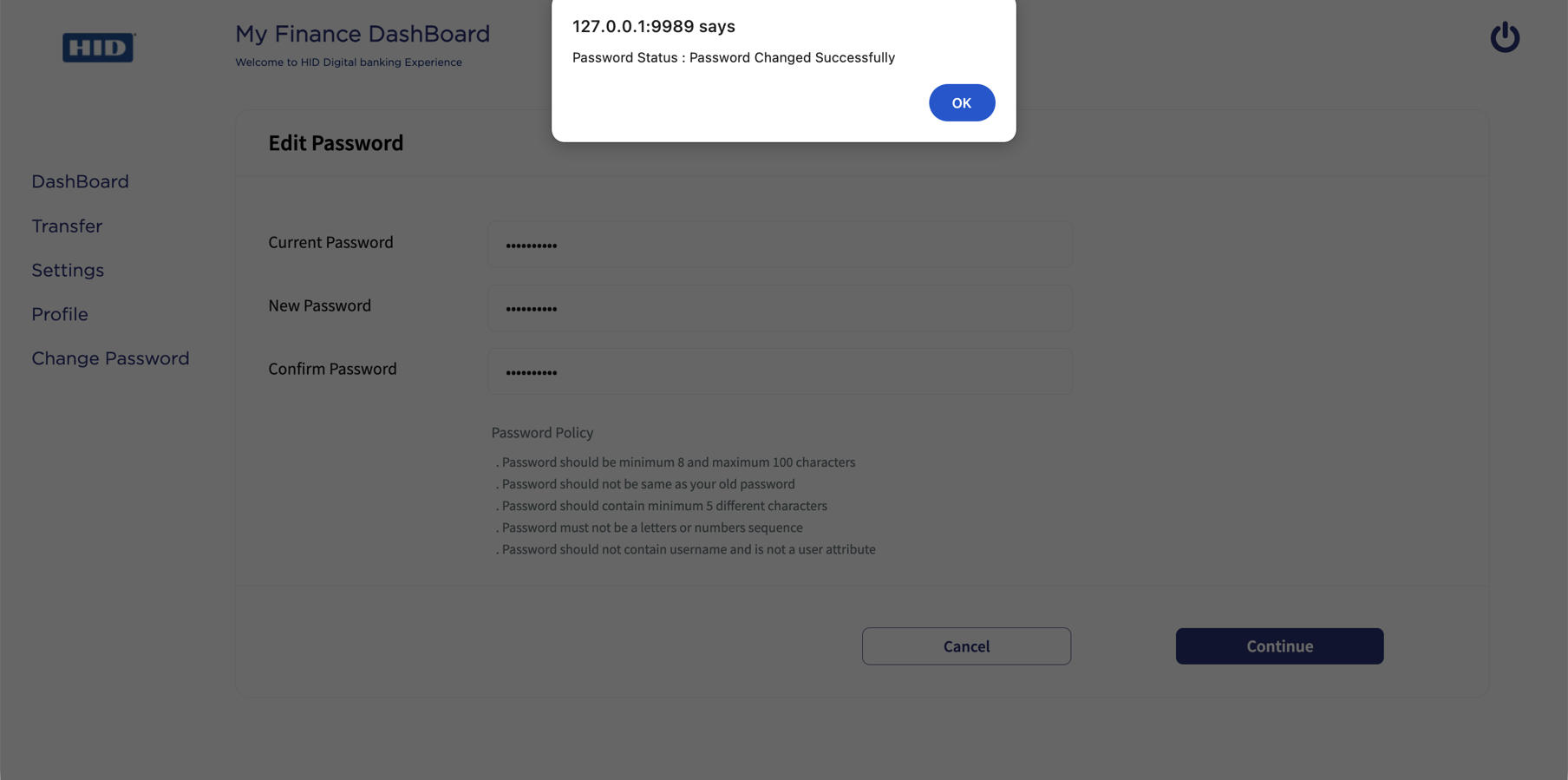
Click Change Password to open the "Edit Password" page.
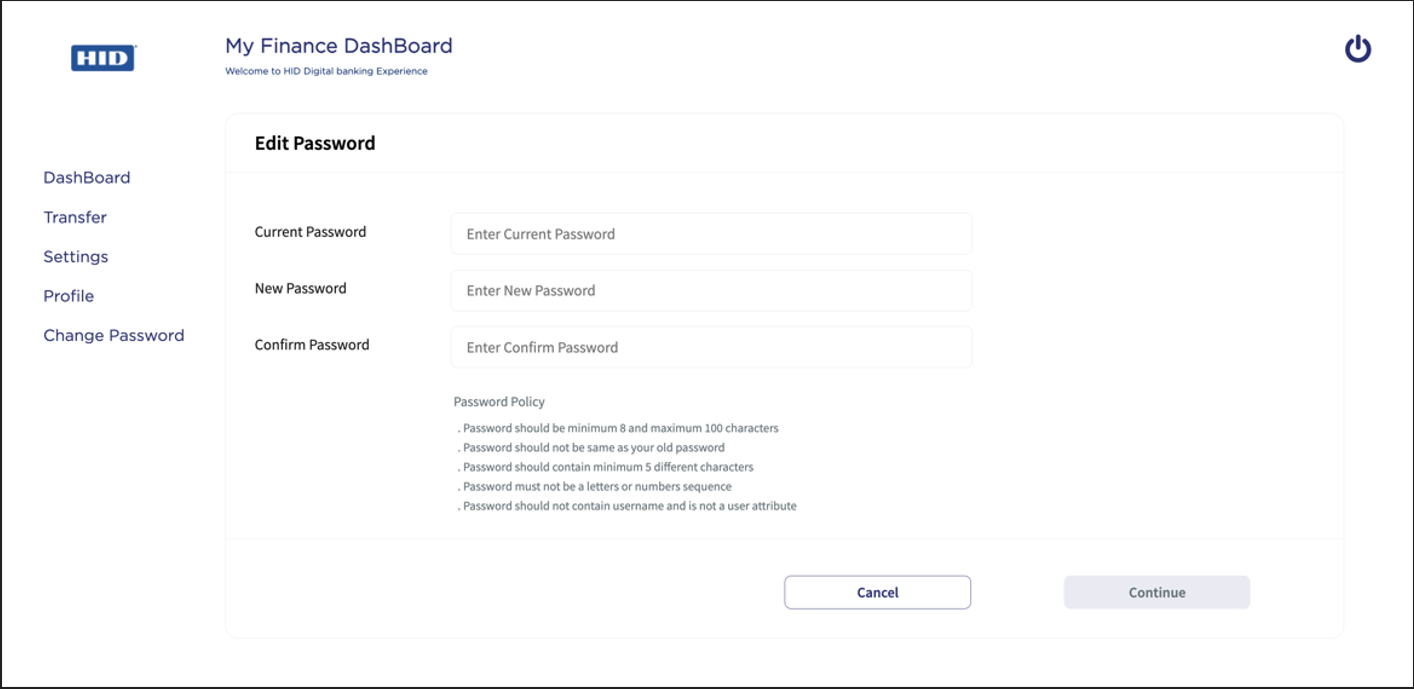
-
Enter your current password, new password, and confirm the new password. Then, click Continue.
Note: The password must comply with the Password policy specified on the Edit Password page. -
To change your password, you will be prompted for authentication.
Validate your identity using one of the configured Multi-Factor Authentication (MFA) methods, such as Approve Notification, Secure Code, OTP (SMS/Email), or Static Password.
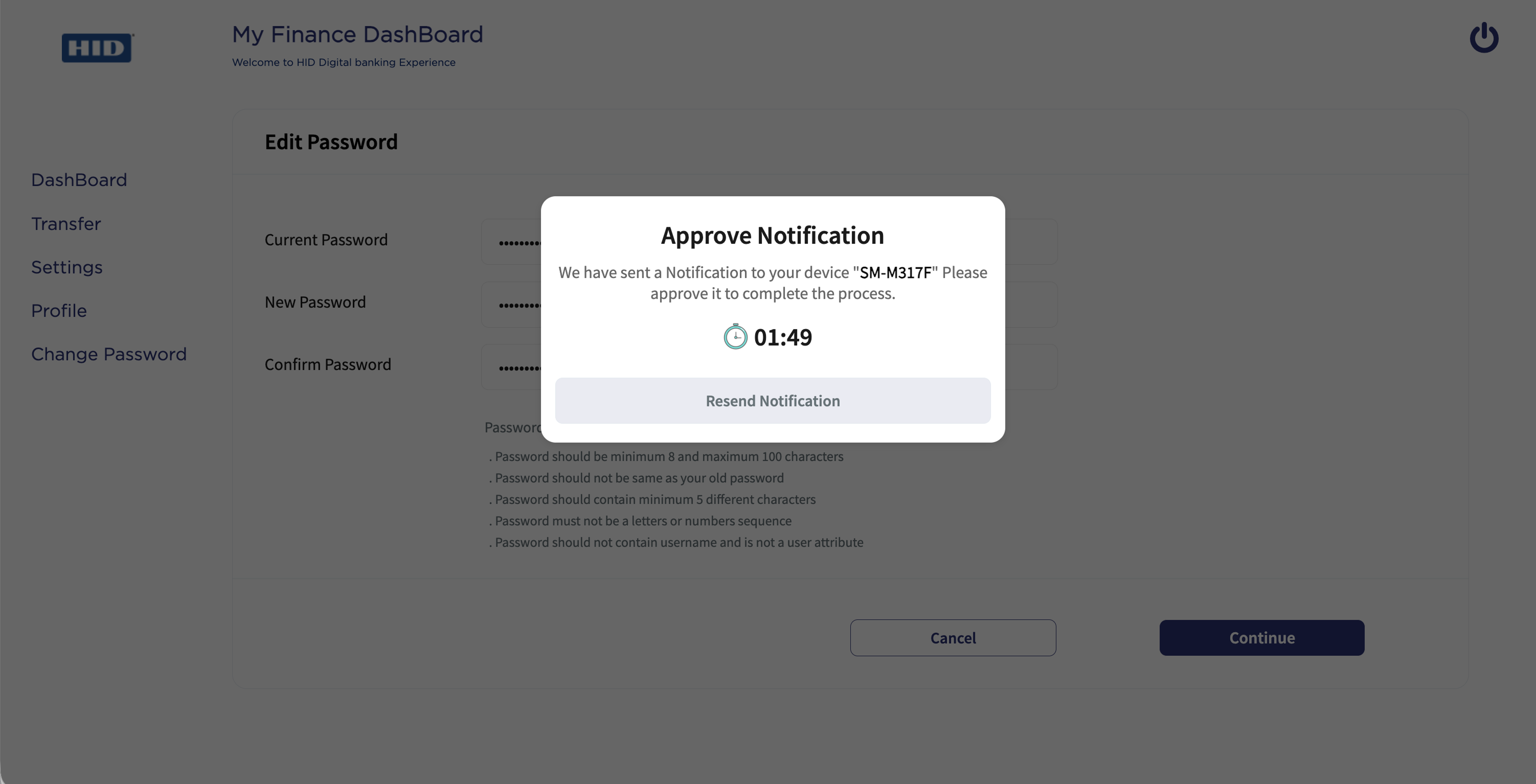
-
Once authenticated, you will get a message confirming that your password has been changed successfully.
You can now log in using your new password.
Update Email Address / Mobile Number
-
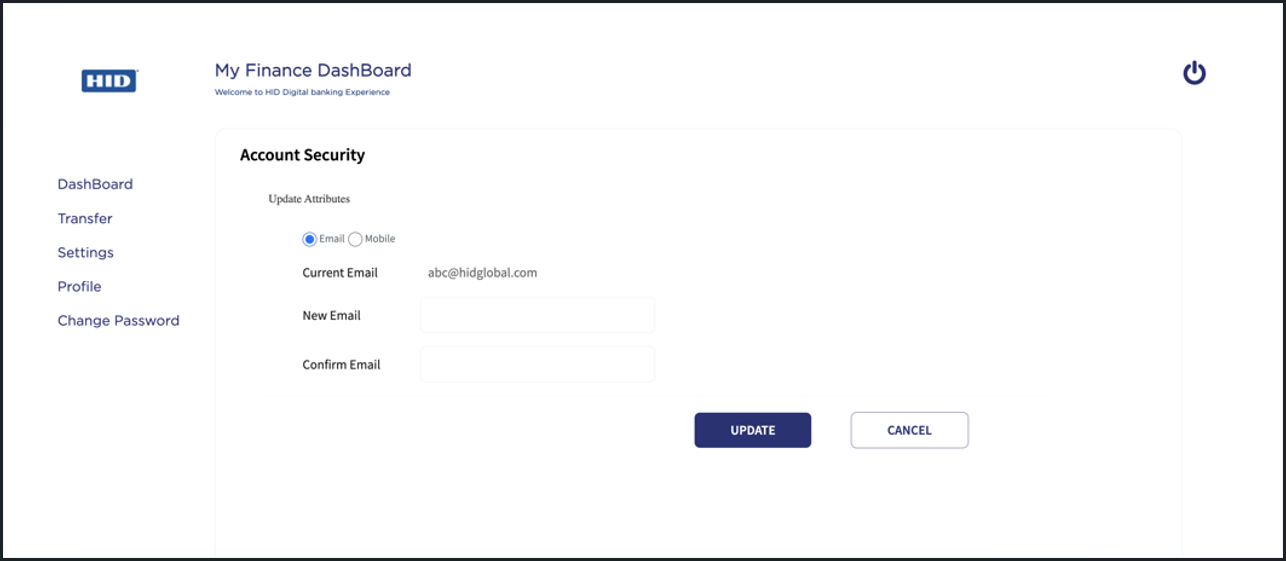
Click Profile to open the "Account Security" page, where you can update your email address and mobile number.
-
To update your email address or mobile number, select the appropriate radio button.
-
Email Address: Select the Email radio button, enter your current and new email addresses, confirm the new email address, and click UPDATE.
-
Mobile Number: Select the Mobile radio button, enter your current and new mobile number, confirm the new mobile number, and click UPDATE.
-
-
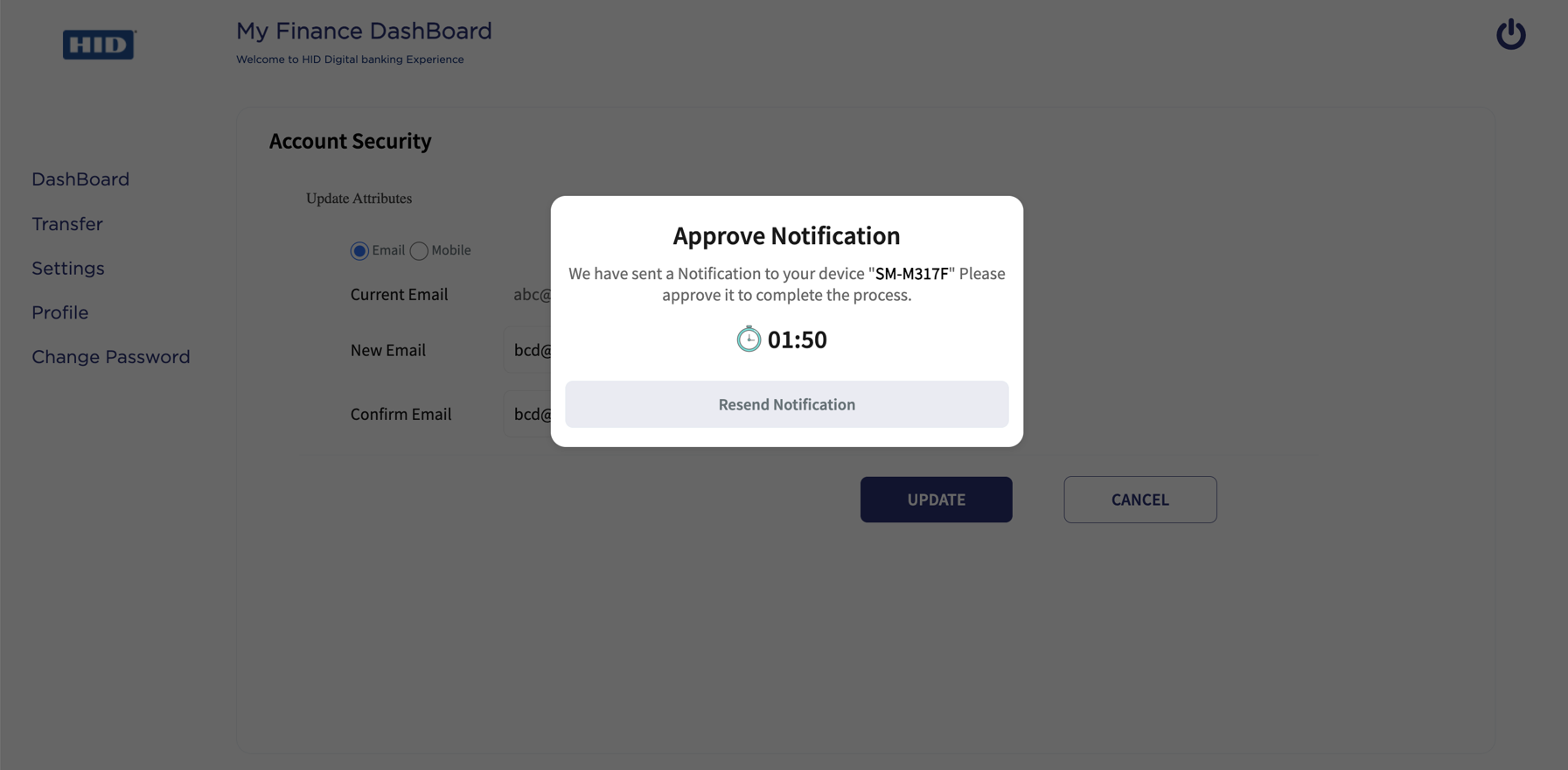
To update your email address or mobile number, you will be prompted for authentication.
Validate your identity using one of the configured Multi-Factor Authentication (MFA) methods, such as Approve Notification, Secure Code, OTP (SMS/Email), or Static Password.
-
Once authenticated, you will get a message confirming that your Email or Mobile Number has been updated successfully.
Self-Service Processors
| Name | Description | Used by (ServiceName-Operation) |
|---|---|---|
|
SearchUserPreProcessor |
It retrieves values from the configuration properties of "PASSWORD_AUTHTYPE" and applies them to the request. |
UserManagementService - SearchUser |
|
SearchUserPostProcessor |
Processes the output of SearchUser API and adds an error flag to the request if noUserRecords, if userActive empty or with the flag FALSE. If the "authType" present in request is not available in the authenticator (results of SearchUser), then updates the "AuthExists" flag to false. If it is present, updates the flag to true. |
UserManagementService - SearchUser
|
|
GetPasswordPolicyPreProcessor |
It retrieves values from the configuration properties of "PASSWORD_AUTHTYPE" and applies them to the request. |
UserManagementService - getPasswordPolicy |
| GetPasswordPolicyPostProcessor | It retrieves values from the response body and applies them to the generic response for the fabric service. | UserManagementService - getPasswordPolicy |
|
ChangePasswordPreProcessor |
From the request, takes the value of "userExists", "AuthExists", "authType", "userId".
For both steps, updates "sequenceFailed" to true. Then adds "userId" and "id" (id = userId + "." + authType) to the input Map (request). |
UserManagementService - changePassword |
|
ChangePasswordPostProcessor |
Processes the output of "ChangePassword", from request takes "ChangePasswordError" to "error", "opstatus". If "opstatus" is empty or 0, updates "error" message to "errorMsgDetail", "sequenceFailed" to true and "status" to false. If no error, updates "status" to true. |
UserManagementService - changePassword |
|
ChangePasswordOrchPostProcessor |
From the request, takes "sequenceFailed" flag. If this flag is true, shows "errorMsgDetail", "status" as false and "opStatus" as "-1". If flag is false, shows the result. |
ChangePassword - ChangePassword (Orchestartion) |
|
CreateDevicePreProcessor |
Calculates the start and expire date based on the current date and time and sets it in the request(inputMap), from server setting takes the value of "DEVICE_TYPE", if not empty, sets in the request(inputMap). |
ScimAPIs - createNewDevice |
|
CreateDevicePostprocessor |
Takes the "DeviceId" value from the request, if value is not present, keeps null. If "DeviceId" is empty, collects an error message named as "detail_CreateDevice" from the request, if the error message is also empty, updates the error message as "Service Failed Please try again Later" and keeps the same in the request. |
ScimAPIs - createNewDevice
|
| PasswordValidationPreprocessor | This preprocessor is to validate the customer password. | PasswordAuthServices\passwordValidation |
| ClientBasePreprocessor | This preprocessor is to get the IDV token and put the value to the header. | PasswordAuthServices\passwordValidation |
| OOBAuthenticatorPreprocessor | This preprocessor is to set the channelId and authType for request. | OTPServices\sendOOB, OTPServices\validateOOB |
| SendOOBPostProcessor | This postprocessor is to check the service is executed successfully or failed. | OTPServices\sendOOB |
| ApplianceOTPGeneratorPreprocessor | Used to generate OTP for Applicance. | HIDSoapServices |
| GenerateOTPPreprocessor | Used to generate OTP for Authservice . | OTPServices |
| SendOTPPreprocessorKMS | Used to send OTP. | OTPServiceKMSOrch |
| FetchUserDetailsPostprocessor | Used to Fetch Phone Number to send OTP. | HIDOTPUtilService |
| GenerateOTPPostprocessor | Used to generate OTP for Authservice. | OTPServices |
| SendOTPPostprocessorKMS | Used to send OTP. | OTPServiceKMSOrch |
| UpdateAttributesPreProcessor | It retrieves values from the configuration properties of "HID_USER_GROUP" and applies them to the request groups. | UpdateUserAttributes |
| UpdateUserMobilePreProcessor | Validates that the user exists and that mobileNumber is present, updates the ATR_MOBILE attribute inside the request dataset, serializes the updated attributes back into inputMap, and forwards userId. | N/A |
| SearchUserforUpdatePostProcessor | Reads totalResults and UserId, stores userId on the request, sets userExists to false when no results are returned, otherwise true, and stores the attributes dataset on the request. | HIDUserAttributes- SearchUser |
Self-Service Component Services
Object Services
| ServiceName | DataModel | Mapping | Purpose | InputParams | Invoking |
|---|---|---|---|---|---|
|
HIDUserManagement |
ChangePassword |
ChangePwd |
Change the user's password. |
userName, Password |
ChangePassword > changeUserPassword |
|
HIDUserManagement |
DeviceRegistrationPolling |
deviceRegistrationPolling |
Poll if the device registration was a success or failure. |
deviceId |
HIDPollConsensus > getHIDDeviceRegistrationStatus |
|
HIDUserManagement |
PasswordPolicy |
getPolicy |
Get the password policy instructions. |
authType |
AuthenticatorPolicy> getPasswordPolicy |
|
HIDUserManagement |
RegisterDevice |
getProvisioningMsg |
Register a new device for the user. |
userName, DeviceId, usernameWithRandomNo |
ApproveDeviceRegistrationOrch > getInviteCode |
|
HIDUserManagement |
SearchDevices |
SearchDevices |
Display the user's devices. |
username, userId |
SearchDevices > searchDevices |
|
HIDUserManagement |
UpdateDeviceName |
updateFriendlyName |
Update the device friendly name. |
deviceId, friendlyName |
UserManagementService > updateDeviceFriendlyName |
|
HIDUserManagement |
UpdateDeviceStatus |
updateDeviceStatus |
Update the device status. |
deviceId, status |
ScimAPIs > updateDeviceStatus |
| HIDUserManagement | AssignUnassignDevice | assignUnassignDevice | Unassign the device before deleting it. | username, deviceId, status | AssignUnassignDevice > assignUnassignDevice |
| HIDUserManagement | DeleteDevice | deleteDevice | Delete the selected device. | deviceId | DeleteDevice > deleteDevice |
| HIDUserManagement | ValidatePassword | validatePassword | PasswordAuthServices > passwordValidation | ||
| HIDUserManagement | ValidateSecureCode | validateOTPAuth | OTPAuthServices > validateOTPAuth | ||
| HIDAuthService | ValidatePassword | validatePassword | Validate the password. | username, password | PasswordAuthServices > passwordValidation |
| HIDAuthService | ValidateOTP | validateOtp | Second factor check to validate the OTP. | username, password, authType | OTPServices > validateOOB |
| HIDAuthService | OTPRequest | sendOTP | To send the OTP for registered mobile number. | userId, AuthenticatorType (AT_OOBSMS/ AT_OOBEML), AuthenticatorValue (OOB Device Type code : DT_OOBSMS/DT_OOBEML) , msgId , password , username | CustomOTPService > sendOOB |
| HIDUserManagement | FIDORegistration | getRegistrationOptions | It will fetch the configuration options to create FIDO credentials. | username | FIDOOrch > getCredentialOptions |
| HIDUserManagement | FIDORegistration | registerCredential | It will register the user with FIDO Authenticator. | username, request_uri, id, rawId, clientDataJSON, attestationObject, csrf | FIDO> registerCredential |
| HidUserManagement | GetUserAttributes | getUserAttributes | Purpose to get user attributes (email and Phone Number) to show in the User Management Component. | username , correlation id | GetUserAttributes (1.0) ->getUserAttributes (Orchestration Service) |
| HidUserManagement | UpdateUserAttributes | updateUserAttributes | To Update the user attributes (email and Phone Number). | username , externalId , mobile , email , first name, last name , correlation id | UpdateUserAttributes (1.0) > updateUserAttributes |
| Utility | CommunicationInformation | getUserCommunicationInfos | Fetch the Infinity user details such as email and MobileNumber to show on Screen when the OTP factres selected and used to send the OTP. | userName |
T24ISExtra (1.0) getUserCommunicationDetailsPreLogin |
| HidUserManagement | SearchUserAttributes | SearchUserAttributes | To Fetch the Users | username | HIDUserAttributes (1.0).SearchUserAttributes |
HID Fabric Services
| Names | Operation Name | Service Type | Description |
|---|---|---|---|
|
UserManagementService |
SearchUser |
Integration |
Performs a user search. |
|
UserManagementService |
changePassword |
Integration |
Performs a change user password. |
|
ChangePassword |
ChangePassword |
Orchestration |
Orchestration for Change password |
|
UserManagementService |
getPasswordPolicy |
Integration |
Displays the Password policy. |
|
SearchServices |
SearchUserAuth |
Integration |
|
|
SearchServices |
SearchDeviceAuth |
Integration |
|
|
SearchDevices |
searchDevices |
Orchestration |
|
|
ScimAPIs |
createNewDevice |
Integration |
Creates a new DeviceId. |
|
ScimAPIS |
updateDevice |
Integration |
Updates the owner of the device during HID Approve device registration request. |
|
DeviceProvisionJava |
getProvisonMsg |
Integration |
Java code to generate a device provisioning message. |
|
ApproveDeviceRegistrationOrch |
getInviteCode |
Orchestration |
|
|
HIDPollConsensus |
getHIDDeviceRegistrationStatus |
Integration |
Java code to perform polling while registering a device. |
|
HIDUserManagement |
DeviceRegistrationPolling |
Orchestration |
Orchestration for polling. |
|
UserManagementService |
updateDeviceFriendlyName |
Integration |
|
|
ScimAPIs |
updateDeviceStatus |
Integration |
|
| AssignUnassignDevice | assignUnassignDevice | Integration | Assign or unassign a device. |
| DeleteDevice | deleteDevice | Integration | Delete a device associated with the provided deviceId. |
| OTPServices | sendOOB | Integration | Sends an OOB (SMS/Email) OTP to the user. |
| OTPServices | validateOOB | Integration | Validates the OOB (SMS/Email) OTP. |
| PasswordAuthServices | passwordValidation | Integration | Validates the user's static password. |
| AuthenticatorPolicy | getPasswordPolicy | Integration | Provides the Password policy. |
| CustomOTPService | sendOTP | Integration | Used to send OTP. |
| OTPServiceKMSOrch | addOOBAndSendOTPAuthService, addOOBAndSendOTPAppliance , generateAndSendOTPAppliance, generateAndSendOTPAuthService, sendLoginOTPAppliance, sendLoginOTPAuthService | Orchestration | Used for adding OOB authenticator , generate OTP and sending OTP. |
| HIDSoapServices | indirectPrimaryAuthenticateDevice | Integration (Soap Service) | Generate and Send OTP. |
| HIDOTPUtilServices | fetchPhoneNumber | Integration | Used to fetch Phone number of the user. |
| OpenIDConfigService | fetchOpenIDConfig | Integration | Used to fetch the well known openID configurations. |
| GetUserAttributes | getUserAttributes | Orchestratiom | Used to get user attributes (Email & Phone number). |
| GetUserAttributes | GetUserAttributes | Integration | Used to get user attributes (Email & Phone number). |
| UpdateUserAttributes | UpdateUserAttributes | Integration | Used to Update user attributes (Email & Phone number). |
| T24ISExtra | getUserCommunicationDetailsPreLogin | Integration | Note: Temenos Integration Service Fetch the Infinity user details such as email and MobileNumber to show on Screen when the OTP factres selected and used to send the OTP. |
| HIDUserAttributes | SearchUserAttributes | Integration | Used to fetch the User Attributes (Phone Number or Email) |
Java Services
| Service Name | Purpose | Dependencies | Called By |
|---|---|---|---|
|
OTPDeliveryService |
Java Service to decide which delivery gateway to use to send SMS |
HID_SMS_MSG_TEMPLATE , IS_HID_GATEWAY_ENABLED , HID_OOB_SMS_OTP_AUTHTPYE, HID_OOB_EMAIL_OTP_AUTHTPYE, HID_SMS_DEVICE_TYPE , HID_EMAIL_DEVICE_TYPE |
CustomOTPService |
Please refer Risk Management System - Non-financial flow section for RMS services
Troubleshooting Fabric Services
Refer to troubleshooting the User Management Fabric Services.


