Card Auto-Update With HID CMS
The Card Auto-Update feature in ActivClient enables automated updates of smart card and key content for security devices managed by HID Credential Management System (CMS).

How Card Auto-Update Works
When a smart card or key is connected to a workstation, ActivClient automatically contacts HID CMS to check whether any updates are available for the device (e.g., a replacement for a soon-to-expire certificate, or new certificates to be added). This check is performed at regular intervals to ensure updates are applied in a timely manner.
Behavior
-
No update available: No user interaction required. The process runs in the background.
-
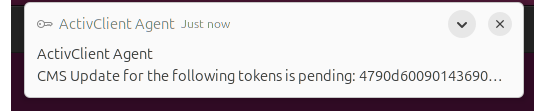
Update available: ActivClient Agent displays a notification indicating that a token update is available.
-
If the user dismisses the notification to postpone the update (e.g., before disconnecting from the network or removing the card or key), ActivClient will prompt again after some time.
-
If the user clicks the notification to accept the update, ActivClient launches the default browser and opens the HID CMS Self-Service Portal The CMS Self-Service Portal is a component of HID CMS that allows end users to access the self-service CMS functions.. After authenticating with their credentials or token, the user can proceed with the update. Once completed, the card or key is ready for use with the updated content and minimal disruption.
-
Do not use the card or key for other operations (such as email signature). Any such requests will be automatically blocked until the update is complete.
Do not lock the screen or log off until the process is complete.
Do not remove the device until the process is complete.
When the card update is complete, the Self-Service Portal informs the user that they should remove and reinsert the token in order to use it. This operation guarantees that all ActivClient and operation system components are aware of the new credentials present on the device.
Card Auto-Update Configuration
If you intend to use the card auto-update feature:
-
Configure HID CMS HID Credential Management System (formerly known as ActivID Credential Management System) is a web-based, smart card, credential and application lifecycle management system. HID CMS augments and works in concert with an enterprise’s primary identity management infrastructure components, including popular directory, database, and PKI components. to enable the Card Auto-Update feature (refer to the HID CMS technical documentation).
-
In the ActivClient configuration file, enable the ACAGENT_CMS_TOKEN_AUTOUPDATE_ENABLED option and set it to true.
-
In the same file, configure the HID CMS connection by enabling the ACAGENT_CMS_URL option and setting its value. (The Card Auto-Update feature will not operate until the connection URL is defined.)
-
Optionally, in the same file, configure the ACAGENT_CMS_AUTOUPDATE_CHECK_INTERVAL_MINUTES option to specify a value other than the default.
-
Configure the user workstations to support HID CMS Self-Service Portal. Refer to the HID CMS documentation for details.
More Information About Card Auto-Update for End-Users