Transitioning HID Approve to Factory Management
-
This transition only applies to legacy deployments. For all future deployments, factory management will be enabled by default, and this transition step will not be required.
-
Maintain manageability in the Authentication Service Admin Portal; otherwise, you won’t be able to view or edit the configuration from the User Interface (UI).
To streamline deployment and simplify administration, all existing HID Approve deployments - whether app or SDK based - must transition to factory management. The HID Approve Factory introduces a purpose-built API that consolidates the many interdependent components of a working deployment into a single management endpoint.
Traditionally, administrators had to manually configure multiple interdependent objects—Authentication Types, Device Types, and Credential Types—in the correct combination for HID Approve to function properly. This setup was complex, error-prone, and often relied on a “default data set” as a starting point. While useful as a shortcut, those defaults created clutter within tenants and were not tailored to individual deployments.
The factory solves these challenges by:
-
Reducing deployment complexity to a single API endpoint designed specifically for HID Approve.
-
Allowing integrators to pass only parameters that matter for HID Approve, while sensible defaults handle the rest.
-
Eliminating the need to rely on broad, pre-populated configuration templates.
Importantly, the transition to factory management is non-destructive:
-
Existing configurations are preserved and not changed.
-
The conversion step only enables factory management; it does not overwrite your objects.
Once transitioned:
-
HID Approve objects (Authentication Types, Device Types, Credential Types) are protected from update or delete via the traditional endpoints.
-
Updates and changes must be performed through the factory interface to ensure consistency and accuracy.
In short, factory management provides a clean, streamlined way to deploy and maintain HID Approve by collapsing a complex, multi-step process into a single, reliable API interface.
Enable Factory Management for HID Approve Applications
To enable factory management for your HID Approve applications, follow the steps below:
-
Click Settings
 in the left navigation bar to open the Settings page.
 -
Click HID Approve Authentication Configuration on the Settings page to open HID Approve Applications page.
-
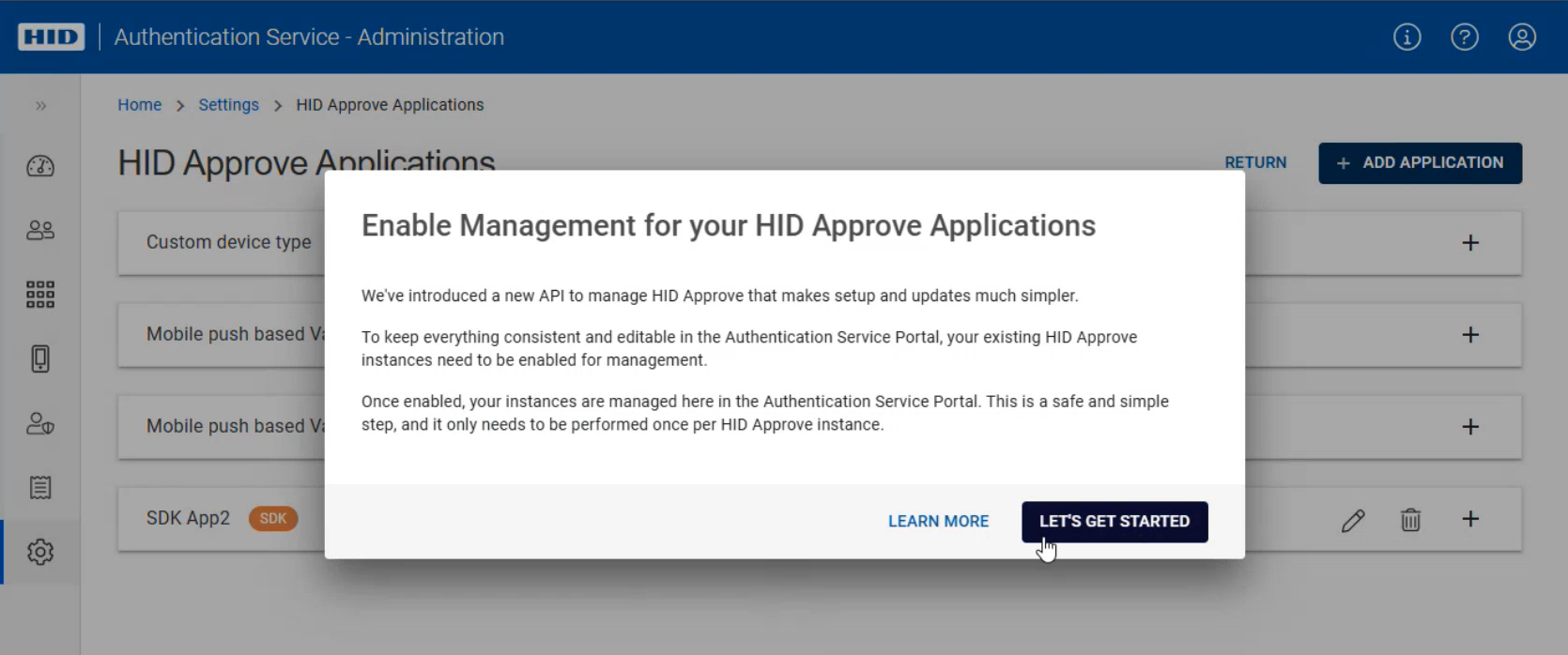
Once "Enable Management for your HID Approve Applications" pop-up appears, click on LET'S GET STARTED to start transitioning HID Approve to Factory Management.
-
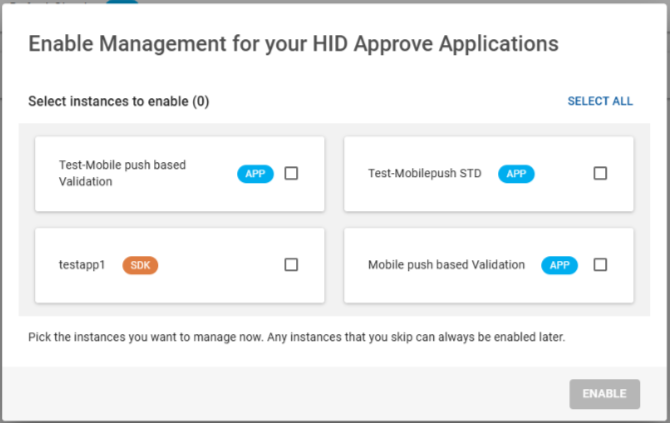
Select the instances you want to manage now and click ENABLE. You can enable the skipped ones later.
-
Once enabled, a notification appears that the selected HID Approve instances have been updated for Factory Management.
Important: If any HID Approve instances haven’t been transitioned to Factory Management, a notification will appear in the HID Approve Authentication Configuration section to enable them.


