PIN Credentials
A PIN is a credential composed of user-selected characters. A PIN is often used in combination with another credential to easily enhance its security.
A PIN may be used as a credential for authentication, when combined with an additional supported credential.
You cannot enroll weak PINs in DigitalPersona, similarly to Windows Hello for Business. According to Microsoft, a weak PIN has a constant delta from one digit to the next (for example, 1111 or 2468)
This algorithm does not apply to alphanumeric PINs.
This PIN should not be confused with a PKI Smart Card PIN which is used as part of a PKI Smart Card credential.
Enroll a PIN Credential
-
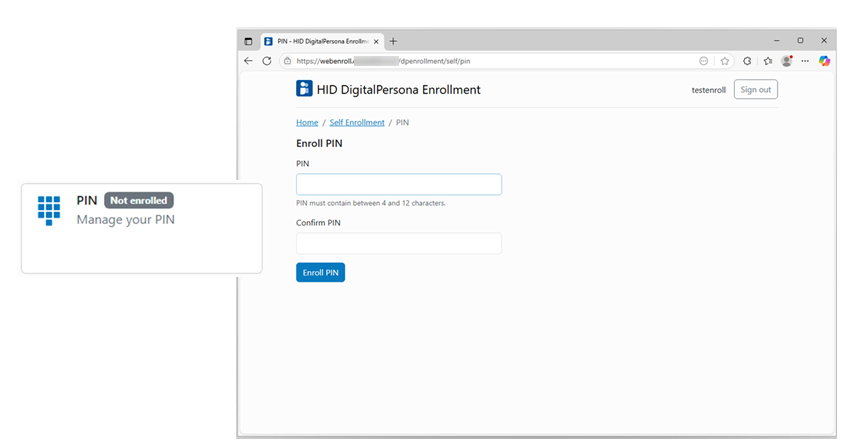
Click the PIN tile to display the Enroll PIN window.
-
Enter and confirm a four-digit PIN.
-
Click Enroll PIN.
Authenticate with Your PIN Credential
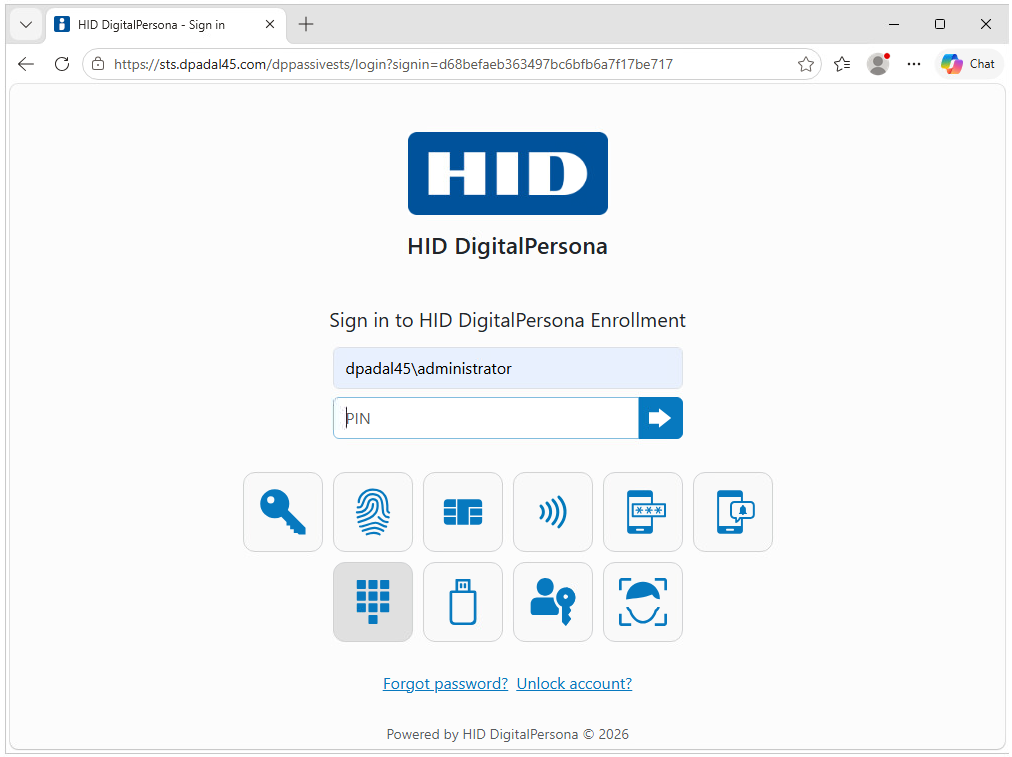
To authenticate with your PIN credential, select the PIN tile and enter your PIN:
Change Your PIN Credential
-
Select the PIN tile.
-
Enter and confirm a four-digit PIN.
-
Click Enroll PIN.
Delete a PIN Credential
-
Select the PIN credential.
-
In the credential page, click the delete icon
 .
-
Click Delete to confirm deletion of your PIN credential.


