Managing Users, Groups and Roles
About the User and Group Structure
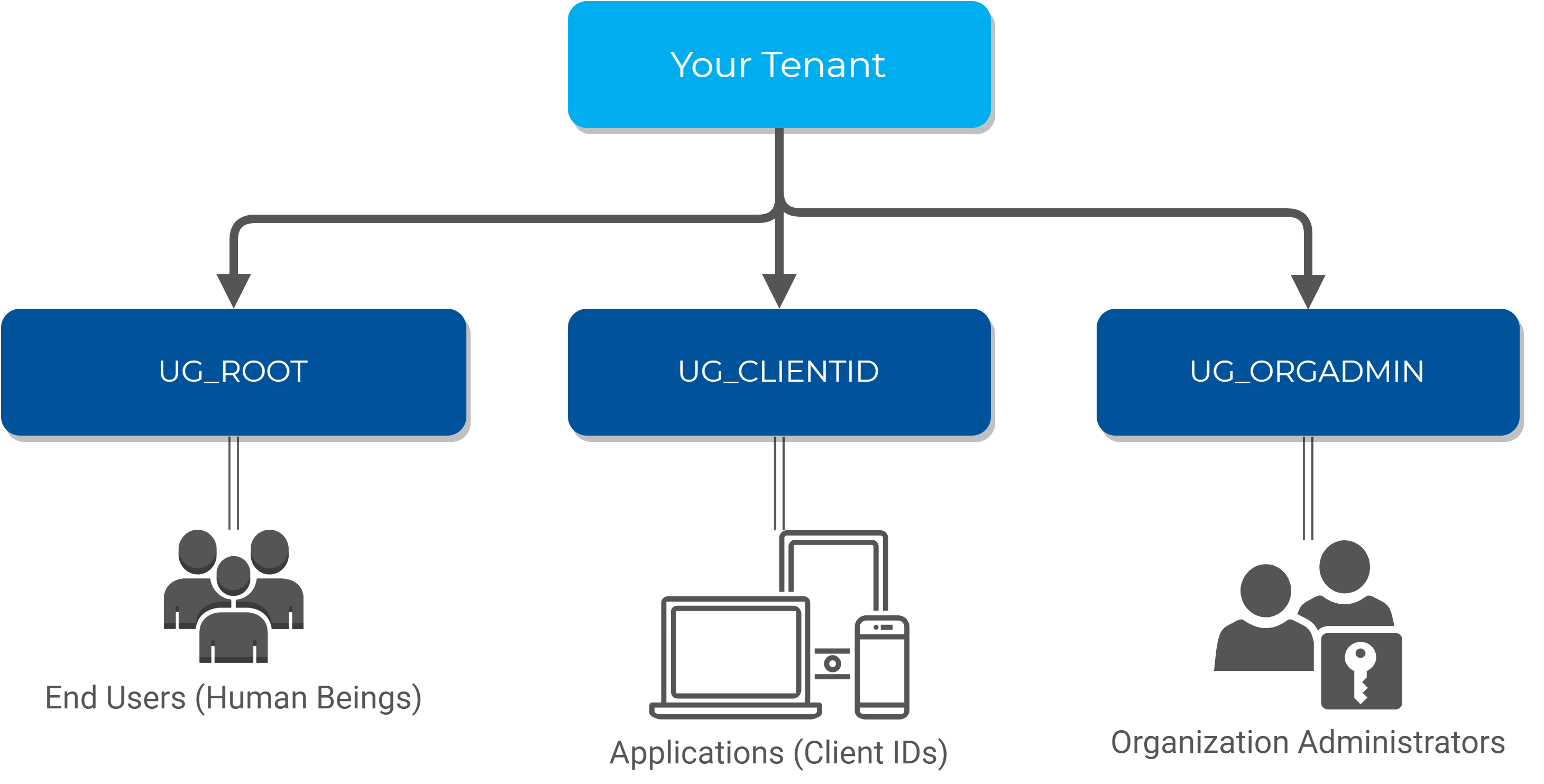
The HID Authentication Service has a pre-defined structure of user groups as follows:
-
UG_ROOT - the 'root' group for all your end users
-
UG_CLIENTID - all your Client IDs
-
UG_ORGADMIN - the administrators of your tenant on the HID Authentication Service
Note: Users in the UG_ORGADMIN group can only authenticate using the Admin Portal client. They cannot authenticate using the Self-Service Portal (SPP) or custom applications.
The HID Authentication Service uses this structure to perform permission checks (for example, Organization Administrators have permissions on the other groups, but end users do not).
It also allows you to filter 'end users' from Client IDs and Administrators.
A Client ID is a User... and more
When you create a Client ID in the HID Authentication Service with the OpenID register endpoint, a user is created under the UG_CLIENTID group, and a role must be assigned to it (RL_OPENIDCLIENT or RL_CLIENTIDM2M).
In the background, the HID Authentication Service registers a 'configuration' so that this user is considered to be a Client ID. This configuration contains all the parameters you specified when calling the register endpoint.
About Custom Groups
The HID Authentication Service has been designed to have a flat structure under UG_ROOT, and it is recommended segregating your users using Roles instead of Groups.
While the HID Authentication Service APIs offer the possibility to manage groups under UG_ROOT, it is not recommended segregating users this way.
Available Roles in the HID Authentication Service
Your tenant in the HID Authentication Service includes a set of pre-defined roles allowing to start using and managing your tenant immediately.
These roles are used by the HID Authentication Service to enforce permission checks on your tenant and are therefore immutable.
Organization Administrators (RL_ORGADMIN)
The Organization Administrator role is a privileged role on your tenant. Therefore, it a role for which it is recommended configuring users with strong multi-factor authentication such as push-based authentication with HID Approve.
An Organization Administrator is allowed to fully manage your tenant, including other administrators and Client IDs.
| Permission | Target Group |
|---|---|
|
Full permissions on Users and Devices |
UG_ROOT |
|
Full permissions on Groups |
UG_ROOT |
|
Full permissions on Client IDs |
UG_CLIENTID |
|
Full permissions on Organization Administrators and their devices |
UG_ORGADMIN |
Client IDs (RL_CLIENTID)
The Client ID role is provided only with read permissions, allowing to authenticate users with OpenID. To be compliant with the least permission principle, the Client ID has no privileges at all.
| Permission | Target Group |
|---|---|
|
Read and Authentication permissions on Users |
UG_ROOT |
|
Read and Authentication permissions on Organization Administrators |
UG_ORGADMIN |
OpenID Client (RL_OPENIDCLIENT)
The OpenID Client role is provided only to authenticate users with OpenID. To be compliant with the least permission principle, the OpenID client has no privileges at all.
It supports only user authentication, push notification and OpenID consent.
M2M Client IDs (RL_CLIENTIDM2M)
The Client ID for M2M (Machine To Machine) role is one of most powerful roles on your tenant. Therefore, it is a role for which we recommend to have Client IDs configured with strong PKI (certificate-based) authentication.
A Client ID for M2M is allowed to fully manage your tenant, including other administrators and Client IDs.
| Permission | Target Group |
|---|---|
|
Full permissions on Users and Devices |
UG_ROOT |
|
Full permissions on Groups |
UG_ROOT |
|
Full permissions on Client IDs |
UG_CLIENTID |
|
Full permissions on Organization Administrators and their devices |
UG_ORGADMIN |
Get the Details of a Client ID, Organization Administrator or End User
There are multiple methods to get the details of an existing Client ID, Organization Administrator or end user.
The chosen method depends on the known data (internal ID, external ID or bearer token) and the level of information required.
The URL of the HID Authentication Service platform (see HID Authentication Service Platforms around the World)
Your tenant ID (the identifier of your tenant, starting with the letter "t", for example, t987198273d986w9869)
A bearer token (access token) obtained by authenticating a privileged user (Organization Administrator, Client ID M2M) through an authentication flow. You need an privileged user to have sufficient permissions to perform the actions in the following sections.
Using a bearer token from an non privileged user / Client ID will result in 401 / 403 HTTP responses from the HID Authentication Service APIs.
For further information about tokens, see Enabling User Authentication
Using the Users Endpoint with the Internal ID
If you already know the internal ID of a Client ID, an Organization Administrator or an end user, you can directly fetch their details using the Users endpoint. This is the most detailed view available.
For further information, see Internal IDs vs External IDs.
GET https://[base-server-url]/scim/{tenant}/v2/Users/49996 HTTP/1.1
Authorization: Bearer YOUR_BEARER_TOKEN
Content-Type: "application/scim+json"The response is the most detailed view of the specified user (in this example, an end user):
{
   "schemas":    [
      "urn:ietf:params:scim:schemas:core:2.0:User",
      "urn:hid:scim:api:idp:2.0:UserDevice",
      "urn:hid:scim:api:idp:2.0:UserAttribute",
      "urn:hid:scim:api:idp:2.0:UserAuthenticator"   ],
   "id": "49996",
   "externalId": "rdavis@company.com",
   "meta":    {
      "resourceType": "User",
      "created": "2019-09-09T00:00:00Z",
      "location": "https://[base-server-url]/scim/{tenant}/v2/Users/49996",
      "version": "1"   },
   "userName": "rdavis@company.com",
   "name":    {
      "familyName": "Davis",
      "givenName": "Richard"   },
   "displayName": "Richard Davis",
   "title": "M.",
   "userType": "FTRESS",
   "active": true,
   "emails": [{"value": "rdavis2@company.com"}],
   "phoneNumbers": [{"value": "567 456 387"}],
   "groups": [   {
      "type": "Group",
      "display": "ROOT",
      "value": "UG_ROOT",
      "$ref": "https://[base-server-url]/scim/{tenant}/v2/Groups/UG_ROOT"   }],
   "roles": [],
   "urn:hid:scim:api:idp:2.0:UserAttribute": {"attributes":    [
            {
         "name": "ATR_EMAIL",
         "type": "string",
         "value": "rdavis2@company.com",
         "readOnly": false
      },
            {
         "name": "LASTNAME",
         "type": "string",
         "value": "Davis",
         "readOnly": false
      },
            {
         "name": "FIRSTNAME",
         "type": "string",
         "value": "Richard",
         "readOnly": false
      },
            {
         "name": "TITLE",
         "type": "string",
         "value": "M.",
         "readOnly": false
      },
            {
         "name": "ATR_MOBILE",
         "type": "string",
         "value": "567 456 387",
         "readOnly": false
      }
   ]},
   "urn:hid:scim:api:idp:2.0:UserAuthenticator": {"authenticators": []},
   "urn:hid:scim:api:idp:2.0:UserDevice": {"devices": []}
}
Using the Search Endpoint with the External ID
If you do not know the internal ID of a Client ID, an Organization Administrator or an end user, but you know its externalId, you can then use the Users search endpoint to find it and browse the details.
For further information, see Internal IDs vs External IDs.
POST https://[base-server-url]/scim/{tenant}/v2/Users/.search HTTP/1.1
Authorization: Bearer YOUR_BEARER_TOKEN
Content-Type: "application/scim+json"{
   "schemas":[
      "urn:ietf:params:scim:api:messages:2.0:SearchRequest"   ],
"filter":"externalid eq \"rdavis@company.com\""}The response is equivalent to the one received with the first method but it is formatted as a search result (that is, an array):
{
   "schemas": ["urn:ietf:params:scim:api:messages:2.0:ListResponse"],
   "totalResults": 1,
   "resources": [   {
      "schemas":       [
         "urn:ietf:params:scim:schemas:core:2.0:User",
         "urn:hid:scim:api:idp:2.0:UserDevice",
         "urn:hid:scim:api:idp:2.0:UserAttribute",
         "urn:hid:scim:api:idp:2.0:UserAuthenticator"      ],
      "id": "49976",
      "externalId": "rdavis@company.com",
      "meta":       {
         "resourceType": "User",
         "created": "2019-09-09T00:00:00Z",
         "location": "https://[base-server-url]/scim/{tenant}/v2/Users/49976",
         "version": "1"      },
      "userName": "rdavis@company.com",
      "name":       {
         "familyName": "Davis",
         "givenName": "Richard"      },
      "displayName": "Richard Davis",
      "title": "M.",
      "active": true,
      "emails": [{"value": "rdavis@company.com"}],
      "phoneNumbers": [{"value": "567 456 387"}],
      "groups": [      {
         "type": "Group",
         "display": "ROOT",
         "value": "UG_ROOT",
         "$ref": "https://[base-server-url]/scim/{tenant}/v2/Groups/UG_ROOT"      }],
      "roles": [],
      "urn:hid:scim:api:idp:2.0:UserAttribute": {"attributes":       [
                  {
            "name": "ATR_EMAIL",
            "type": "string",
            "value": "rdavis@company.com",
            "readOnly": false
         },
                  {
            "name": "LASTNAME",
            "type": "string",
            "value": "Davis",
            "readOnly": false
         },
                  {
            "name": "FIRSTNAME",
            "type": "string",
            "value": "Richard",
            "readOnly": false
         },
                  {
            "name": "TITLE",
            "type": "string",
            "value": "M.",
            "readOnly": false
         },
                  {
            "name": "ATR_MOBILE",
            "type": "string",
            "value": "567 456 387",
            "readOnly": false
         }
      ]},
      "urn:hid:scim:api:idp:2.0:UserAuthenticator": {"authenticators": []},
      "urn:hid:scim:api:idp:2.0:UserDevice": {"devices": []}
   }]
}
Using the UserInfo Endpoint with the Bearer Token
The UserInfo endpoint allows fetching basic information about the owner of the bearer token. If the bearer token is obtained with client_credentials, the UserInfo endpoint will return information about the Client ID that was used to get it. Otherwise, information about the indirect end user is returned.
For further information about direct and indirect users, see End Users.
For further information about the client_credentials authentication flow and other OpenID authentication flows, see OpenID Authentication Flows.
Simply call the UserInfo endpoint with your bearer token:
GET https://[base-server-url]/idp/{tenant}/authn/userinfo HTTP/1.1
Authorization: Bearer YOUR_BEARER_TOKENThe response is an actual ID Token encoded in Base64:
eyJraWQiOiIxNTM2ODU0OTk4MTA3IiwiYWxnIjoiUlMyNTYifQ.eyJzdWIiOiJqb2huLnNtaXRoQGdtYWlsLmNvbSIsImVtYWlsX3ZlcmlmaWV
kIjpmYWxzZSwiZ3JvdXBpZHMiOlsiVUdfUk9PVCJdLCJyb2xlcyI6W10sInBob25lX251bWJlcl92ZXJpZmllZCI6ZmFsc2UsInBob25lX251bWJlciI6I
jg3NiA1NjcgNDU2IiwicHJlZmVycmVkX3VzZXJuYW1lIjoiam9obi5zbWl0aEBnbWFpbC5jb20iLCJlbWFpbCI6ImpvaG4uc21pdGhAZ21haWwuY29tIn0. KZ24TGBszK-Cx3jpseuNKO6TZN0x-uIUwxNYRVb5Rba5pMmSV4cVNXsx6SKDIlTUnVwJpF1pZKTkEqHhtCIjCFPB2djE0ytMdeU5PBRPIbYYp1YL78A1cVRTDM7uNpbnULSZifCQv8ha7bRNLfiwQGinh8oAJCzFMJRSnbR2r
JSw48PubpJvIs4dVtfDY1cF1aGBHQlEr2k60pYtBref7mUkTHbOX9c4k9KDMgV02gEJbhzVVEP33BD_OWsJdw_aaouC6Zko5qYYtBr1m6om93gMlt4MB_MLPMccmRjJAyUeFuesCvge9NWfdopU2RmYcn2bRaKoS6Iy4USzFUXiJg.
To read the data, you need to split the token by matching the dots (.) and decode the second part from Base64.
String token = "...";
Array[String] splitToken = [];
splitToken = token.split( '.' ); // 0 based result array => [0 => header, 1 => body, 2 => signature]
String data = splitToken[1]; // Fetch the body to have the data
The following samples illustrate the Base64-decoded header, body and signature.
Body
{
    "sub": "john.smith@company.com",
    "email_verified": false,
    "groupids": ["UG_ROOT"],
    "roles": ["RL_ORGADMIN"],
    "phone_number_verified": false,
    "phone_number": "876 567 456",
    "preferred_username": "john.smith@company.com",
    "email": "john.smith@company.com"
}Signature
KZ24TGBszK-Cx3jpseuNKO6TZN0x-uIUwxNYRVb5Rba5pMmSV4cVNXsx6SKDIlTUnVwJpF1pZKTkEqHhtCIjCFPB2djE0ytMdeU5PBRPIbYYp1YL
78A1cVRTDM7uNpbnULSZifCQv8ha7bRNLfiwQGinh8oAJCzFMJRSnbR2rJSw48PubpJvIs4dVtfDY1cF1aGBHQlEr2k60pYtBre
f7mUkTHbOX9c4k9KDMgV02gEJbhzVVEP33BD_OWsJdw_aaouC6Zko5qYYtBr1m6om93gMlt4MB_MLPMccmRjJAyUeFuesCvge9NWfdopU2RmYcn2bRaKoS6Iy4USzFUXiJg
Topics in this section:
See also:


