Card Auto-Update With HID CMS
The Card Auto-Update feature in ActivClient enables automated updates of smart card and key content for security devices managed by HID Credential Management System (CMS).

How Card Auto-Update Works
When a smart card or key is connected to a workstation, ActivClient automatically contacts HID CMS to check whether any updates are available for the device (e.g., a replacement for a soon-to-expire certificate, or new certificates to be added). This check is performed at regular intervals to ensure updates are applied in a timely manner.
Behavior
-
No update available: No user interaction required. The process runs in the background.
-
Update available: ActivClient Agent displays a notification indicating that a token update is available.
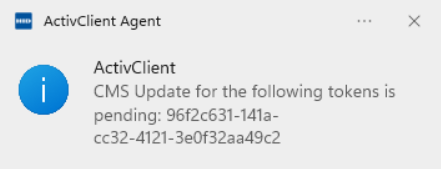
-
If the user dismisses the notification to postpone the update (e.g., before disconnecting from the network or removing the card or key), ActivClient will prompt again after some time.
-
If the user clicks the notification to accept the update, ActivClient launches the default browser and opens the HID CMS Self-Service Portal. After authenticating with their credentials or token, the user can proceed with the update. Once completed, the card or key is ready for use with the updated content and minimal disruption.
-
Do not use the card or key for other operations (such as email signature). Any such requests will be automatically blocked until the update is complete.
Do not lock the screen or log off until the process is complete.
Do not remove the device until the process is complete.
When the card update is complete, the Self-Service Portal informs the user that they should remove and reinsert the token in order to use it. This operation guarantees that all ActivClient and Windows components are aware of the new credentials present on the device.
For example, if the Windows Logon certificate is updated, removing and re-inserting the card publishes the new certificate to the Windows CAPI store, a requirement for a successful Windows Logon.
Card Auto-Update Configuration
If you intend to use the card auto-update feature:
-
Configure HID CMS to enable the Card Auto-Update feature (refer to the HID CMS technical documentation).
-
Configure the Enable Card Auto-Update policy to Enabled.
-
Configure the HID CMS connection using the CMS Server URL policy. (The Card Auto-Update feature will not operate until the connection URL is defined.)
-
Configure the user workstations to support HID CMS Self-Service Portal. Refer to the HID CMS documentation for details.
More Information About Card Auto-Update for End-Users