Troubleshooting the Push Notification (CIBA Callback)
You can troubleshoot and debug issues related to Push Notification. The Push Notification uses Client-Initiated Backchannel Authentication (CIBA) workflow to authenticate at the time of login and during the financial transactions.
CIBA Workflow Sequence Diagram
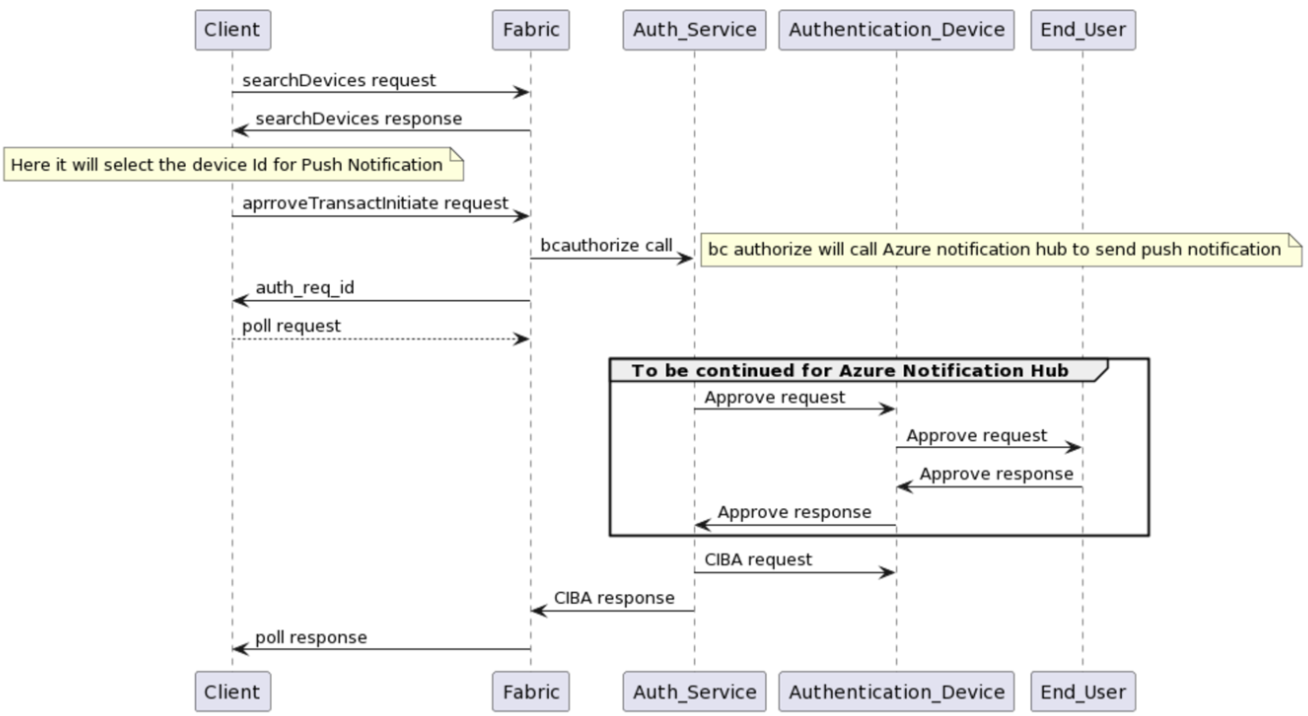
Checklist for Troubleshooting
Following are the checklist items for troubleshooting issues in Push Notification:
| Environment | Checks |
|---|---|
| Client-side |
|
| Server-side Logs |
|
| Fabric-side |
|
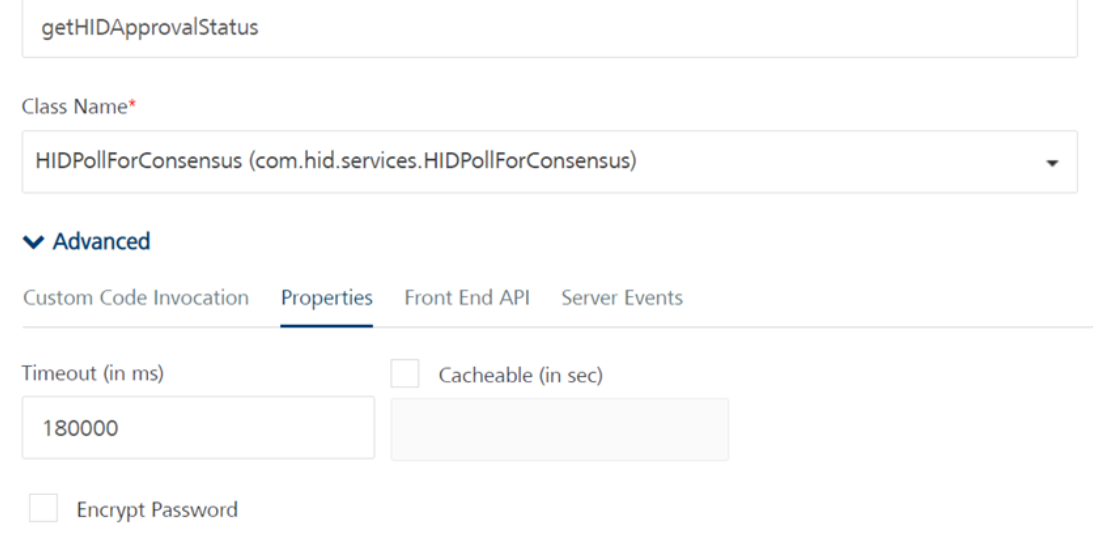
Verify the correctness of the CIBA endpoint:
-
Confirm if the port matches the Fabric's port.
-
Add the webhook endpoint as the callback URL and assess if a response can be obtained.
-
If a response is received through the webhook.site endpoint, it indicates a potential scenario where the HID region's public IP is blocked by the firewall.
-
In such situations, you must reach out to your IT team to whitelist the HID public IPs.
-
Expected Response APIs after Troubleshooting
Check Integration Service with auth_req_id:
To receive the auth_req_id response from approveTransactInitiate API call response, enable the developer tool on the Web Client (browser).
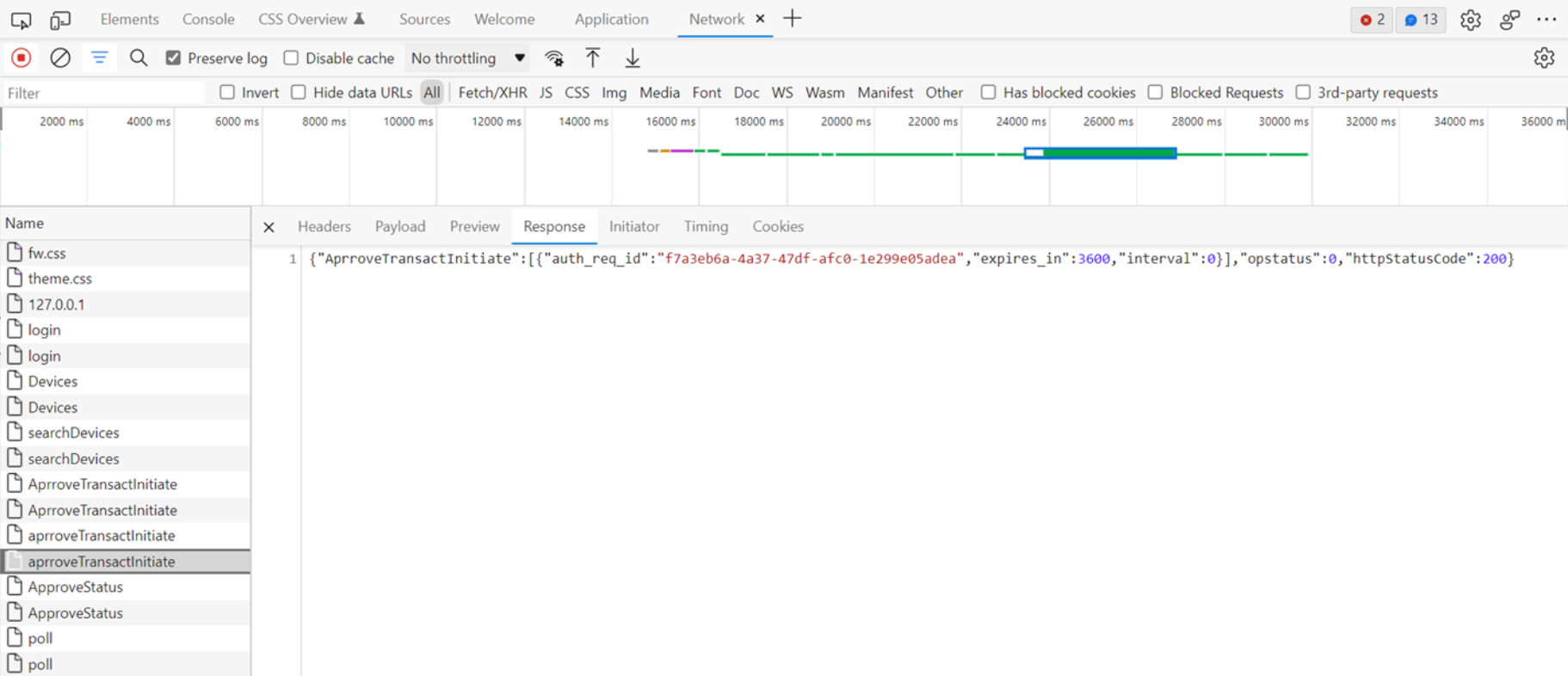
Following are the possible cases for the correct functioning of Push Notification:
-
Case 1 - Approved: Success
-
Case 2 - Not Approved: Failure
-
Case 3 - Not Approved for 1 Minute: Success
-
Case 4 - Not Approved for 2 Minute: Failure
Case 1 - Approved: Success
Network Response API:
-
ApproveTransactInitiate:
{"AprroveTransactInitiate": [{"auth_req_id":"a1571242-0650-4b07-bbf0-4d8a86073932","expires_in":3600,"interval":0}],"opstatus":0,"httpStatusCode":200} -
Poll:
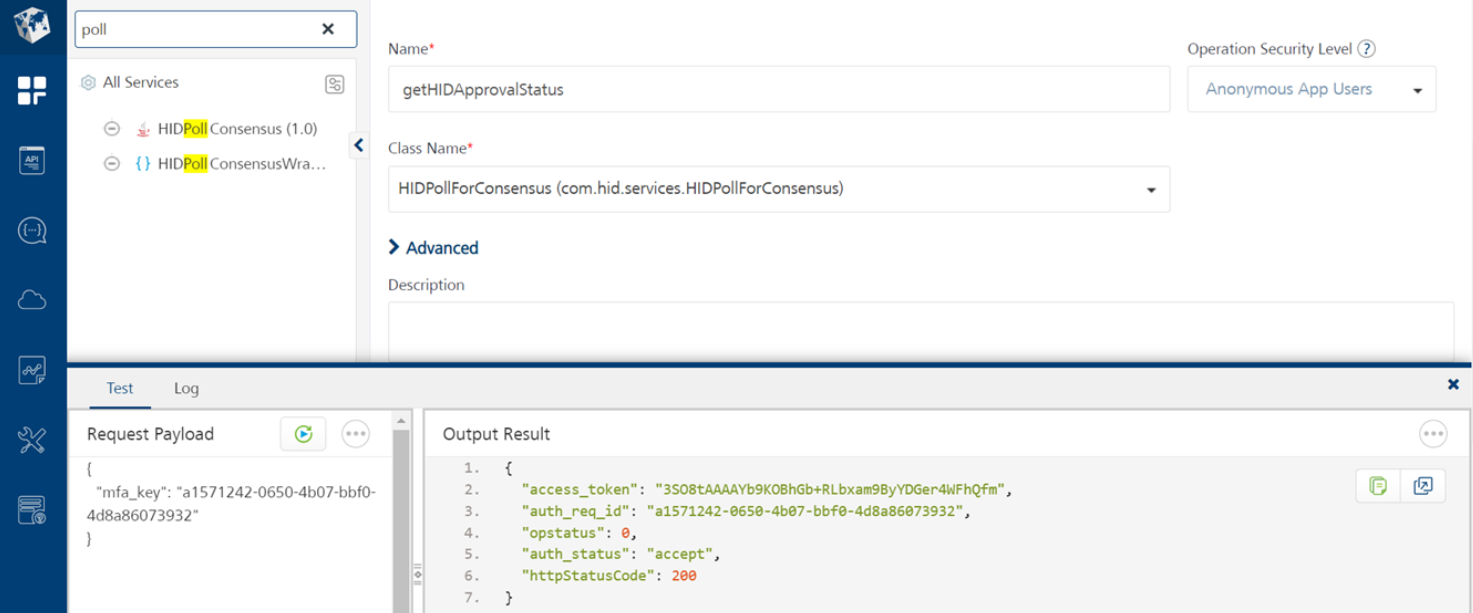
{"ApproveStatus":[{"access_token":"3SO8tAAAAYb9KOBhGb+RLbxam9ByYDGer4WFhQfm","auth_status":"accept"}],"opstatus":0,"httpStatusCode":200}
Integration API response through Fabric:
Case 2 - Not Approved: Failure
Network Response API:
-
ApproveTransactInitiate:
{"AprroveTransactInitiate":[{"auth_req_id":"f7a3eb6a-4a37-47df-afc0-1e299e05adea","expires_in":3600,"interval":0}],"opstatus":0,"httpStatusCode":200} -
Poll:
{"ApproveStatus":[{"auth_status":"UNKNOWN"}],"opstatus": -1,"httpStatusCode":401,"errmsg":"HID ActivID Push based operation approval is not known"}
Integration API response through Fabric:
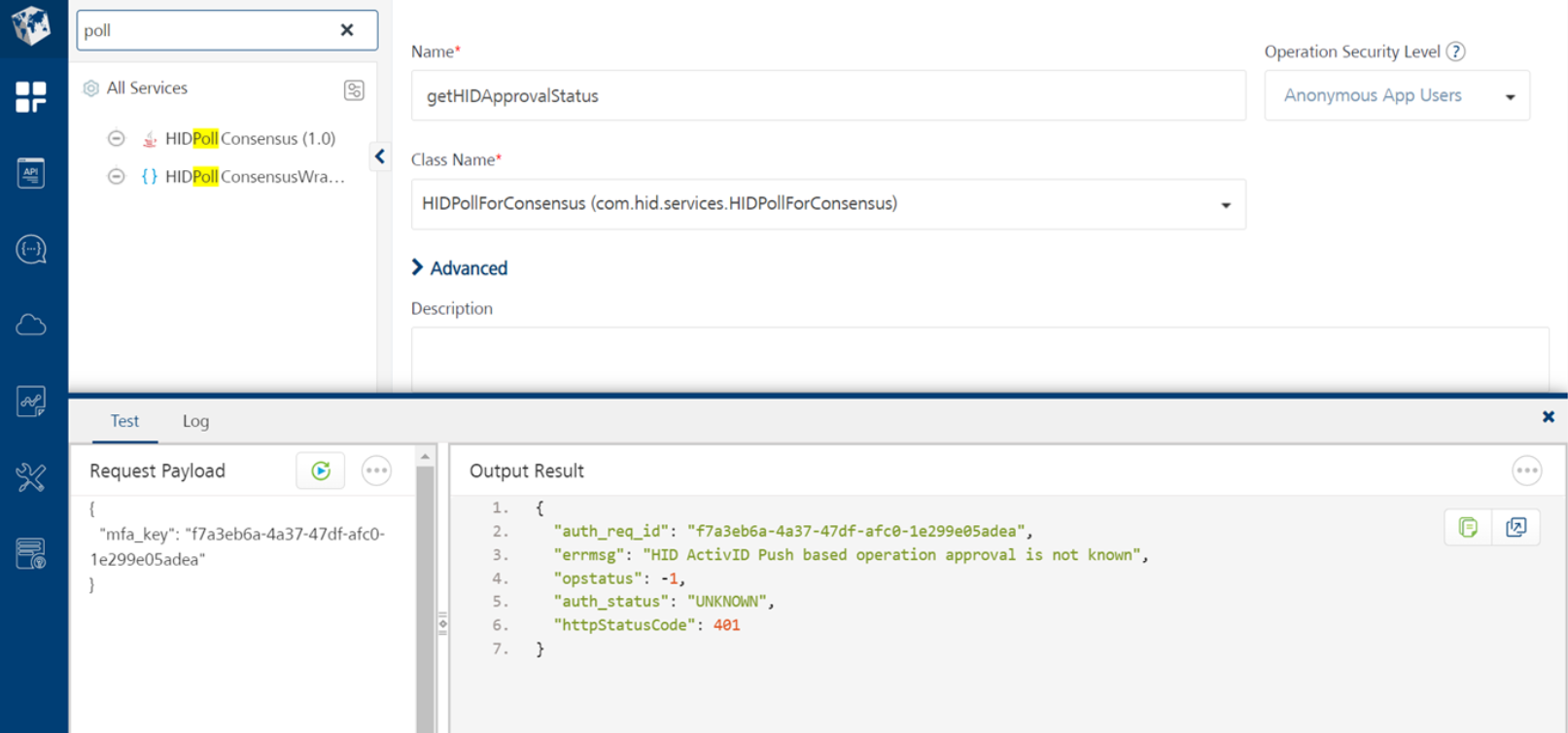
Case 3 - Not Approved for 1 Minute: Success
Network Response API:
-
ApproveTransactInitiate:
{"AprroveTransactInitiate":[{"auth_req_id":"6023428c-dc8b-493f-b5d0- 0d82ba739349","expires_in":3600,"interval":0}],"opstatus":0,"httpStatusCode":200} -
Poll:
{"ApproveStatus": [{"auth_status":"UNKNOWN"}],"opstatus":-1,"httpStatusCode":401,"errmsg":"HID ActivID Push based operation approval is not known"}{"ApproveStatus": [{"access_token":"3SO8tAAAAYb9TUtyco68EnuxDuV+nUGzgeQBMisa","auth_status":"accept"}],"opstatus":0,"httpStatusCode":200}
-
If you initially not approved the request within the first minute but later approve it within the second minute (for example, you approved the request at 1 minute and 33 seconds), you will receive two response APIs: one indicating failure and the other indicating success.
-
However, in Fabric, you will only receive the most recent API response, which means you will only receive the success response.
Integration API response through Fabric:
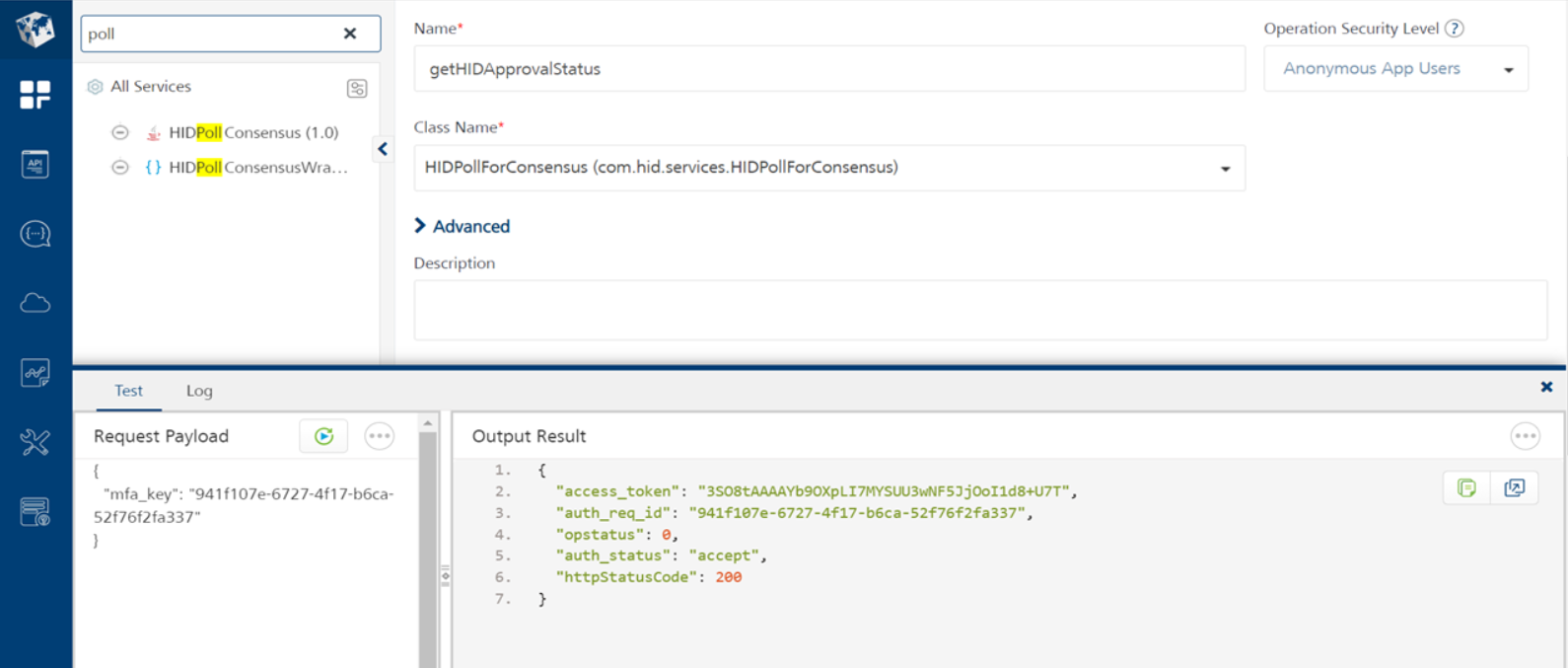
Case 4 - Not Approved for 2 Minute: Failure
Network Response API:
-
ApproveTransactInitiate:
{"AprroveTransactInitiate":[{"auth_req_id":"941f107e-6727-4f17-b6ca-52f76f2fa337","expires_in":3600,"interval":0}],"opstatus":0,"httpStatusCode":200} -
Poll:
{"ApproveStatus":[{"auth_status":"UNKNOWN"}],"opstatus":-1,"httpStatusCode":401,"errmsg":"HID ActivID Push-based operation approval is not known"}
-
A timeout message will appear if you do not approve the request within 2 minutes.
Integration API response through Fabric:
Test CIBA request using Webhook.site
CIBA Tester is a newly added feature through middleware that allows an integrator to test the CIBA workflow using Postman.
Update the CIBA_Callback URL with the unique webhook URL. Follow these steps:
-
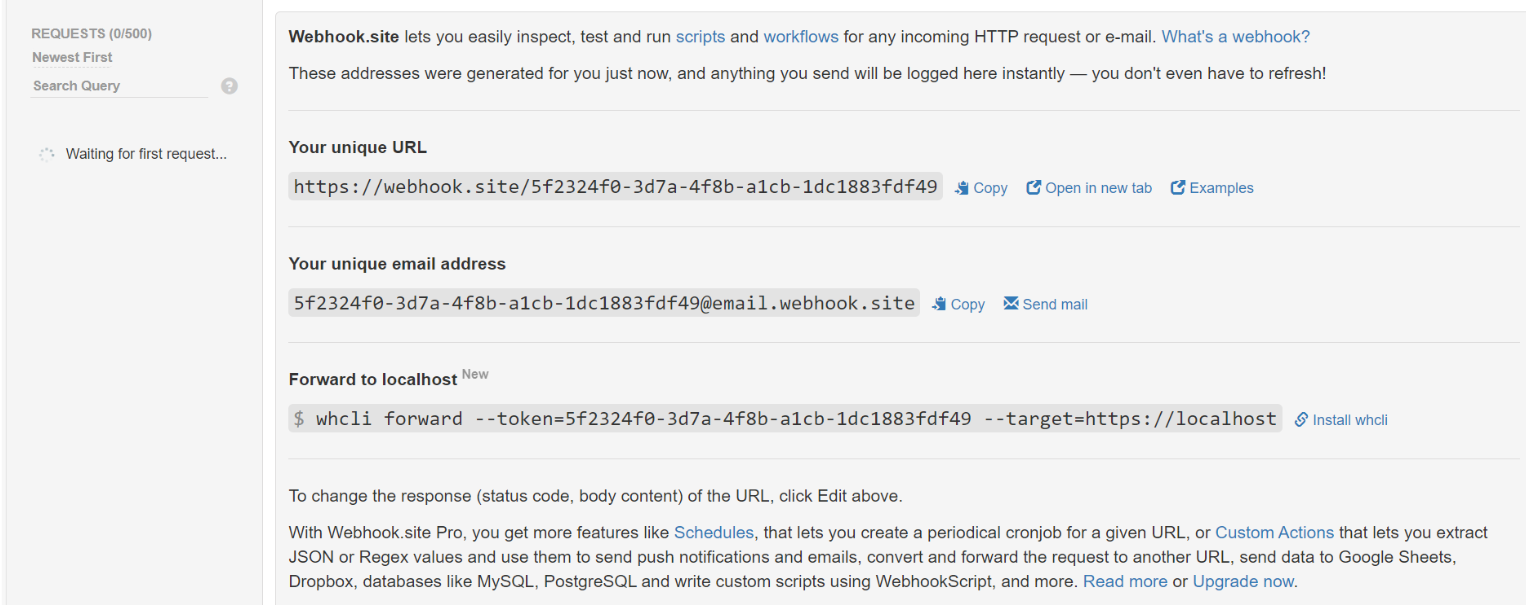
Visit Webhook.site (Webhook.site - Test, process and transform emails and HTTP requests)
-
Copy the unique URL and paste it into the CIBA_URL Postman environment variable.
-
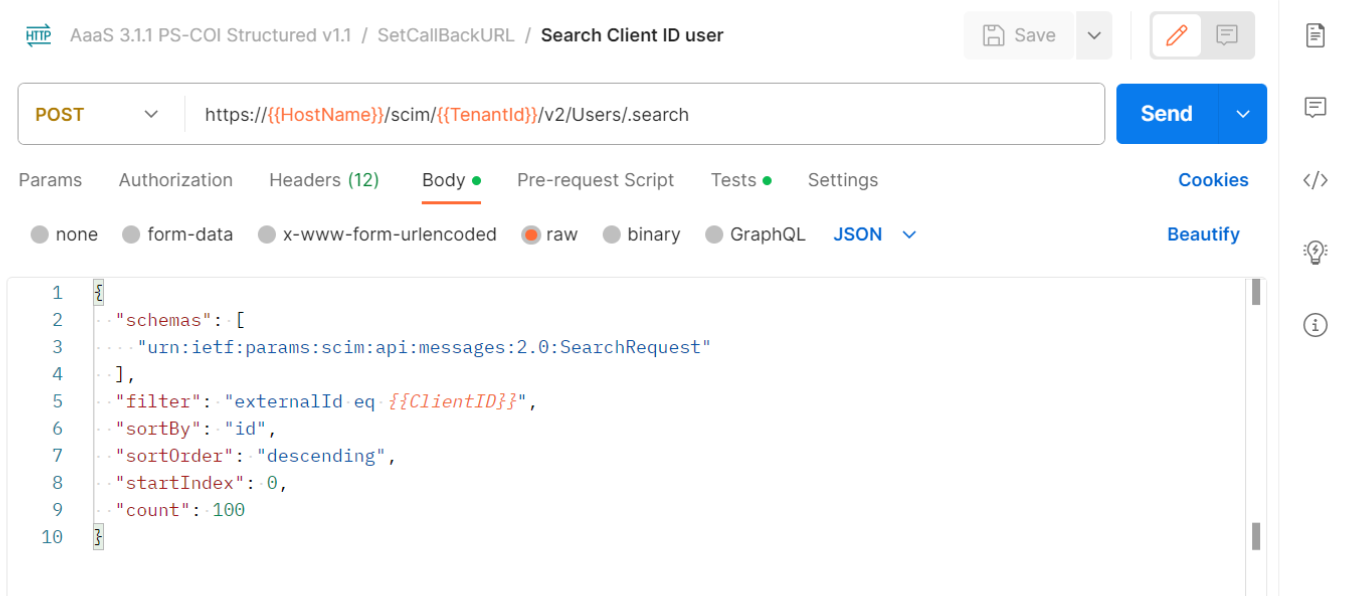
Go to the Postman collection, navigate to the SetCallbackURL folder, and execute the API in sequence.
-
Search for Client ID user.
-
Set ClientId Callback URL.
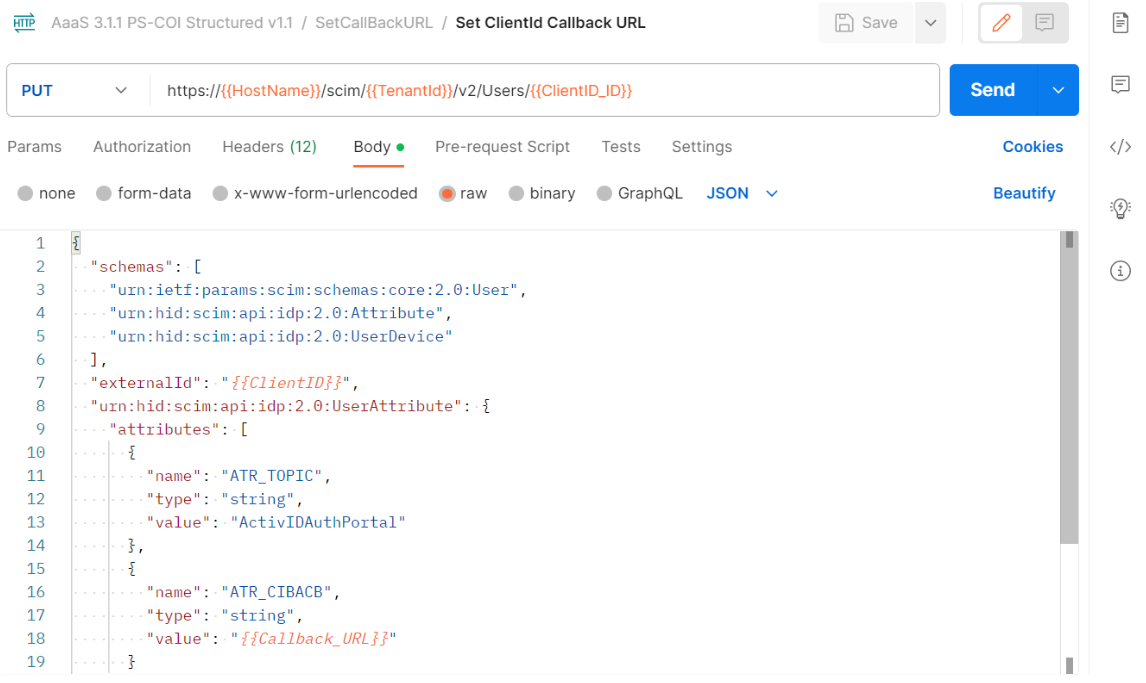
This process will set the unique URL as a callback URL for the user.
-
-
Visit the published web application and log in with the existing user. Once the approval notification is approved or denied from the mobile, you will receive the response in webhook.site. Copy that response and paste it as the body for CIBATestEndpoint.
CIBATestEndpoint API
| Method |
POST |
|---|---|
| Endpoint | https://{{HostName}}/services/CIBATestEndpoint |
| Headers | Content-Type: application/json |
Upon initiating a Push notification from a web application and subsequently approving/denying it through mobile, you will receive the following object:
{
  "access_token": "Bo2UXwAAAYvWtKdsMMrj1VXQO3qdEKMB7MQ8YVNS",
  "auth_req_id": "9e76c146-1174-4151-a95c-9746a3eb1709",
  "id_token": "eyJraWQiOiIxNTg5MzA3MzQxMTIzIiwidHlwIjoiSldUIiwiYWxnIj
  oiUlMyNTYifQ.eyJhdF9oYXNoIjoiZktkOXFLbFBpMkQzY05FdXNYcHJCQSIsInN1Yi
  I6ImFuZHJvaWR0ZXN0IiwicmVhc29uIjoiUmVhc29uIG5vdCBkZWZpbmVkIiwiSldTI
  joiZXlKamRIa2lPaUowWlhoMFhDOXdiR0ZwYmlJc0ltRnNaeUk2SWxCVE5URXlJbjAu
  ZXlKMFpITWlPaUpJWld4c2J5QmhibVJ5YjJsa2RHVnpkRnh5WEc1UWJHVmhjMlVnZG1
  Gc2FXUmhkR1VnYkc5bmIyNGlMQ0pqYkdsbGJuUmhjSEJ5YjNaaGJITjBZWFIxY3lJNk
  ltRmpZMlZ3ZENJc0luUjRZMjkxYm5SbGNpSTZJaklpZlEuZWVYdjJGSUNDUC1VRHNVN
  GZ5ZUhjZXpwdHdvZWp1UU1TY01BNW5HVjZMR05zX09GMEpvWDA1d1Ffa21JX0JvVkc1
  RGZrdGh1UGZMQzdnQ1k2djg2dy0wa2dCMnp1YklLRlNSZm1NN3IwUHVFMzNma2ptQ3k
  5emlKaW14UW5odHhnMG1CQlhvWG16WS1WN00yYkhWZTQ4WFJCb0M3U1M0eHNqbjJENl
  dKZ2xsUEhRemxKeXc2azJoSWxnc080MzhQVk8ySGh3UWw1YkhDS0J4eUhYaUpucnJxU
  TM5UHp1QUo2aUlrelNvM2l3ZkxuaW5MeDBzc19UNkxzX1UycDYyVUlNdjB3S0traHNW
  MHFoOWhaNzViX0ppTlBITkdFM3JtVTQ3TG5EM0Jra09FaHMxYjAyVWZFVFhPRHkySVJ
  HTTF5YUZ2bTNiVmFGNDF3OXl0bmRvdWh3IiwiUFVLIjoiTUlJQklqQU5CZ2txaGtpRz
  l3MEJBUUVGQUFPQ0FROEFNSUlCQ2dLQ0FRRUF1aVoxYnZ3eStrYmU0aTRRQ3V0RjByW
  UpIVC9iMkZodml0NUp6MjgxTFRIVHJPSzJGV0x2UzVpUk1neXN5Rytua2JUZjIzczdX
  TkZWbzNhZ3pXTHRXK2JTaG1MalhobHJ6MlFvWWVzSkNJNlJRV0FxbUd1OUR3ZER5c2R
  3ZFBOcm8vV1g4OXJSTUtReC9lUzdJcDg1T0l0eGpjN2R0MlU3cGFuc21Wd2tmOThDNE
  tBdWVaOTdXSXR3YVYvNWVEM2wzM0Rqc1l0TUpXR2dpNStUN2x0bElVM1FtRkx4UWI0V
  ndoeHpIQ2hwbVRxeW5DN1daQ0dRTDFkQzFQL3orSHdwdU9uSExHaTU5aThZOWJsNnoy
  eXFPdEF1N0lnWjU5TFpTVUhhZzV6U2FQbzlPT1dsS1ljb2JEU2oxVzR6NEF2OWRjZ1g
  wRWRxSjVMRUhxZ280czVScndJREFRQUIiLCJpc3MiOiJodHRwczovL3Rlc3QuYWFhcy
  5oaWRjbG91ZC5jb20vaWRwL3RkN2Y3MTMxYTUyODkzMDczMDY2OTYvYXV0aG4iLCJkZ
  XZpY2VpZCI6MzM4OTYwLCJyZXN1bHQiOjEsImF1ZCI6IjI5Mzg2MjI5NTM3MjQ4Njgz
  MTYyMDIxMzQzNDM1Mzg3NjE4NDkzNDU5OTYyNzIyMyIsInVybjpvcGVuaWQ6cGFyYW1
  zOmp3dDpjbGFpbTphdXRoX3JlcV9pZCI6IjllNzZjMTQ2LTExNzQtNDE1MS1hOTVjLT
  k3NDZhM2ViMTcwOSIsImF1dGhfdGltZSI6MTcwMDExNDI0NSwiY2xpZW50YXBwcm92Y
  WxzdGF0dXMiOiJhY2NlcHQiLCJleHAiOjE3MDAxMTc4NDUsImlhdCI6MTcwMDExNDI0
  NX0.AkhBk5GbdE7t9lbiJyWShyAcNXKhR6zhadEsoWA9IfPGwtLyhXDj7YAqhe3Eo3u
  QgEFW7Dk3BzsWwAErEN7EsL_RByajUqb5TBsdjMBZ6PK-FIySVoKJrnMcqQcD46Atdh
  lSD1lSNDCeJR_3x7rVU0UnF9wNWc8aUqnGOqoEx5PJ0W5DP7UfgOtWKZCetbzQN0VW0
  HjToH3GGQdFTMxyfgQVN6_0Okv4Sm_f8uAxVyrkAN-YsrK4v5m7GPb_B33qdztmNpuu
  khJG4ZJF46PineuyWBX60cJQGQ9qkK6JV6VnjmLlyLzGun8cO3q5SMDhlxvEhQ9ax8W
  uAJZpzO8MVw",
  "token_type": "Bearer",
  "expires_in": 3600
}
Variations in Response Cases
 Case 1: No tampering of data
Response
{
    "CibaListenerMsg": "CIBA_Callback_Reached : success | Id_token
Check : Success | Token Expiry : Active | Signing Status : Valid"
} Response
{
    "CibaListenerMsg": "CIBA_Callback_Reached : success | Id_token
Check : Success | Server Error : Unterminated string at 1293
[character 1294 line 1]"
} Introduce a new parameter the request body given below and set isSignValidationRequired to false. This indicates that the request body is sent without signature validation.
Upon initiating a Push notification from a web application and subsequently approving/denying it through mobile, you will receive the following object:
{
  "access_token": "Bo2UXwAAAYvWtKdsMMrj1VXQO3qdEKMB7MQ8YVNS",
  "auth_req_id": "9e76c146-1174-4151-a95c-9746a3eb1709",
  "id_token": "eyJraWQiOiIxNTg5MzA3MzQxMTIzIiwidHlwIjoiSldUIiwiYWxnI
  joiUlMyNTYifQ.eyJhdF9oYXNoIjoiZktkOXFLbFBpMkQzY05FdXNYcHJCQSIsInN1
  YiI6ImFuZHJvaWR0ZXN0IiwicmVhc29uIjoiUmVhc29uIG5vdCBkZWZpbmVkIiwiSl
  dTIjoiZXlKamRIa2lPaUowWlhoMFhDOXdiR0ZwYmlJc0ltRnNaeUk2SWxCVE5URXlJ
  bjAuZXlKMFpITWlPaUpJWld4c2J5QmhibVJ5YjJsa2RHVnpkRnh5WEc1UWJHVmhjMl
  VnZG1Gc2FXUmhkR1VnYkc5bmIyNGlMQ0pqYkdsbGJuUmhjSEJ5YjNaaGJITjBZWFIx
  Y3lJNkltRmpZMlZ3ZENJc0luUjRZMjkxYm5SbGNpSTZJaklpZlEuZWVYdjJGSUNDUC
  1VRHNVNGZ5ZUhjZXpwdHdvZWp1UU1TY01BNW5HVjZMR05zX09GMEpvWDA1d1Ffa21J
  X0JvVkc1RGZrdGh1UGZMQzdnQ1k2djg2dy0wa2dCMnp1YklLRlNSZm1NN3IwUHVFMz
  Nma2ptQ3k5emlKaW14UW5odHhnMG1CQlhvWG16WS1WN00yYkhWZTQ4WFJCb0M3U1M0
  eHNqbjJENldKZ2xsUEhRemxKeXc2azJoSWxnc080MzhQVk8ySGh3UWw1YkhDS0J4eU
  hYaUpucnJxUTM5UHp1QUo2aUlrelNvM2l3ZkxuaW5MeDBzc19UNkxzX1UycDYyVUlN
  djB3S0traHNWMHFoOWhaNzViX0ppTlBITkdFM3JtVTQ3TG5EM0Jra09FaHMxYjAyVW
  ZFVFhPRHkySVJHTTF5YUZ2bTNiVmFGNDF3OXl0bmRvdWh3IiwiUFVLIjoiTUlJQklq
  QU5CZ2txaGtpRzl3MEJBUUVGQUFPQ0FROEFNSUlCQ2dLQ0FRRUF1aVoxYnZ3eStrYm
  U0aTRRQ3V0RjByWUpIVC9iMkZodml0NUp6MjgxTFRIVHJPSzJGV0x2UzVpUk1neXN5
  Rytua2JUZjIzczdXTkZWbzNhZ3pXTHRXK2JTaG1MalhobHJ6MlFvWWVzSkNJNlJRV0
  FxbUd1OUR3ZER5c2R3ZFBOcm8vV1g4OXJSTUtReC9lUzdJcDg1T0l0eGpjN2R0MlU3
  cGFuc21Wd2tmOThDNEtBdWVaOTdXSXR3YVYvNWVEM2wzM0Rqc1l0TUpXR2dpNStUN2
  x0bElVM1FtRkx4UWI0VndoeHpIQ2hwbVRxeW5DN1daQ0dRTDFkQzFQL3orSHdwdU9u
  SExHaTU5aThZOWJsNnoyeXFPdEF1N0lnWjU5TFpTVUhhZzV6U2FQbzlPT1dsS1ljb2
  JEU2oxVzR6NEF2OWRjZ1gwRWRxSjVMRUhxZ280czVScndJREFRQUIiLCJpc3MiOiJo
  dHRwczovL3Rlc3QuYWFhcy5oaWRjbG91ZC5jb20vaWRwL3RkN2Y3MTMxYTUyODkzMD
  czMDY2OTYvYXV0aG4iLCJkZXZpY2VpZCI6MzM4OTYwLCJyZXN1bHQiOjEsImF1ZCI6
  IjI5Mzg2MjI5NTM3MjQ4NjgzMTYyMDIxMzQzNDM1Mzg3NjE4NDkzNDU5OTYyNzIyMy
  IsInVybjpvcGVuaWQ6cGFyYW1zOmp3dDpjbGFpbTphdXRoX3JlcV9pZCI6IjllNzZj
  MTQ2LTExNzQtNDE1MS1hOTVjLTk3NDZhM2ViMTcwOSIsImF1dGhfdGltZSI6MTcwMD
  ExNDI0NSwiY2xpZW50YXBwcm92YWxzdGF0dXMiOiJhY2NlcHQiLCJleHAiOjE3MDAx
  MTc4NDUsImlhdCI6MTcwMDExNDI0NX0.AkhBk5GbdE7t9lbiJyWShyAcNXKhR6zhad
  EsoWA9IfPGwtLyhXDj7YAqhe3Eo3uQgEFW7Dk3BzsWwAErEN7EsL_RByajUqb5TBsd
  jMBZ6PK-FIySVoKJrnMcqQcD46AtdhlSD1lSNDCeJR_3x7rVU0UnF9wNWc8aUqnGOq
  oEx5PJ0W5DP7UfgOtWKZCetbzQN0VW0HjToH3GGQdFTMxyfgQVN6_0Okv4Sm_f8uAx
  VyrkAN-YsrK4v5m7GPb_B33qdztmNpuukhJG4ZJF46PineuyWBX60cJQGQ9qkK6JV6
  VnjmLlyLzGun8cO3q5SMDhlxvEhQ9ax8WuAJZpzO8MVw",
  "isSignValidationRequried":"false"
  "token_type": "Bearer",
  "expires_in": 3600
} Response
{
    "CibaListenerMsg": "CIBA_Callback_Reached : success |
Id_token Check : Success | Token Expiry : Active | Signing
Status : Valid"
}
-
For more details about HID Public IPs, see HID Authentication Service Platforms around the World.
-
For more details about Push Notification, see User Authentication with HID Approve.


